14
MANUAL COOKING
ADDITIONAL FEATURES
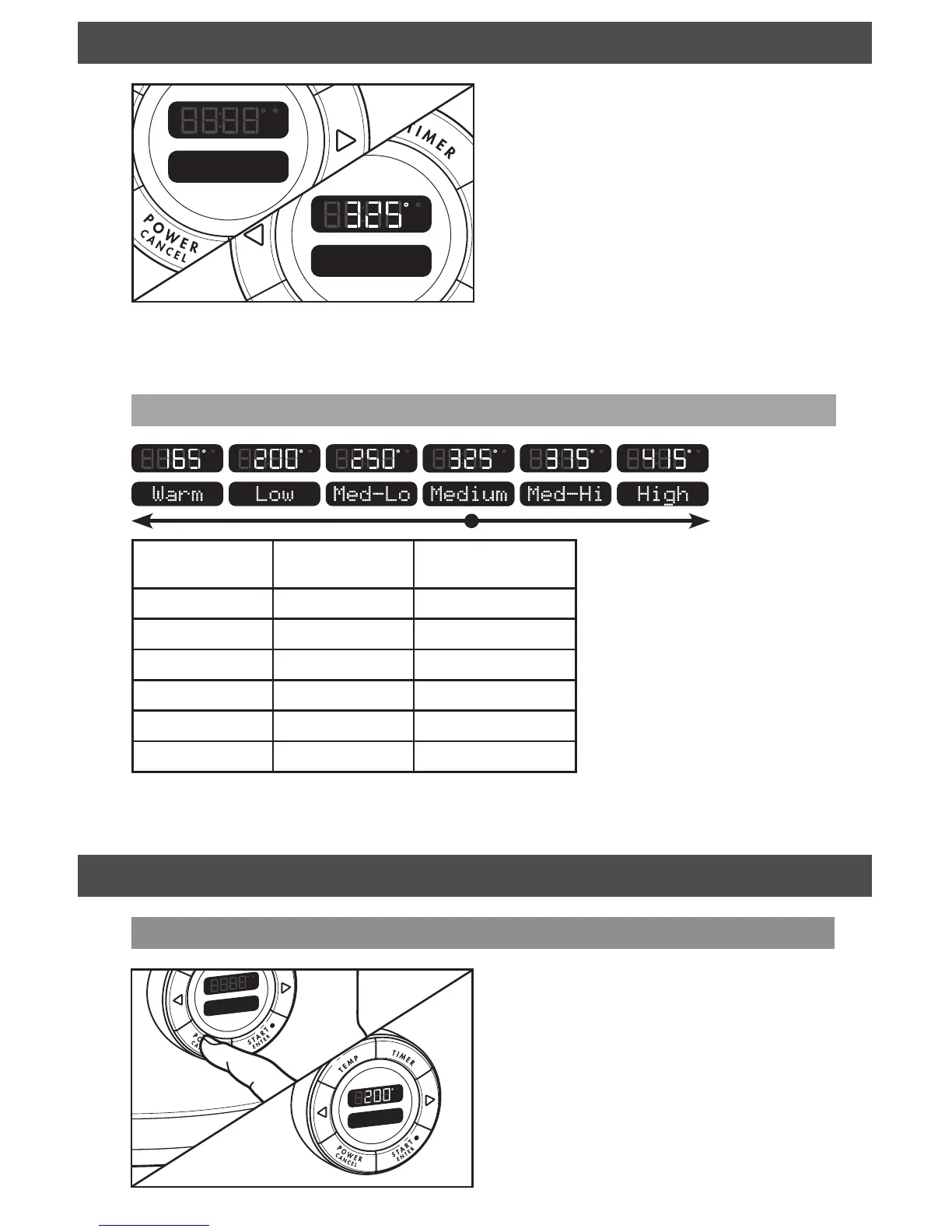
Manual cooking mode has 6 preset ranges to
allow you to cook like on a regular stove top:
Warm, Low, Med-Lo, Medium, Med-Hi, and
High. Each range is adjustable based on the
chart below.
To select and adjust a manual mode:
1. Press > to scroll to Manual mode.
Press START/ENTER to select.
2. Medium will appear in the display, with a
temperature of 325°F (163°C).
3. Tap < or > to adjust the temperature in
5°F (3°C) increments, or press and hold
< or > to jump between Manual cooking
modes.
Last selections used
If the Multi-Cooker remains plugged in, it will
remember the last cooking method or mode
and temperature settings used the next time
it is turned on.
Manual
Cooking Mode
Preset
Temp* in °F (°C)
Max. Temp
in °F (°C)
High
415°F (213°C) 450°F (232°C)
Medium High
375°F (191°C) 410°F (210°C)
Medium
325°F (163°C) 370°F (188°C)
Medium Low
250°F (121°C) 320°F (160°C)
Low
200°F (93°C) 245°F (118°C)
Warm
165°F (74°C) 195°F (91°C)
* Preheating will appear in the display until the selected temperature is reached.



 To Next Page