9
PRODUCT USAGE
REHEAT
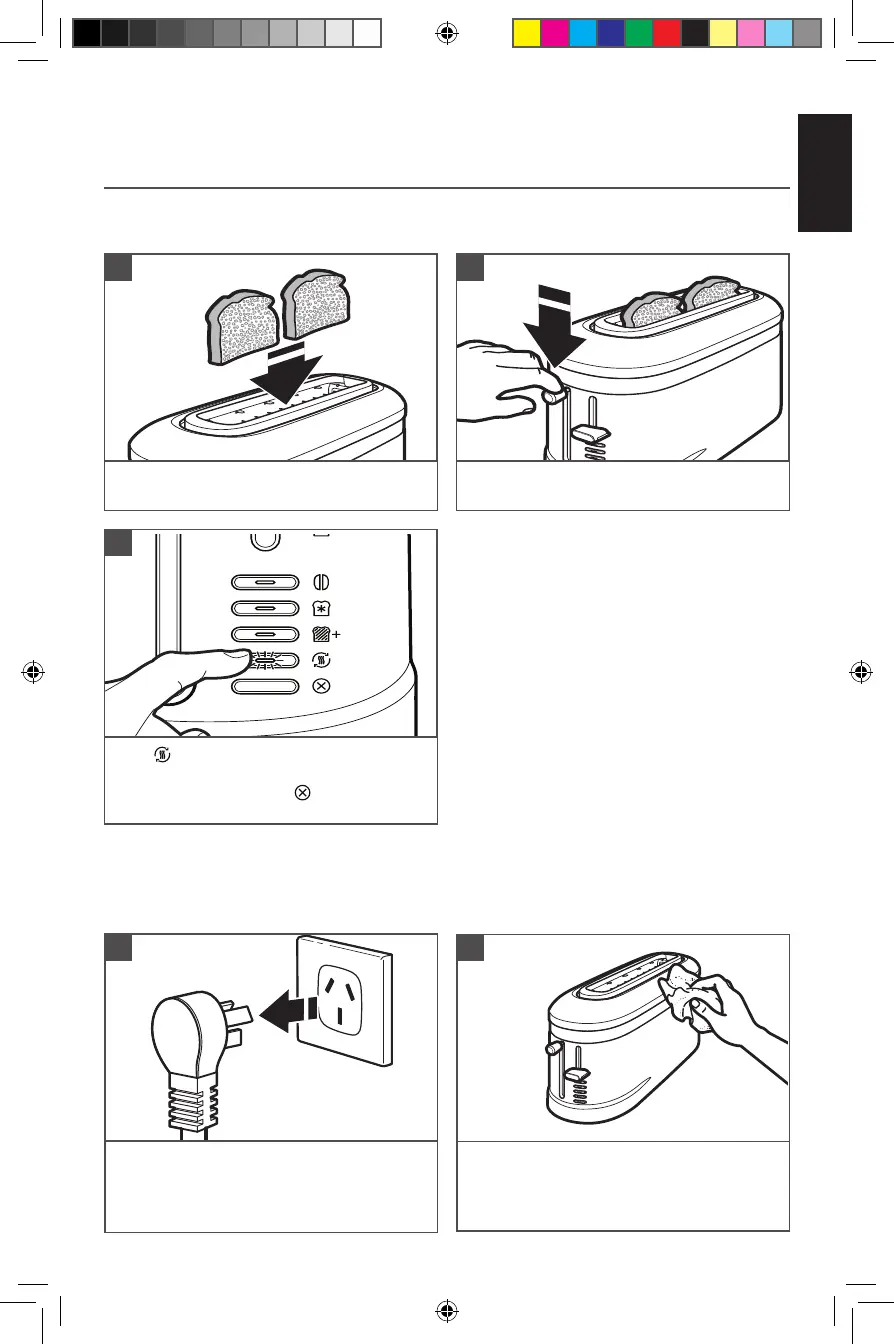
Insert the previously toasted food into the
slot(s).
1
Press down on the high lift lever to start the
toasting cycle.
2
NOTE:
Do not place food with butter or any other topping in the Toaster. Use the Reheat function
with dry foods only.
NOTE:
No shade adjustment is necessary — the
Reheat function overrides whatever shade level
you have set.
Press . The toast will pop up automatically
at the end of the cycle and the Toaster will
turn off, or you may press at any time to
cancel the function.
3
CARE AND CLEANING
NOTE: For consistent browning results, empty the crumb tray after each use.
Wipe the Toaster with a soft, damp cotton
cloth. Do not use paper towels, abrasive
cleansers, or liquid cleaning products.
2
Unplug the Toaster and let it cool before
cleaning or emptying the crumb tray.
1
W11427799A.indb 9W11427799A.indb 9 3/5/2020 2:05:25 PM3/5/2020 2:05:25 PM




 To Next Page