20
Instructions for using the oven
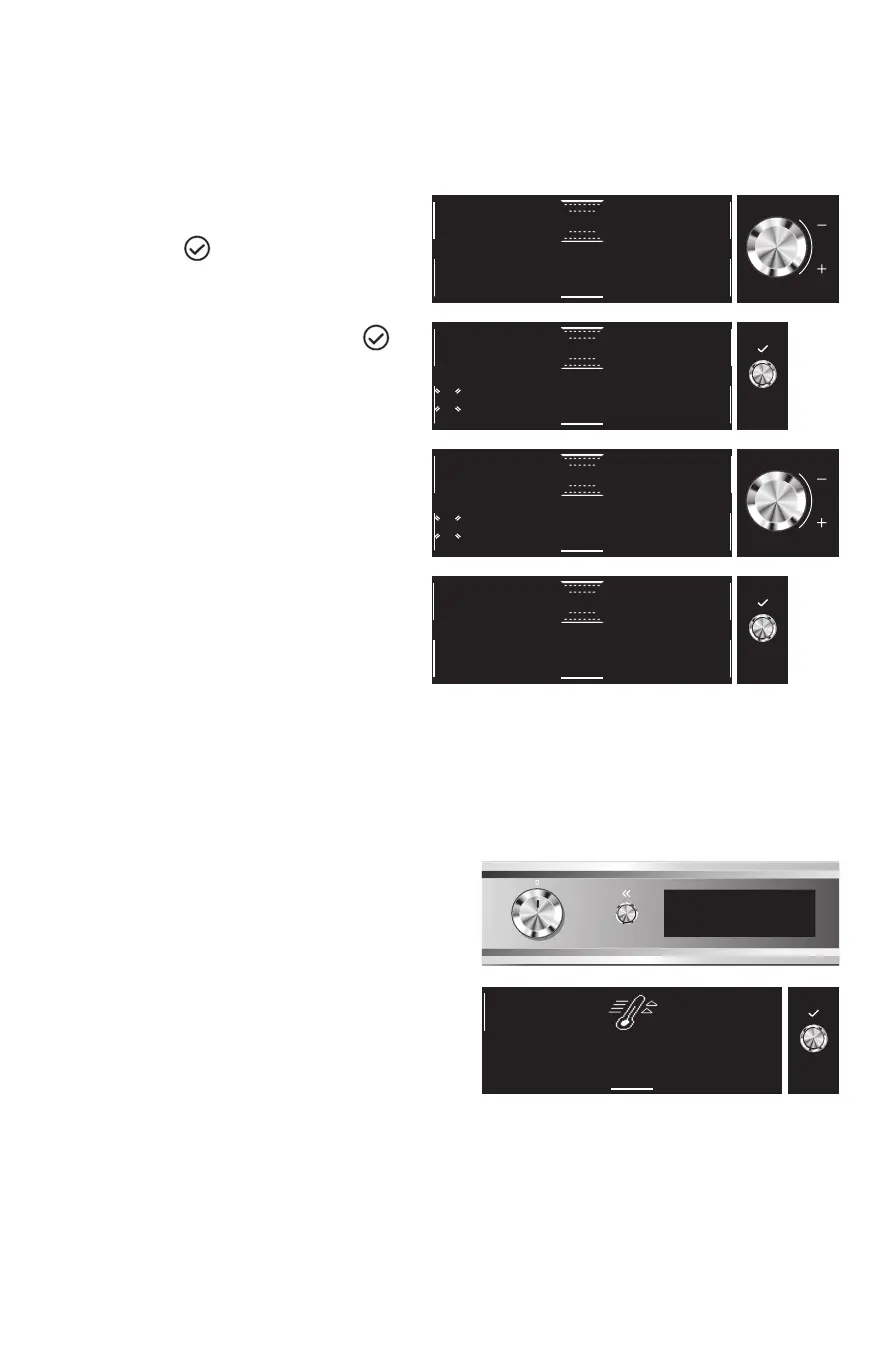
PREHEATING THE OVEN (STANDARD FUNCTIONS ONLY).
If you do not wish to preheat the oven (for the functions that allow it), simply change the oven’s default
setting as follows:
1. Turn the “Browse” knob to position the cursor
at preheating.
2. Press button
to select the setting: “Yes”
ashes on the display.
3. Change the setting by turning the “Browse”
knob: “No” appears on the display.
4. To conrm your choice, press button
.
FAST PREHEATING (STANDARD FUNCTIONS ONLY).
If you wish to preheat the oven quickly before inserting food, proceed as follows:
1. Turn the Function knob to select “Specials” and
conrm by pressing .
2. Turn the “Browse” knob to select the fast preheating
function.
3. Conrm by pressing : the settings are shown on the
display.
4. If the suggested temperature is the one you
require, turn the “Browse” knob to position the
cursor at “Start” and then press . To change the
temperature, proceed as described in previous
paragraphs. An acoustic signal will sound when the
oven has reached the set temperature. At the end
of preheating, the oven automatically selects the conventional function . At this point food can be
placed in the oven for cooking.
5. If you wish to set a dierent cooking function, turn the “Functions” knob and select the function you
require.
Start
Conventional
200°C
TEMPERATURE
YES
PREHEAT.
--:--
COOK TIME
--:--
END TIME
Start
Conventional
200°C
TEMPERATURE
YES
PREHEAT.
--:--
COOK TIME
--:--
END TIME
Start
Conventional
200°C
TEMPERATURE
NO
PREHEAT.
--:--
COOK TIME
--:--
END TIME
Start
Conventional
200°C
TEMPERATURE
NO
PREHEAT.
--:--
COOK TIME
--:--
END TIME
Start
Press +/- to adjust ...
180°C
TEMPERATURE



 To Next Page