BLENDER SERVICE MANUAL
4
PRODUCT FEATURES
The following are some of the KitchenAid Blender's
unique product features:
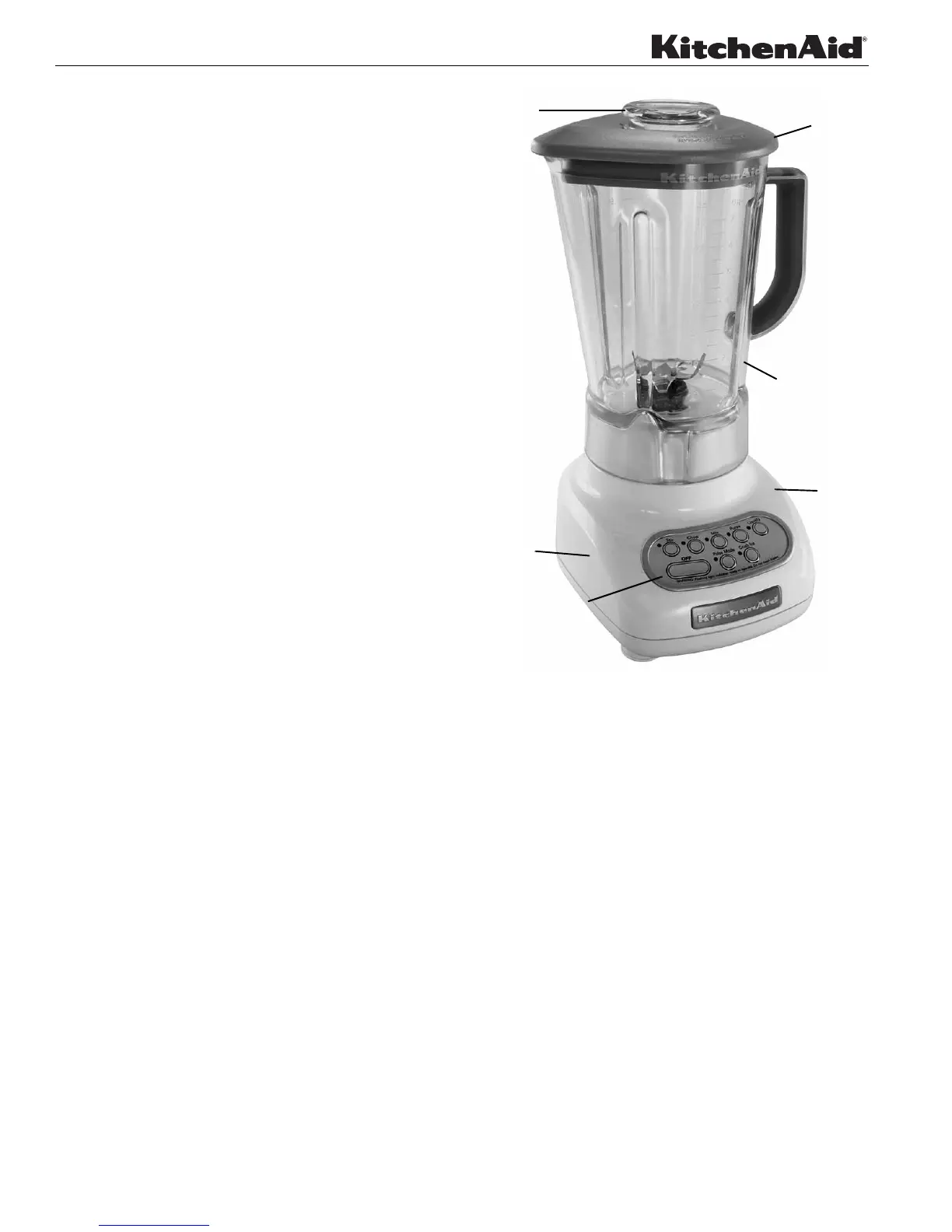
• Power Cord Storage: The Power Cord can be
stored conveniently in the Blender Power Base.
• Clean Touch Control Panel: The Electronic
Control Panel Pad features smooth styling to
ensure easy cleanup.
• Step Start Feature: The Step Start feature
automatically starts the Blender at a lower speed
to prevent splattering, then quickly increases to
the selected speed for optimum performance.
• Stainless Steel Blade: A new and improved
mixing blade assembly assures complete and
efficient processing of a variety of foods.
• Press On or Snap In Lid: The Blender Lid
features a removable center ingredient cap (2-oz.
capacity) for adding ingredients while blending.
• Polycarbonate Jar: 56-oz., one piece
polycarbonate jar resists shattering, scratching
and staining. Handle features soft inner grip for
firm, comfortable, no-slip control.
The Key components of the KitchenAid Blender.
Figure 1
PRELIMINARY INSPECTION OF
BLENDER
Before servicing the Blender, the following
inspection should be performed. All service should
be performed on a clean, dry surface with good
illumination.
1. Lid and Ingredient Cap: Place the Lid on top
of the Jar and push securely on the Jar with the
ingredient cap in place.
2. Jar Assembly: Inspect the Blades. Make sure
that the Blades are intact and that the seals are
in place and in good condition. Make sure that
the base of the Jar is solidly attached to the
Power Base.
POWER
BASE
POWER
CLEAN
TOUCH
CORD
STORES
IN
POWER
BASE
PAD
PRESS ON
OR SNAP IN
LID
INGREDIENT
CAP
POLYCARBONATE





 To Next Page