13
FOR ELECTRICAL CONNECTION, SEE THE PARAGRAPH ON INSTALLATION
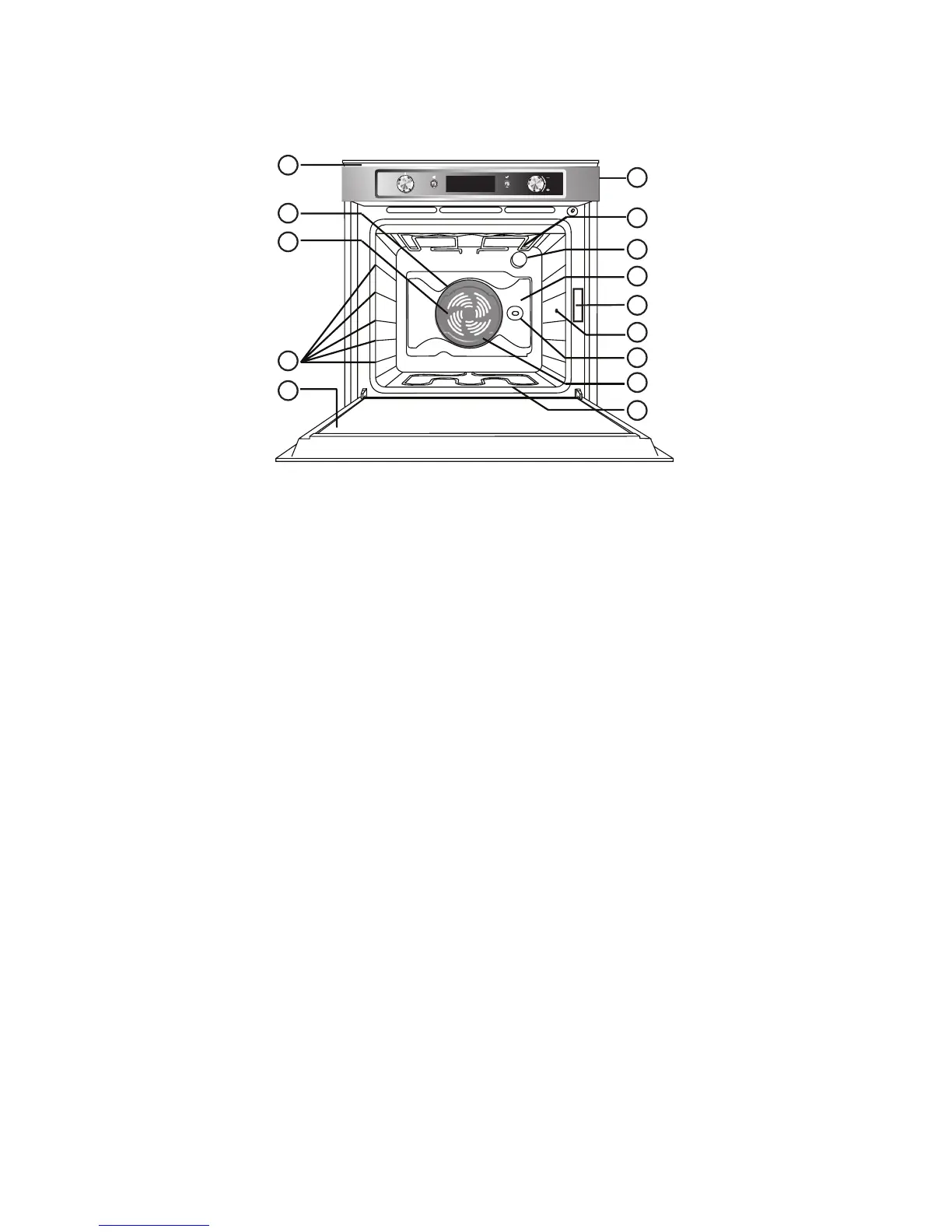
1. Control panel
2. Upper heating element/grill
3. Cooling fan (not visible)
4. Dataplate (not to be removed)
5. Lamps
6. Circular heating element (not visible)
7. Fan
8. Rotisserie (if supplied)
9. Bottom heating element (not visible)
10. Door
11. Position of shelves (the number of shelves is indicated on the front of the oven)
12. Rear wall
13. Meat probe connection
14. Twelix disc
N.B:
- During cooking, the cooling fan may switch on at intervals in order to minimise energy consumption.
- At the end of cooking, after the oven has been switched off, the cooling fan may continue to run for a
while.
- When the oven door is opened during cooking, the heating elements switch off.
Instructions for oven use





 To Next Page