10
OPTIONAL ATTACHMENTS
PRODUCT USAGE
KitchenAid
®
offers a wide range of optional attachments such as the Spiralizer, Pasta
Cutters, or Food Grinder that may be attached to the Stand Mixer attachment power
hub.
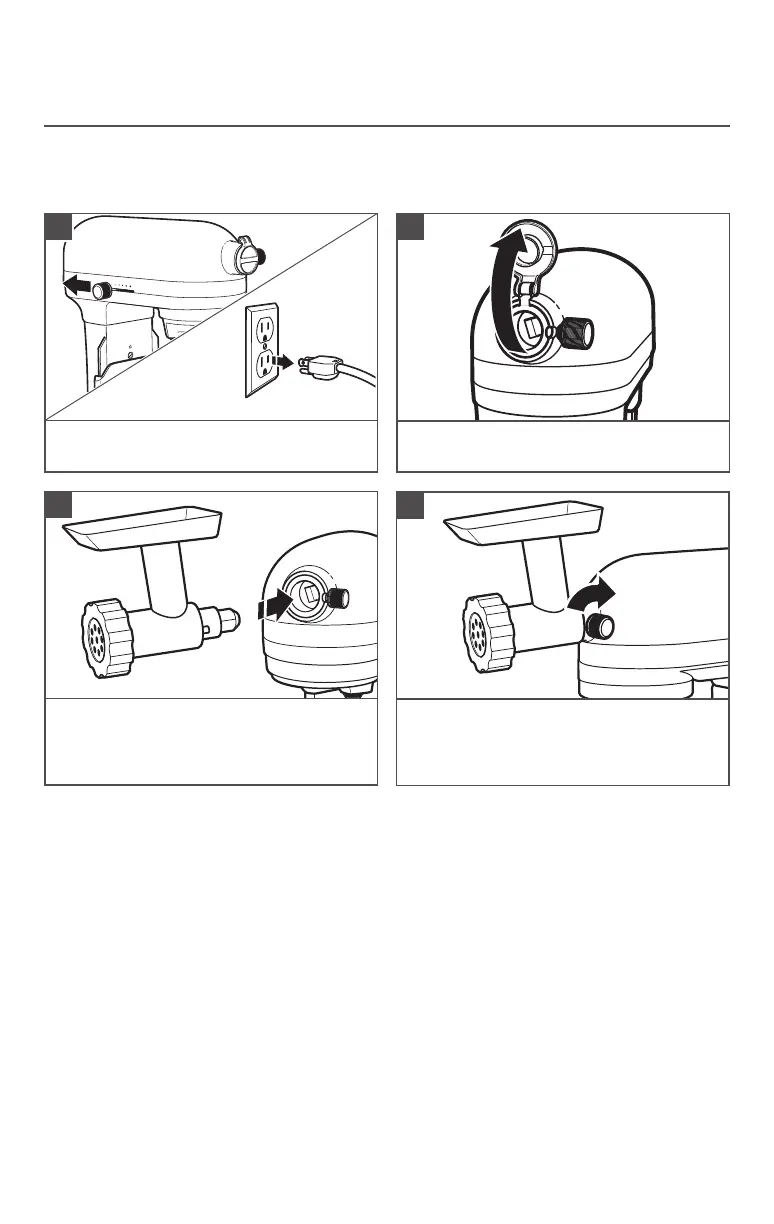
Turn the Stand Mixer to “OFF/ 0” and
then unplug.
1
Flip up hinge attachment hub cover to
open.
2
Insert attachment into attachment hub,
making certain that attachment power
shaft fits into the square attachment hub
socket.
3
Tighten the attachment knob by turning it
clockwise until the attachment is secured
to the Stand Mixer.
4
NOTE: See the Use and Care Guide of each specific attachment for more details.






 To Next Page