TROUBLESHOOTING
GENERAL
5. Oven is smoking – Should you notice smoke
during a cooking cycle, it is time to self clean
the oven. Once the current cooking cycle is
over and the +Powered Attachments have
cooled down, remove them, along with the
roll-out rack for powered attachments and
begin a Self-Cleaning cycle.
NOTE: Steam during a cycle is normal, and
will dissipate quickly with very little odor.
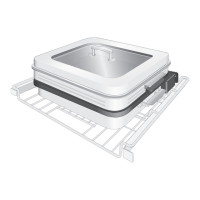
6. +Grill Attachment is smoking – Once cool,
remove the +Powered Attachment, +Grill
Attachment, and Base Pan from oven. The
Base Pan and all +Powered Attachments are
dish washer safe. Clean +Grill Attachment
and/or Base Pan by hand washing or place in
dishwasher.
7. Smoke/steam from oven changes the
User Interface (UI) (false touch) – If steam
from the oven affects the UI, simply hit the
Back button once to return to the preheat/
cooking timer. If steam completely canceled
out of cooking mode, use the UI to return to
previous cooking setting.
TROUBLESHOOTING | 23





 To Next Page