1312
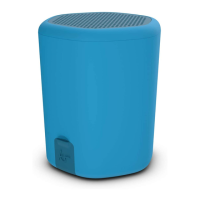
TWS (True Wireless Stereo) for stereo sound*
1. Both Hive2o speakers must be turned on and in pairing mode
(make sure your device isn’t connected to either while trying
to pair for TWS)
2. Double press MFB (1) on both speakers and the LED Indicator (5)
will ash white and blue on both speakers
3. The master speaker will automatically nd the other speaker,
the slave will become solid white and the master will then
ash quickly
4. Turn your iOS, Android, or Windows device’s Bluetooth ON
and search for new devices
5. Select ‘KS Hive2o’. If asked for a passcode, enter ‘0000’, and
the device will pair
6. Once connected, the LED Indicator (5) will be a solid white if
playing audio or slowly ashing white if not playing audio
Note: To cancel the TWS on both, double press MFB (1) on both
speakers and they will disconnect. The second speaker will
re-enter pairing mode while the master will continue to be paired
to your device.
*Second Hive2o sold separately
Specications
Bluetooth
®
technology v4.2
Bluetooth connectivity distance up to 10 m
Bluetooth connectivity distance
between Hive2os in TWS mode
up to 10 m
Frequency band 2402 – 2480 MHz
Transmission power 2-4 dBM (conducted)
S/N 80 dB
Frequency response 20 Hz – 20 kHz
Drivers 1 x 45 mm
Output RMS 5 W
[continued...]


 To Next Page