8 9
Instructions for use
Getting started
Mains power
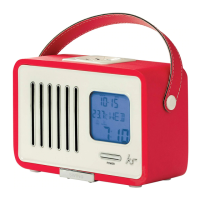
1. Plug the power adaptor into a convenient mains wall outlet and switch it on
2. The screen (3) will turn on
3. The Swing is now in ‘STANDBY’ mode
4. Press the Power button (1) to turn the Swing on
5. Press the Power button (1) again to put the Swing in standby mode
6. Disconnect from the mains to eliminate standby
Battery power:
1. Remove the battery cover (16) and insert 4 x AA batteries observing the correct polarity
2. Replace the battery cover (16)
3. The screen (3) will turn on
4. The Swing is now in ‘STANDBY’ mode
5. Press the Power button (1) to turn the Swing on
6. Press the Power button (1) again to put the Swing in standby mode
7. Remove the batteries to eliminate standby
Note: Please use only standard non rechargeable batteries. Rechargeable batteries may not provide
enough power for the Swing to operate correctly.
Time/Date
To set the time
• Press and hold the Set button (4)
• Press Previous (5) or Next (7) to change the year followed by Set (4) to confirm
• Press Previous (5) or Next (7) to change the month followed by Set (4) to confirm
• Press Previous (5) or Next (7) to change the day followed by Set (4) to confirm
• Press Previous (5) or Next (7) to change between 12/24 hour clock mode followed
by Set (4) to confirm
• Press Previous (5) or Next (7) to change the hours followed by Set (4) to confirm
• Press Previous (5) or Next (7) to change the minutes followed by Set (4) to confirm
• The time is now set


 To Next Page