10 11
Temperature
You can change the temperature reading between Celsius and Fahrenheit. To do this, press the Next
button (7) whilst in standby mode.
FM Radio
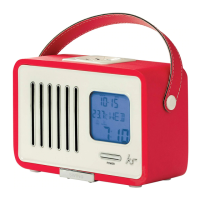
Whilst in standby mode, press the Power button (1) to turn the Swing on. Please ensure the aerial is
fully extended and adjusted to the best position.
To tune into a station, you can
1. Press Scan (6) to automatically scan to the next channel
2. Press and hold Scan (6) to automatically scan to the previous channel
3. Press or press and hold Previous (5) or Next (7) to manually scan
To change the volume
1. Press the Volume– button (9) to decrease the volume
2. Press the Volume+ button (12) to increase the volume
Alarm
To set the alarm
• Press and hold the Alarm button (11)
• Press Previous (5) or Next (7) to change the hours followed by Alarm (11) to confirm
• Press Previous (5) or Next (7) to change the minutes followed by Alarm (11) to confirm
• Press Previous (5) or Next (7) to change between FM or buzzer followed by Alarm (11) to confirm
• Press Previous (5) or Next (7) to change the alarm volume followed by Alarm (11) to confirm
• The alarm is now set and active
Note: If using FM as an alarm, it will use the last station listened to for the alarm.
• To enable/disable the alarm, simply press (not hold) the Alarm button (11) when in standby mode.
The alarm icon will turn on/off respectively
• When the alarm is sounding, press either the Snooze button (10) to enter snooze mode or press the
Alarm button (11) to stop the alarm
[continued...]


 To Next Page