11
Use and Operation
• Switch on the power source. Do not turn on the Ice maker within 30 minutes after moving the
• ice maker.
• Pour water into the water tank. Please use drinking water for making ice.
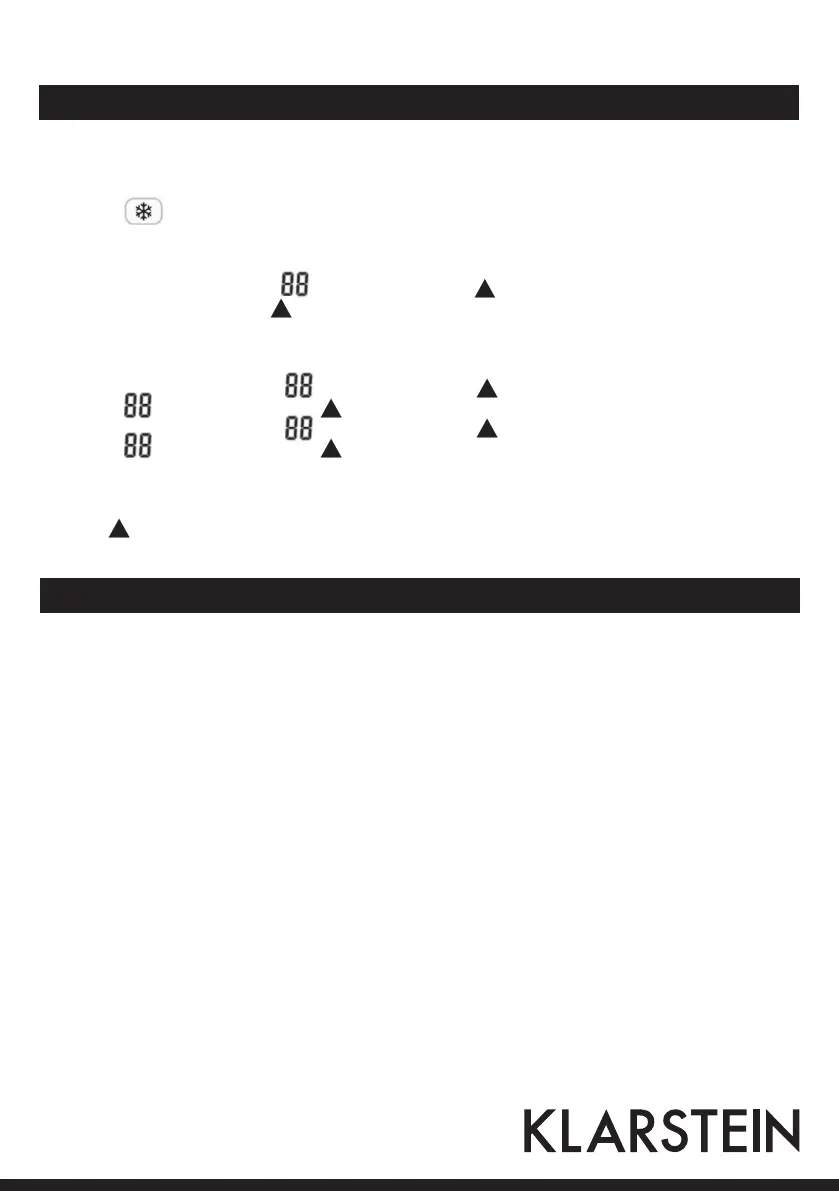
• Press key to start making ice.
Real Time Setting
Press the SET button one time, hour blinking, press the button to set hour, press the SET button one
time, minutes flash, press the button to set minutes.
ON/OFF Timer
• Press the SET button 3 times, hour blinking, press the button to set hour, press the SET button one
time, minutes flash, press the button to set minutes;
• Press the SET button 5 times, hour blinking, press the button to set hour, press the SET button one
time, minutes flash, press the button to set minutes;
The timer functions take on use
Press to set timer, set the cycle timer function mode: time power on > time power off > timer off. Power on
default time is 8:00, power off default time is 12:00.
Cleaning and Care
Self-Clean Mode
The self-clean mode should be put into operation before you use your ice maker for the first time
and/or if there has been a long period without use.
Three Icons as Large, Medium and small Icons will be on at the same time when the ice maker is
in self-clean mode.
Stage 1
• Add equal parts of water and vinegar (1:1) to the ice maker’s reservoir.
• With the stand-by mode, keep pressing ON/OFF button at least 5 seconds to activate the self-clean mode.
Please note that self-clean mode will start automatically after “Beep” sound.
• During the self clean mode, the upper water bucket is filled and dumped. The pump will remain in conti-
nuous operation as it feeds water to the bucket and evaporator coils. This cycle will continuous for five times.
• Upon completion, the unit automatically changes to stand-by mode.




 To Next Page