33
EN
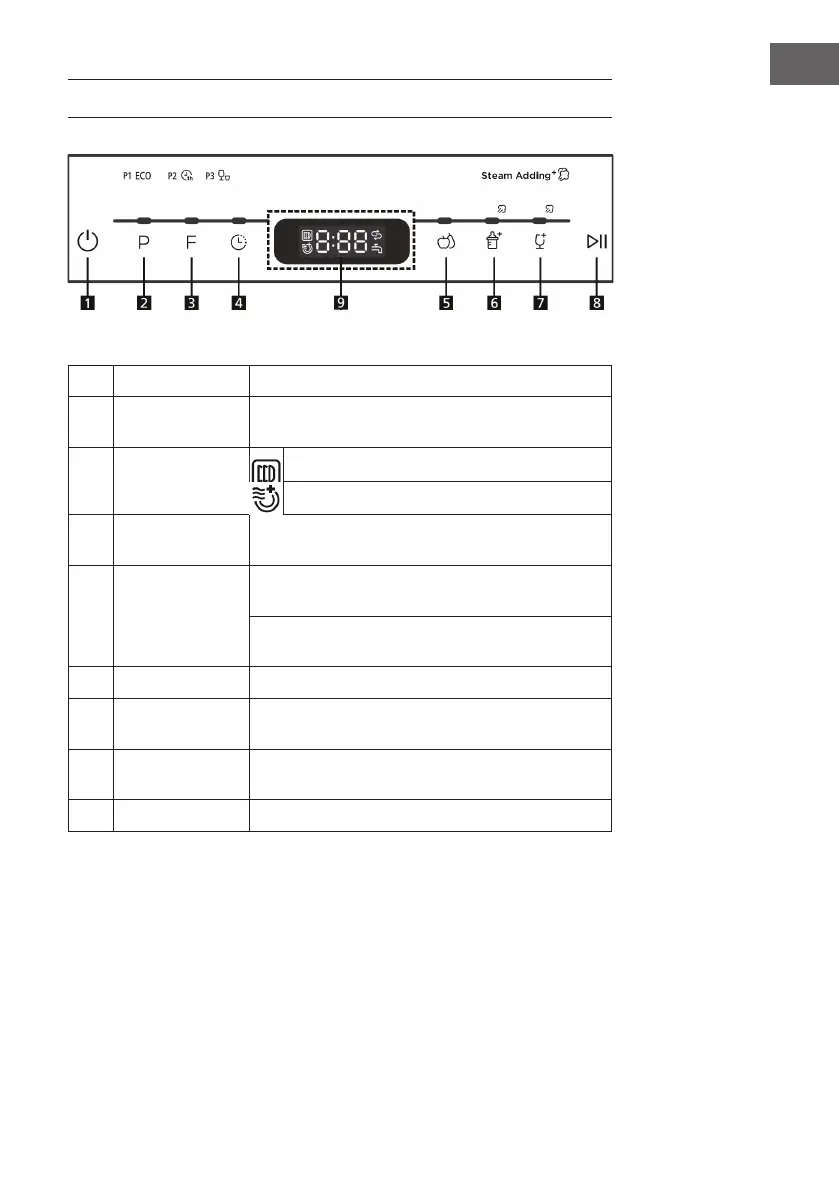
CONTROL PANEL AND BUTTON FUNCTIONS
1
Power
Switches device on and off.
2
Programm
Press repeatedly to select one of the following
programs: P1 (eco), P2 (hour), P3 (fast).
3
Function
Cupboard dry: prevents odor, moisture and mold
Extra dry
4
Delayed start
You can program the start so that the dishwasher starts
with a delay of 0-24 hours.
5
Wash fruit
Hot water: suitable for washing fruits with a larger
surface, such as: apples, pears.
Kaltwasser: Geeignet für Früchten mit einer kleinen
Oberäche, wie z. B. Erdbeeren.
6
Baby bottles
Suitable for washing baby bottles.
7
Glass
For lightly soiled containers such as glasses, crystal
glass and ne porcelain (steam is added).
8
Start/Pause
Press this button to start or stop the dishwasher. The
warning light will ash at startup.
9
Display
Displays the time and functions.





 To Next Page