29
EN
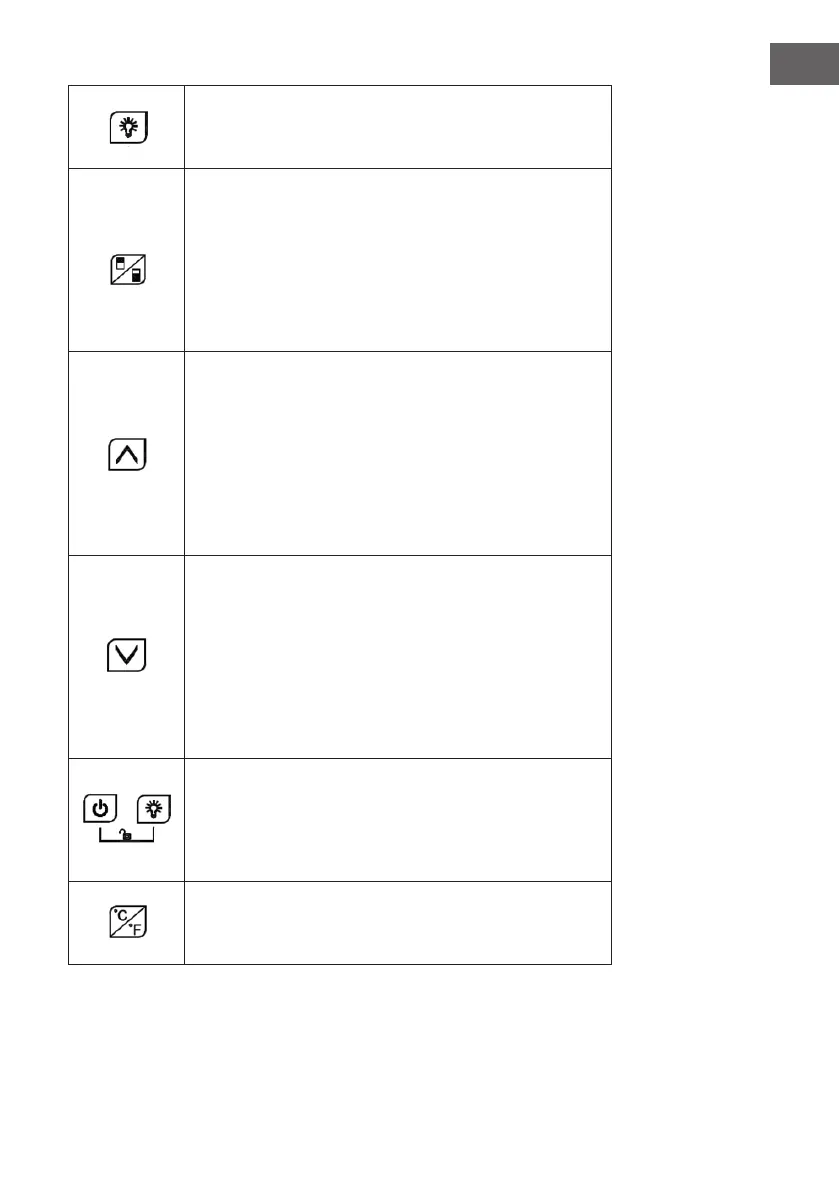
LIGHT
• Press the button to turn the LED lights inside the appliance on
or off. In standby mode, this button will not work.
ZONE SWITCH
• Press the button to switch between the upper zone and lower
zone when choosing which zone to set the temperature for.
• Press the button once and the LED display in the chosen
zone will ash regularly.
• Press the UP and DOWN buttons to set the temperature.
Press the button again to switch zones and then set the
temperature.
UP
• Press the button once, the LED display will ash regularly to
indicate the current temperature setting.
• Press the button again to change the set temperature;
each time the button is pressed, the temperature setting is
increased by 1°C.
• If no entry is made for 5 seconds, the LED display stops
ashing and the new set temperature will be saved. The LED
display shows the current interior temperature.
DOWN
• Press the button once, the LED display will ash regularly to
indicate the current temperature setting.
• Press the button again to change the set temperature;
each time the button is pressed, the temperature setting is
decreased by 1°C.
• If no entry is made for 5 seconds, the LED display stops
ashing and the new set temperature will be saved. The LED
display shows the current interior temperature.
CHILD LOCK (Key combination)
1. Lock: Press and hold both buttons down at the same time for
3 seconds to lock.
2. Unlock: Press and hold both buttons down at the same time
for 3 seconds to unlock.
FAHRENHEIT/CELSIUS DISPLAY
• Press this button to switch the temperature display between
Fahrenheit and Celsius.



 To Next Page