70
EN
Display Specication
• When setting, if no other operation,it will conrm automatically after 10 seconds.
Except clock setting for the rst time.
• During setting program, after adjusted for 3 seconds, it will conrm automatically.
Except auto menu, it will conrm after adjusted for 10 seconds.
• When the oven is in setting state or pause state, including auto menu and defrost
program, if no operation in 5 minutes, it will enter into the off state.
• The oven lamp will light all the time if the door is open.
• The oven lamp will light all the time if the oven is paused.
• The button must be pressed to continue cooking if the oven door is open during
cooking process.
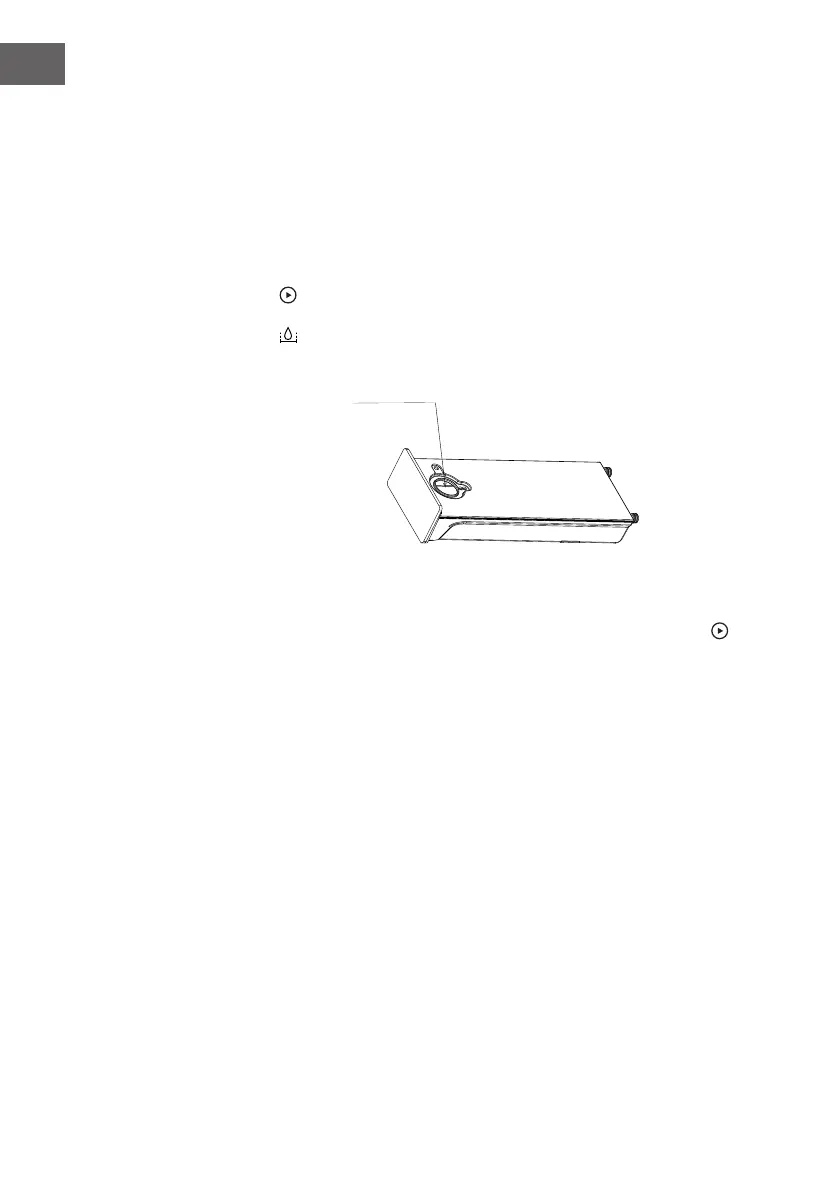
• The button can be press in any state to open the water tank.
Add water to here
Steam note:
1. Before steam cooking:
Before starting the steam cooking mode, if the tank is short of water, press
button,abnormal buzzer will ring and the screen icon will show water scarcity status
of water level to remind you to add water.
Note: Before starting the steam cooking mode, please clean the water tank.
2. During steam cooking:
During steam cooking mode, if the tank is short of water, abnormal buzzer will ring
and the screen icon will show water scarcity status of water level to remind you to
add water. After adding water, it can work normally.
3. After steam cooking:
1-After steam function is nished , the water in boiler will be withdraw to water
tank.
This process lasts for about 1 minute.
2-During the process to withdraw the water back to water tank , if the water tank is
full , the system will be beeping 10 times to remind you clean up the tank. After the
water tank is empty, the system will continue to withdraw water.
Note: After steam cooking, please remove the water from water tank.



 To Next Page