47
EN
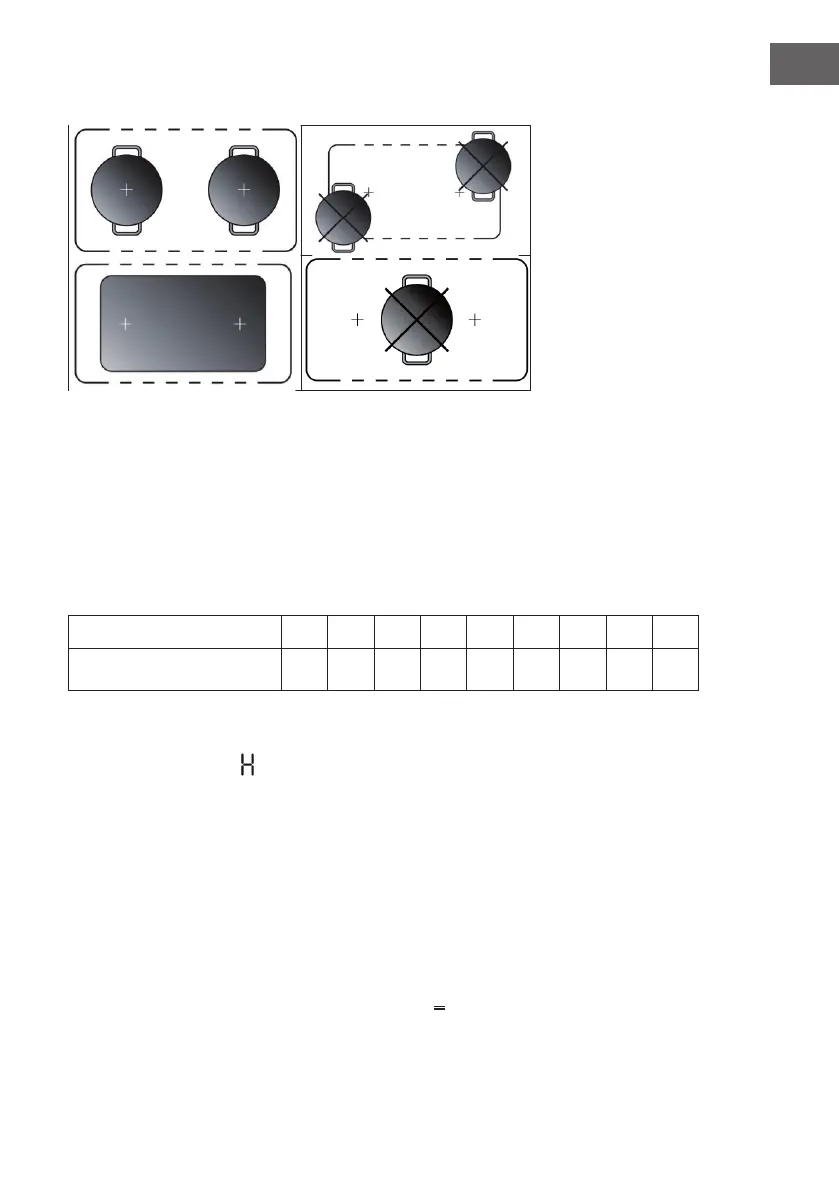
Examples of good pot placement and bad pot placement
Water overow protection
The hob will automatically shut down within 10 seconds if water overows the
control panel.
Auto switch o
The hob will automatically switch o when you did not set cooking time, forgot to
switch o the hob, and did not operate the hob at all. The default working times
for various power levels are shown in the below table:
Power level
c 1 3 4 5 6 7 8 9
Default working timer (hour )
8 8 8 4 4 4 2 2 2
Control panel warnings
Residual heat indicator
• The hob is tted with a residual heat indicator for each cooking zone.
• These indicators alert the user when cooking zones are still hot.
• If the display shows 'H', the cooking zone is still hot.
• If the residual heat indicator of a given cooking zone is lit, that zone can be
used, for example, to keep a dish warm or to melt butter.
• When the cooking zone cools down, the display goes o.
Incorrect or missing pot indicator
If you are using a pot that is not suitable, not correctly positioned or not of the
correct dimensions for your induction hob, the symbol “ ” will appear in the
display. If no pot is detected within 120 seconds, the hob switches o.


 To Next Page