43
EN
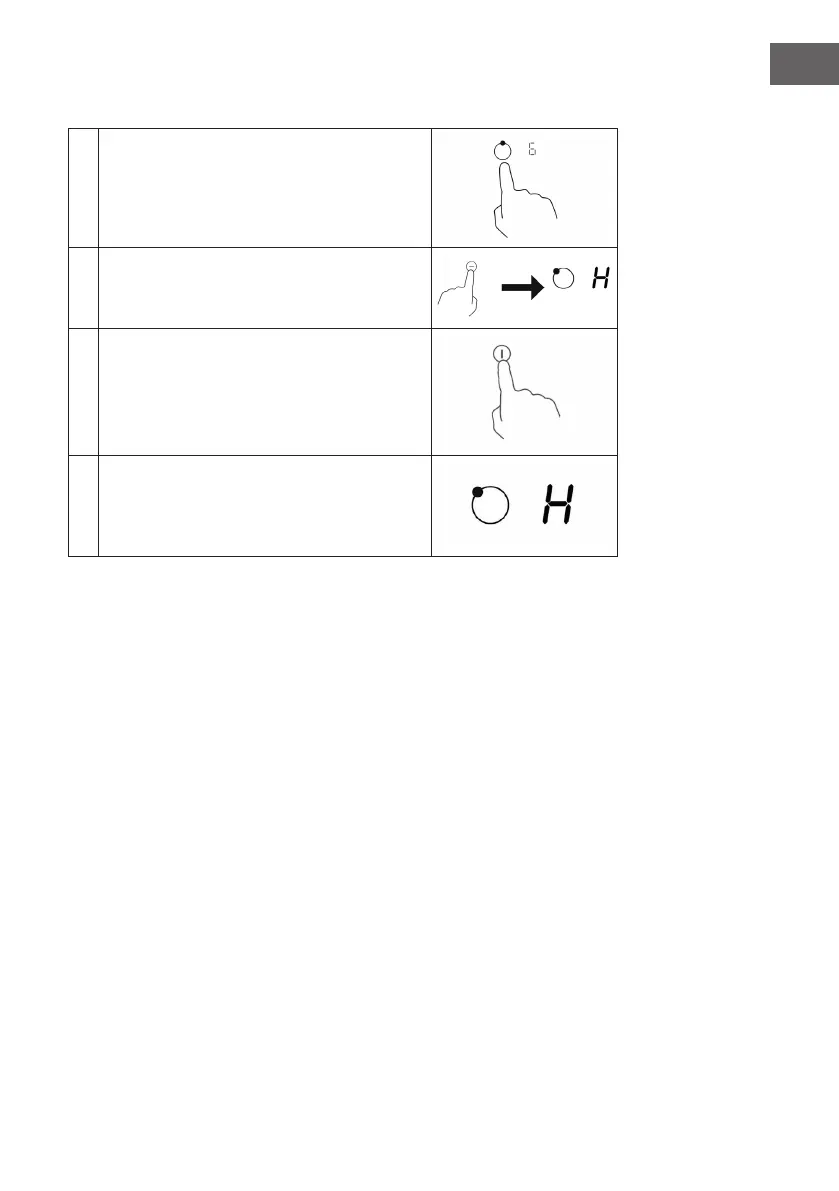
After cooking
1 Select the hobs that you want to switch o.
2
Switch the hob o by scrolling down to "0" scroll
down. Make sure that the display shows "0" and
then "H".
3
Turn o the entire induction cooktop by
pressing the on/o switch.
4
Watch out for hot surfaces. If the hob is still hot,
an "H" will appear. It will fade when the surface
has cooled down to a safer temperature.
Locking the control panel
You can secure the control panel against unintentional use (e.g. if children
accidentally switch on a hob). When the control panel is locked, all functions except
the On/O key are disabled.
Lock: Touch the key with the key symbol. The timer displays „lo“.
Unlock: Ensure that the induction cooktop is turned on. Press and hold the key
with the key symbol for a while. Now you can use the induction hob again. When
the hob is in lock mode, the controls are inactive except for the on/o key. This
way, you can always turn o the appliance in case of an emergency. However, you
should unlock the device again when you use it again.



 To Next Page