42
EN
OPERATION
Cooking
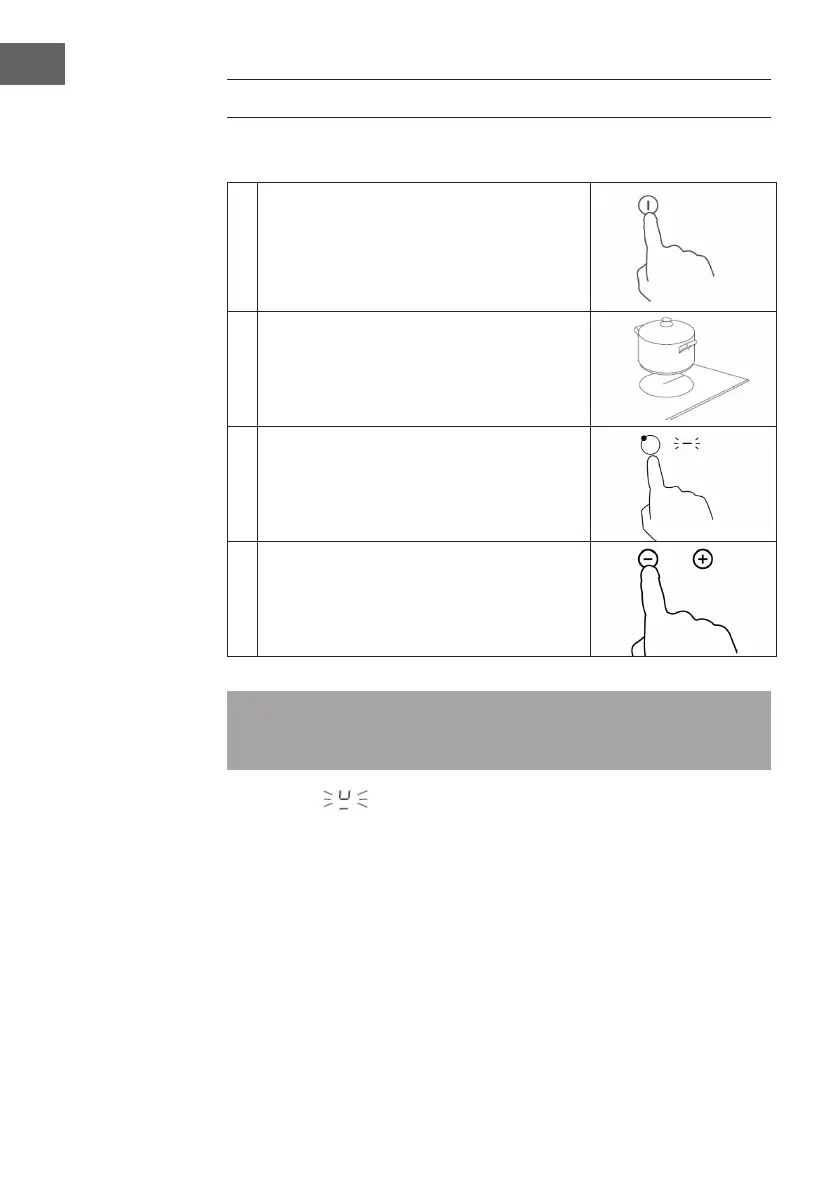
1
Touch the On/O key. After switching on, there
is a beep. All displays show "-" or "--". This
signals the standby mode.
2
Place a suitable pot on the hob. Make sure the
bottom and surface of the hob are clean and
dry.
3
Touch the selection of the hob. The indicator
next to the key starts to ash.
4
Select the temperature level by pressing "-" or
"+".
Note: If you have not selected a temperature within one minute, the induction
hob switches o automatically and you must start again with step 1. You can
adjust the temperature at any time during cooking.
If the display
ashes alternately with and the temperature setting, it
means:
• that you have not placed the pot correctly on the hob in question
• that the pot you are using is not suitable for induction cooking
• that the pot is too small
• that the pot has not been placed correctly in the center of the hob.
If a suitable pot has not been placed, no heating will take place. Without a suitable
pot, the display goes o after one minute.



 To Next Page