6
ENGLISH
OPERATING INSTRUCTIONS
NOTE: Fully charge before first use.
CHARGING
Connect included Micro-USB cable to Micro-USB Charging Port
7
,
and plug the other end into a computer, USB AC adapter, or other USB
power supply (not included). When charging, the battery indicator will
flash for 10 seconds. Normal charging time is about 3 hours.
FUNCTION BUTTONS
Press Power On / Off Button
2
for 2 seconds to power the unit
on or off. When powering on, the start-up screen will display for
10 seconds as the imager runs self-calibration. When complete,
the display will show the thermal image with the center target
temperature and high / low temperatures.
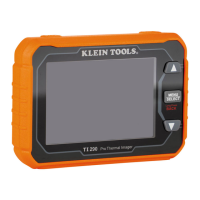
Press Menu / Select Button
6
to access Menu functions and setup.
Use the Right
4
and Left
5
Scroll Buttons to make selections.
MENU FUNCTION
Press the Menu / Select Button
6
and the Menu and Setup
functions (shown below) will appear on the LCD. Use the Right
4
and Left
5
Scroll Buttons to scroll through the functions. Press the
Menu / Select Button
6
to open the function or make a selection. To
exit the function, long press the Menu / Select Button
6
.
F
Temperature Units: Selectable between °F and °C.
G
Center Target Temperature and High / Low Temperature:
Turns these icons on or off.
H
Color Pallets: Selectable between Ironbow, Rainbow, and Gray.
I
Gallery (requires microSD
®
card, not included):
Scroll through and view captured photos.
J
Settings:
• Temp Bar: Turns feature on or off.
• Time & Date: Sets time and date stamp for images.
• Emissivity: Adjustable from 0.1 to 0.99 (default is 0.95).
• Auto Power Off: Set to 5, 10, or 30 minutes.
• Brightness: User-selectable low, medum, or high.
• HI/LO Alert: Sets temperature alarms.
• Local Info: Provides information on firmware version, capacity,
availability, code, and battery temperature.
• Default Settings Reset: Restores factory-default settings.
• Format SD: Formats microSD
®
card for use with TI250.


 To Next Page