7
CLEANING
Be sure unit is turned off and wipe with a clean, dry lint-free
cloth.
Do not use abrasive cleaners or solvents.
STORAGE
Do not expose to high temperatures or humidity. After a period of
storage in extreme conditions exceeding the limits mentioned in
the General Specifications section, allow unit to return to normal
operating conditions before using.
OPERATING INSTRUCTIONS
PHOTO CAPTURE
NOTE: microSD
®
card must be installed before powering on to use
Photo Capture capabilities.
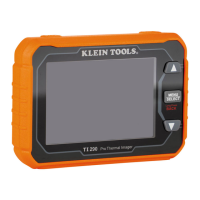
Press Camera Shutter Button
3
to take a photo.
Press the Right Scroll Button
4
to save the photo, or the Left Scroll
Button
5
to discard photo.
PHOTO GALLERY
To view photos, press the Menu / Select Button
6
, then select
Gallery
I
. Use the Right
4
and Left
5
Scroll Buttons to scroll
between photos.
When within the Photo Gallery, a second press of the Menu / Select
Button
6
will open additional options:
• Use the Left Scroll Button
5
to highlight the information icon ,
then press the Menu / Select Button
6
to display information about
the photo (date, time, temperatures, emissivity, etc.) Long press the
Menu / Select Button
6
to exit.
• To delete a photo, select the Trash Can icon , then press the Right
Scroll Button
4
to delete. Long press the Menu / Select Button
6
to exit.
BATTERY INDICATOR
D
• Solid Green: Battery has more than 40% charge remaining
• Partial Yellow: Battery has less than 40% charge remaining
• Partial Red: Low battery, needs recharging
• Blinks Red 10 Times: No Power, Immediate Shut Down
NOTE: For information on a replacement battery for this product,
contact Klein Tools Customer Service.


 To Next Page