Need help?
Do you have a question about the Klein Tools TI222 and is the answer not in the manual?
Instructions to ensure safe operation, including warnings and important cautions for handling and use.
Explanation of symbols on the tester and a breakdown of the device's physical features and connectors.
Configuration options for temperature scale, crosshairs, alarms, color palettes, and emissivity.
Steps for downloading the required app and connecting the thermal imager to an iOS device.
Instructions on how to aim the camera and capture still images in live view mode.
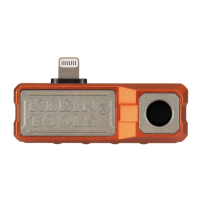
The Klein Tools TI222 is a thermal imager designed for use with iOS devices, allowing users to easily capture, store, and share thermal images and videos. This device is a valuable tool for troubleshooting hot and cold spots, providing detailed thermal data directly on your iPhone or other compatible iOS device.
The primary function of the TI222 is to convert infrared radiation into visible thermal images, which are then displayed on your iOS device through the dedicated Klein Tools Thermal Imager app. This allows for the visualization of temperature differences across surfaces, making it easy to identify areas of heat loss, overheating components, or other thermal anomalies. The device is equipped with a high-resolution sensor that captures over 10,800 pixels, ensuring detailed thermal imagery for effective analysis.
Beyond static image capture, the TI222 supports video recording, including time-lapse video. This feature is particularly useful for monitoring temperature changes over time, such as observing the heating or cooling cycles of equipment, or tracking thermal patterns in a dynamic environment. The ability to capture and store these images and videos directly on your iOS device facilitates easy sharing with colleagues or clients, streamlining the diagnostic and reporting process.
The TI222 offers several advanced temperature measurement features. It can display differential temperature, which shows the temperature difference between two points, aiding in the identification of significant thermal gradients. Touch-point temperature allows users to tap on any point in the thermal image to get an instant temperature reading for that specific spot. Additionally, the device includes high and low temperature alarms, which can be configured to alert users when temperatures exceed or fall below predefined thresholds, making it easier to detect critical thermal conditions without constant monitoring.
To enhance visual analysis, the TI222 provides selectable color palettes. These palettes, such as Ironbow, Rainbow, and Grayscale, allow users to choose the most suitable visual representation of temperature variations for their specific application, improving the clarity and interpretability of thermal images.
Operating the TI222 is straightforward, requiring the installation of the free Klein Tools Thermal Imager app on your iOS device. The device connects directly to your iOS device via its Lightning connector. Once connected, the app automatically launches, and a prompt will ask for permission to communicate with the thermal imager, which you must allow. The TI222 is designed to fit phone cases up to 1/16" (1.5 mm) thick; thicker cases may need to be removed for a secure connection.
In Live View mode, the app displays real-time thermal imagery. Users can easily capture photos by tapping the Photo Capture button. For video recording, the Video Capture button initiates standard video capture, while the Time-Lapse Video button starts recording thermal changes over an extended period. During video recording, still images can also be captured. All captured media is stored in the app's photo/video gallery.
The app's gallery allows users to view, manage, and share their thermal images and videos. Files can be selected individually or in groups, and options are available to view file information, copy/share files via various device options, or delete unwanted media. This comprehensive file management system ensures that users can efficiently organize their thermal data.
The TI222 offers extensive customization through its settings menu. Users can switch between Fahrenheit and Celsius temperature scales, and enable or disable various display elements such as high/low temperature crosshairs, center temperature crosshairs, temperature bars, differential temperature, and touchscreen temperature. Shutter sounds and alarm sounds can also be toggled on or off.
A key feature for accurate measurements is the adjustable emissivity setting. Emissivity, which measures a surface's ability to emit thermal energy, can be set from 0.01 to 0.99. This adjustment is crucial because different materials emit thermal energy at different efficiencies. By matching the emissivity setting to the material being measured, users can obtain more accurate temperature readings. The manual provides a guidance chart for common materials and their approximate emissivity values to assist with this setting.
High and low temperature alarms can be configured with specific temperature thresholds, providing immediate visual and audible alerts when these limits are crossed. The time-lapse capture interval can also be adjusted, offering options for slow, medium, or fast capture rates, allowing users to tailor the recording speed to the specific dynamics of the thermal event they are monitoring.
The app also includes a Frequently Asked Questions (FAQ) section, offering helpful tips for using the thermal imager, and supports multiple languages (English, Spanish, French) for broader accessibility.
Maintaining the TI222 is simple and ensures its longevity and accurate performance. For cleaning, the unit should be disconnected from the iOS device and wiped with a clean, dry, lint-free cloth. It is important to avoid using abrasive cleaners or solvents, as these can damage the device's sensitive components or housing.
For storage, the TI222 should not be exposed to high temperatures or humidity. If the unit has been stored in extreme conditions outside its specified operating range, it should be allowed to return to normal operating conditions before use to ensure accurate readings and proper functionality.
The device is designed with no user-serviceable parts inside, emphasizing that users should not attempt to open or repair the unit. Any damage to the housing or the Lightning connector/adapter should prompt discontinuation of use. Additionally, users are cautioned not to point the camera at the sun or any other strong energy source, as this can affect accuracy or cause damage to the sensor.
The TI222 is built to be robust, with a drop protection rating of 6.6 ft. (2m), indicating its durability in typical work environments. The product also adheres to CE, UKCA, and Canada ICES-003 (B) / NMB-003 (B) compliance standards, ensuring it meets relevant safety and electromagnetic compatibility requirements.
For end-of-life disposal, the TI222 and its accessories should not be placed in regular trash. Instead, they must be disposed of properly in accordance with local regulations, with resources like www.epa.gov/recycle provided for additional information on responsible recycling.
 General
| USB port | Yes |
|---|---|
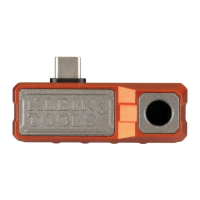
| USB connector type | USB Type-C |
| Sensor type | - |
| Product color | Red |
| Built-in display | No |
| Display diagonal | - \ |
| Housing material | Aluminum |
| Display resolution | - pixels |
| Battery capacity | - mAh |
| Charging source | USB |
| Total megapixels | - MP |
| Viewfinder resolution | 10800 pixels |
| Infrared spectral band | 8 - 14 µm |
| Thermal sensitivity (NETD) | 60 mK |
| Temperature measurement range | -20 - 400 °C |
 Weight and Dimensions
| Depth | 54 mm |
|---|---|
| Width | 19 mm |
| Height | 27 mm |
| Weight | 31 g |

 To Next Page