There are two ways to turn off the player:
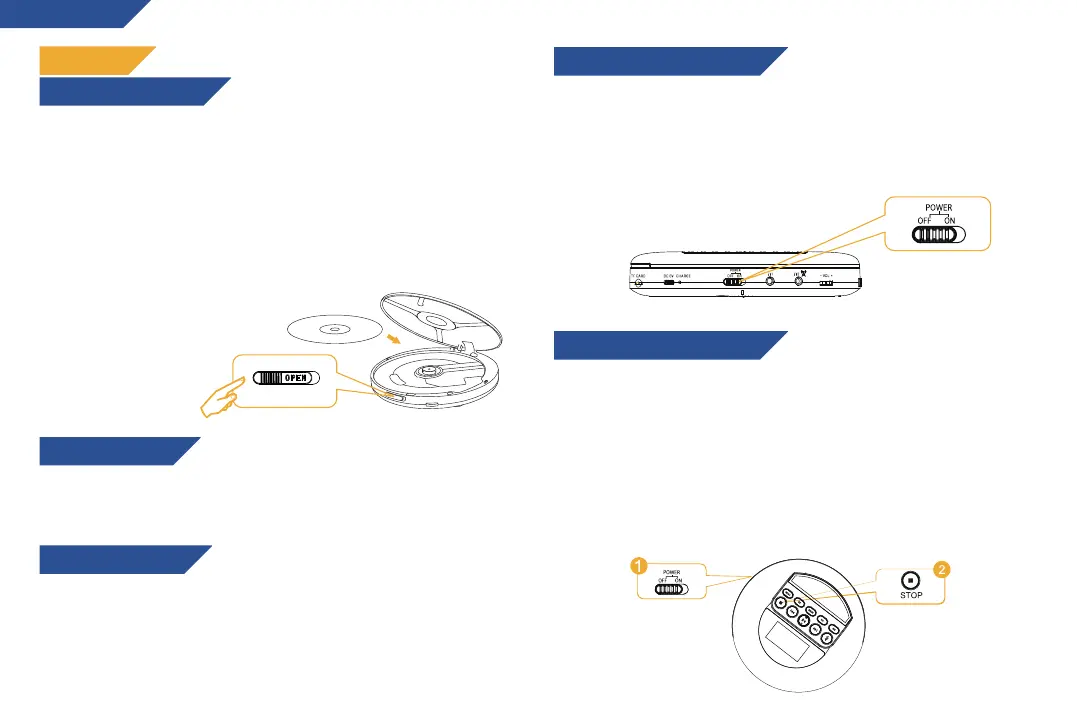
1. Move the power switch to the OFF position if the player will not be
used for an extended period of time.
2.The player will enter standby mode by pressing the STOP button
twice in succession. On standby, the player will continue to consume
some power, since it is not completely switched off.
IMPORTANT: while on standby mode, press the Play/Pause button to
reactivate the player.
Push the OPEN button on the right to open the cover. Before first use,
remove the protective cardboard to reveal the lens. Insert your index
finger into the center hole of the disc and take the edge of the disc
with your thumb. Keep the labeled side upward while inserting the
disc into CD player and press the disc gently to lock it in place.
Close the disc cover completely, otherwise the player will not read the
disc.
To remove an inserted disc, gently pull it upwards from the side.
Note: The player is
only compatible
with CD, CDR, Mp3,
HDCD formats.
After inserting a TF card into the corresponding slot, press and hold
the MODE button to enter TF card playback mode. NOTE: the TF card
slot only supports cards up to 32GB of capacity.
Only earphones with a 3.5 mm jack are compatible with this device. In
order to experience the best sound quality, please use the included
KLIM Fusion or similar high fidelity headphones. You may connect two
headphone sets simultaneously, one in each port.
ENGLISH
FIRST USE
HOW TO INSERT A DISC
USING A TF CARD
HOW TO TURN ON THE PLAYER
HOW TO TURN OFF THE PLAYER
The power switch is located on the side. Slide it to the ON position to
play normally. When the last track in a disc is played or there is no
disc in the unit, the player will enter standby mode after 20
seconds. Press the PLAY button again to restart the player.
USING EARPHONES
4


 To Next Page