ENGLISH
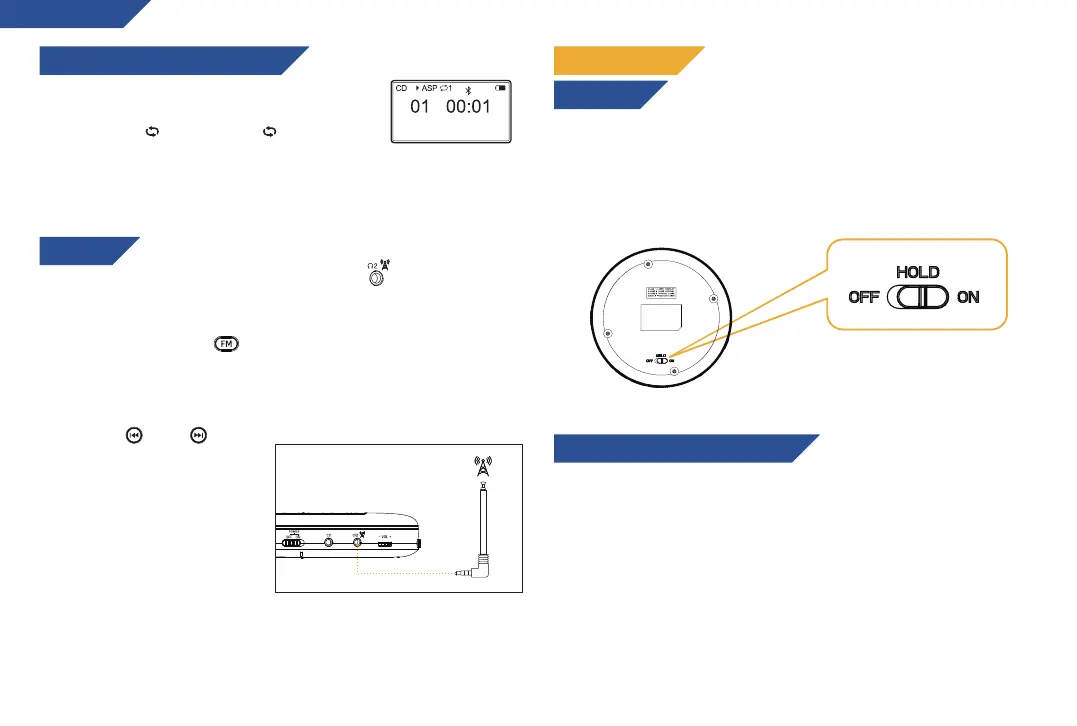
Press the MODE button to change the playback
mode:
Repeat once ( 1 ).Repeat all ( ALL), random
playback (RAND), track preview (INTRO), OFF.
During track preview, the first 10 seconds of each track is played
before moving to the next track.
PLAYBACK SETTINGS (REPEAT MODE)
FM RADIO
1. Connect the headphones to the AUX 2 port : they will act as
an antenna and increase the signal reception. You can also connect
a detachable 3.5 mm antenna (not included).
2. Press the FM button ( ) to enter Radio mode.
3. Press the PLAY button and the player will start searching for
stations and storing them automatically. Once the search has
finished, it will play the first station detected.
4. Use the ( ) and ( )
buttons to change stations.
Note: press the MODE button
to change the frequency
manually.
Press the FM button to exit
Radio mode.
After playback mode and sound effects have been set up, you can
use the HOLD switch underneath the unit to disable all function
buttons (except the volume controller), in order to avoid any
unwanted operation.
Use the included 3.5 mm male-to-male cable to connect the CD
player to other devices such as external speakers, amplifiers,
headphones, etc. You can also connect it to your car’s audio
system via the AUX port.
NOTE: connection via USB port is not supported. Refer to your
audio system’s manuals for further instructions. WARNING: do
not manipulate the CD player while driving. Always keep your
attention on the road!
KEY LOCK
OTHER FEATURES
CONNECTION TO OTHER SPEAKERS
6


 To Next Page