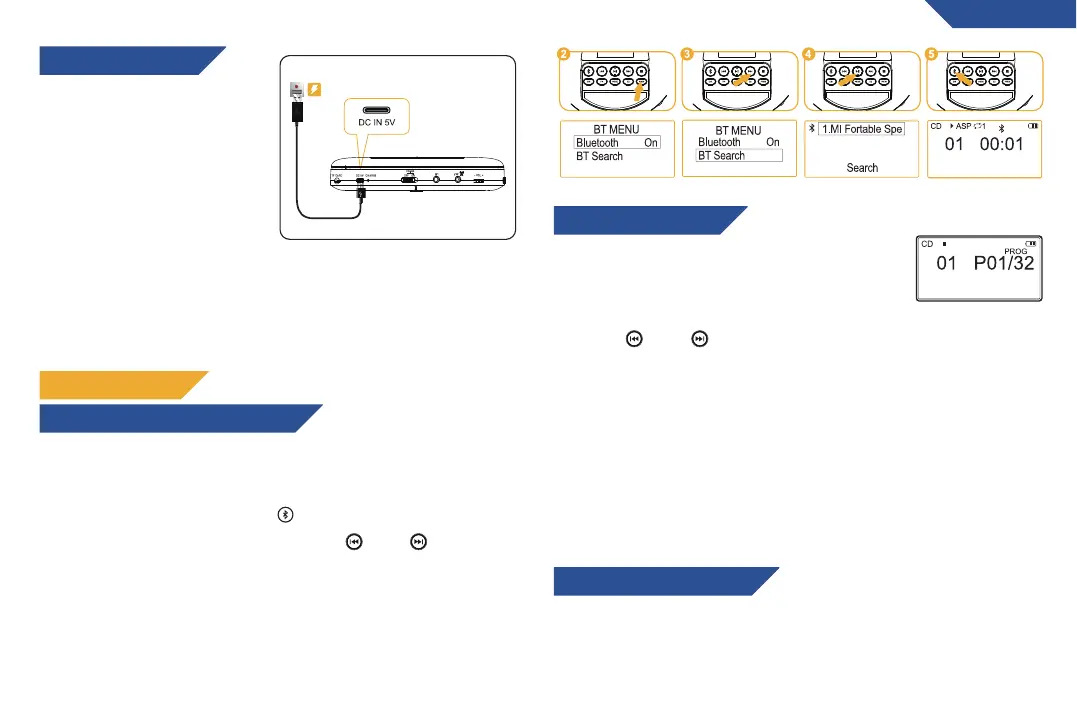
This product is equipped with
one charging cable. You can use
any charger that supports USB
2.0 protocol or standard USB
charger to charge the player.
Note: the low battery sign
flashes on the screen when
battery level is low.
Charging time: It takes around 4
hours to fully charge the player (this varies depending on the power
output). When the battery is being charged, the LED indicator is red.
Once the player is fully charged, the LED indicator will turn green.
1. Turn on your Bluetooth headphone/speaker and make sure that
the Bluetooth function is turned on.
2. Turn on the KLIM Nomad player and press the Bluetooth button to
activate the Bluetooth function ( )
3.Select the "BT Search" option using the ( ) and ( ) buttons,
then press the PLAY button to start searching for available
Bluetooth devices to pair with.
4. Press the PLAY button to select the name of your device that
needs to connect to.
5. Once the device is successfully paired, press the Bluetooth button
to return to the play interface.
1. Press STOP to stop all playback.
2. Press the PROG button to enter programming
mode. The screen changes as depicted on the
right.
3. Press ( ) and ( ) to select the track you want to save, then
press PROG to save it.
4. Repeat step 3 until you have assigned all the tracks. You can
assign up to 32 tracks.
5. Press PLAY while in programming mode to start playing your track
selection.
To exit programming mode, press the STOP button.
NOTE: the preselection is not stored in memory. Once you leave the
programming mode, you’ll need to reprogram all tracks again.
ENGLISH
CHARGING THE PLAYER
HOW TO CONNECT BLUETOOTH DEVICES
PLAYBACK OPTIONS
SAVING TRACK PRESETS
HOW TO PLAY AN MP3 DISC
Press DIR to choose different folders if there are multiple folders on
the inserted disc.
5


 To Next Page