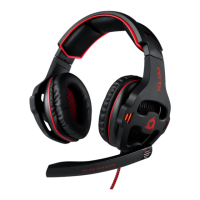
KLIM Puma User Manual www.klimtechs.com
IV. TROUBLESHOOTING
If you ever encounter any problems, remember that we remain at your disposal to help you
with any issues. Do not hesitate to contact us at support@klimtechnologies.com for
additional support.
My microphone is not working
1. Check that the microphone mute button on the controller is not active.
2. Check that the headset's microphone is selected as the default input device on your
Windows, MacOs or PS4 audio settings as well as on your game/software.
I can't hear anything coming from the headset
1. Check that the KLIM Puma is selected as the default audio device on your Windows,
MacOs or PS4 audio settings, as well as on your game/software.
2. Check the Audio Mix on your system.
The headset is too loud even at minimum volume (Windows)
A known Windows bug may cause a connected headset or speaker to have an abnormally
loud volume. You can fix this using a free program called EqualizerApo, which lets you set
lower values for a specific device on your system.
We thank you again for your purchase and hope that you enjoy using our KLIM Puma
Gaming Headset. Do not hesitate to leave a comment on the site you purchased it from, it
will help us tremendously :)
The KLIM team


 To Previous Page