KLIM Skill Gaming Mouse User Manual www.klimtechs.com
Macros
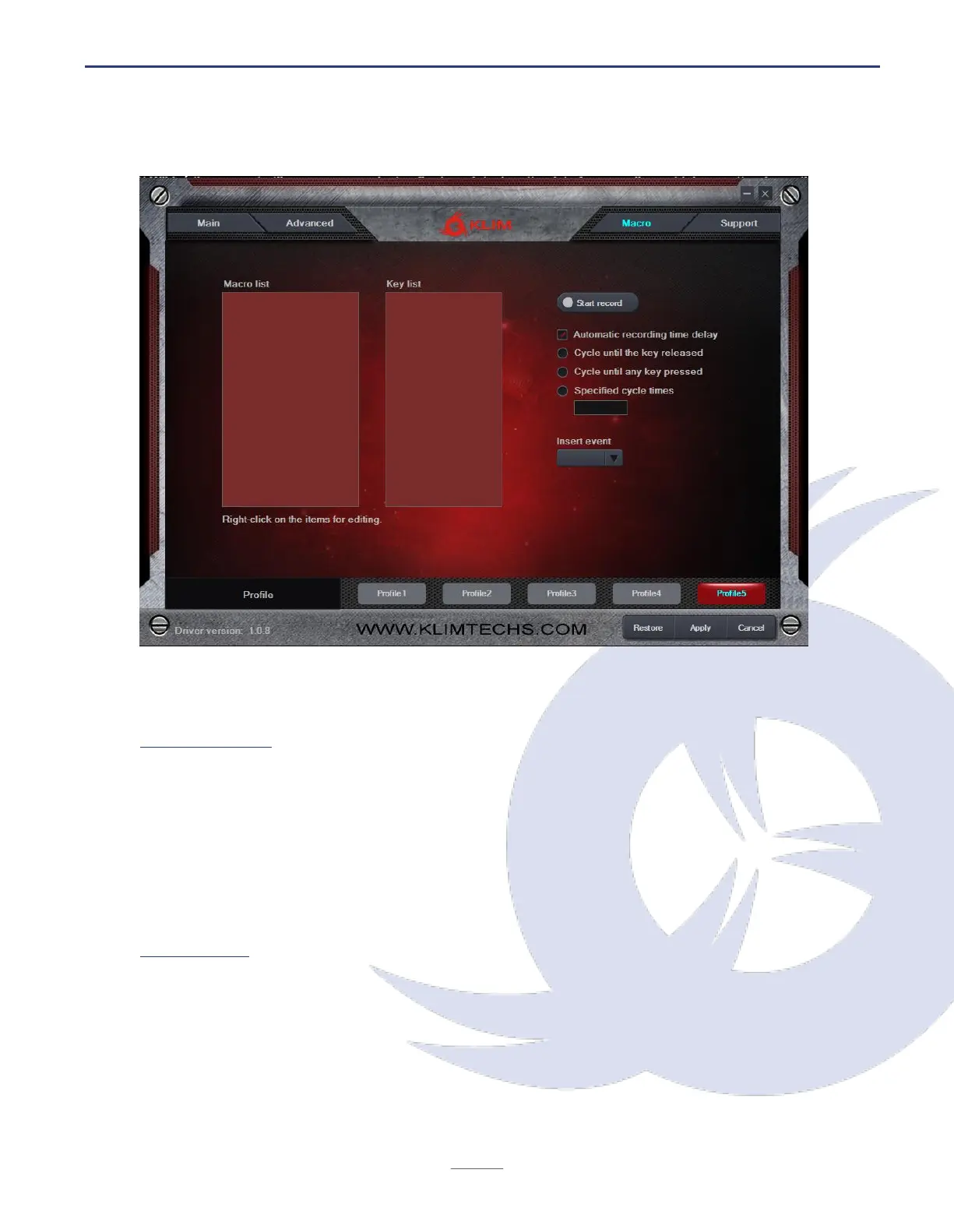
Macros allow you to perform a number of predefined actions with a single mouse button
press. The Macro Setting window lets you create, save and edit macros.
Creating a macro
1. Write a Macro Name and click on New Macro.
2. Click Start Recording, then Accept. Use the keyboard to record a sequence of key presses.
Use the Insert Event dropdown to include various actions.
3. When done, click Stop Recording, Accept and then Confirm.
You may delete or modify key presses by right clicking on them, or adjust the delay between
keypresses by right clicking on the delay indicator (50 ms by default).
Using a macro
1. Access the Key Setting screen by clicking on the Main button on the top left corner.
2. Click on the button (1-7) you would like to assign the macro to, then select Macro Key
and choose a macro you have previously created.
3. Select any additional options, then click Apply.


 To Next Page