1
15
3
ADJUSTMENT INSTRUCTIONS
1
1
T
T
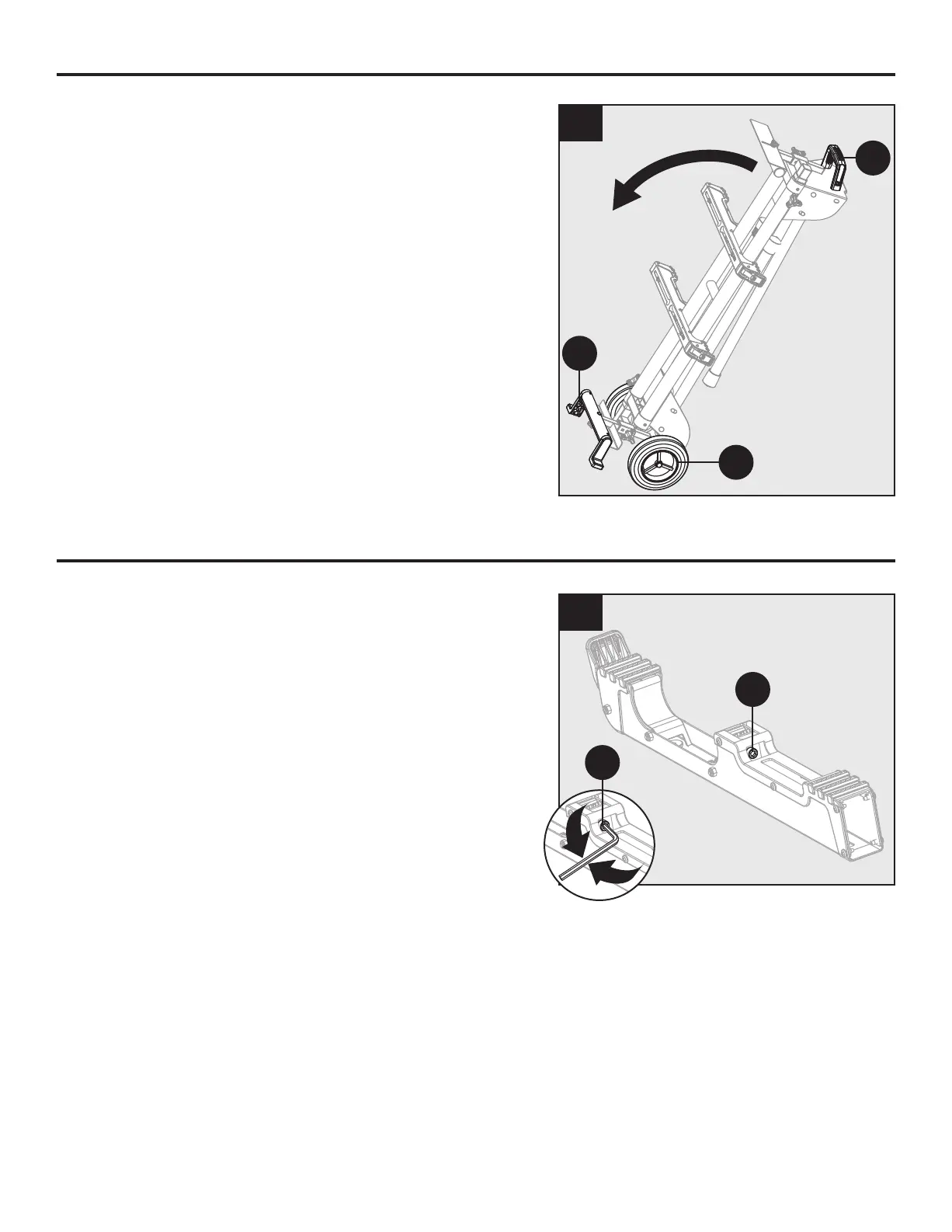
• Grasp the handle (R) to tilt the stand until it stands on
the wheels (B) and stand support (S).
B
R
S
OPERATING INSTRUCTIONS
BRACKET ADJUSTMENT BOLT
Mounting brackets are designed to fit snugly over the
stand rails. With the locking levers in the lowered (locked)
position, you should not be able to remove the saw and
bracket assembly from the rails. If the saw and bracket
assembly can be removed from the rails when the levers
are locked, the bracket adjustment bolts need to be
tightened. If the saw and bracket assembly will not fit
over both rails, the bracket adjustment bolts need to be
loosened.
Note: The saw should be removed from the mounting
brackets before attempting to tighten or loosen the bracket
adjustment bolts.
To adjust:
• Turn the bolt (T) with 5mm hex key. Rotate clockwise
if the bracket assembly need to be tightened or
counterclockwise if the assembly needs to be loosened.
• Install the bracket on the miter stand rails and lower the
locking lever to check the adjustment.
• Repeat with the second mounting bracket.


 To Next Page
 Loading...