Codes
Code LED Explanation
U1 Red Check the imaging guides.
U2 Red Ink cartridge missing.
U3 Red Document too long.
U6 Red Scanner cover open.
U7 Red • Too much paper is in the input
tray.
• The feed module is not inserted
properly.
U8 Red Multifeed stop.
U8 Green flash Multifeed paused; waiting for
user input.
U9 Red Document jam or the paper path
is blocked.
U41,
U42
Red
Calibration failed. Try the
calibration again. If it fails
again, call Service.
U51 Red Timeout: USB disconnected
while scanner was running.
Rescan documents.
U52 Red Timeout. Rescan documents.
U53 Red USB speed is not supported. Be
sure you are using a USB 2.0 (or
higher) connection.
U55 Red USB events over threshold.
Rescan documents.
U56 Red Image capture already started.
Rescan documents.
U57 Red Image footer is missing. Rescan
documents.
E Red flash • Be sure all cables are
connected properly.
• Turn power off and then on
again.
If problem persists, call Service.
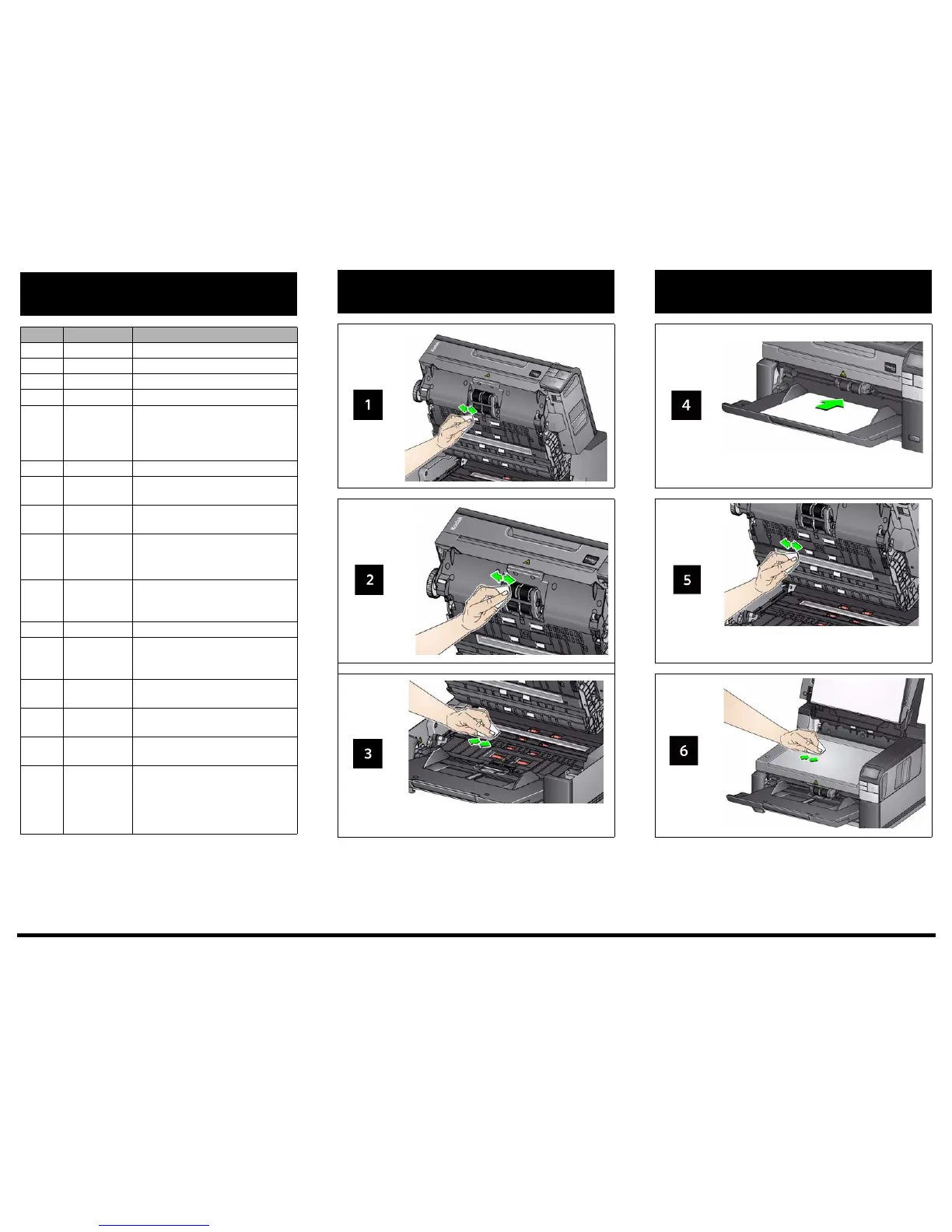
Clean the transport, rollers
and background strips
Running a transport cleaning sheet and
clean the imaging guides
For detailed cleaning and replacement procedures see Chapter 5, Maintenance in the User’s Guide.



 To Previous Page