7
Owner’s Manual
6KK14BEA2AA00 / 6KK17BGA2AA00 / 6KK21BGA2AA00
Operaon
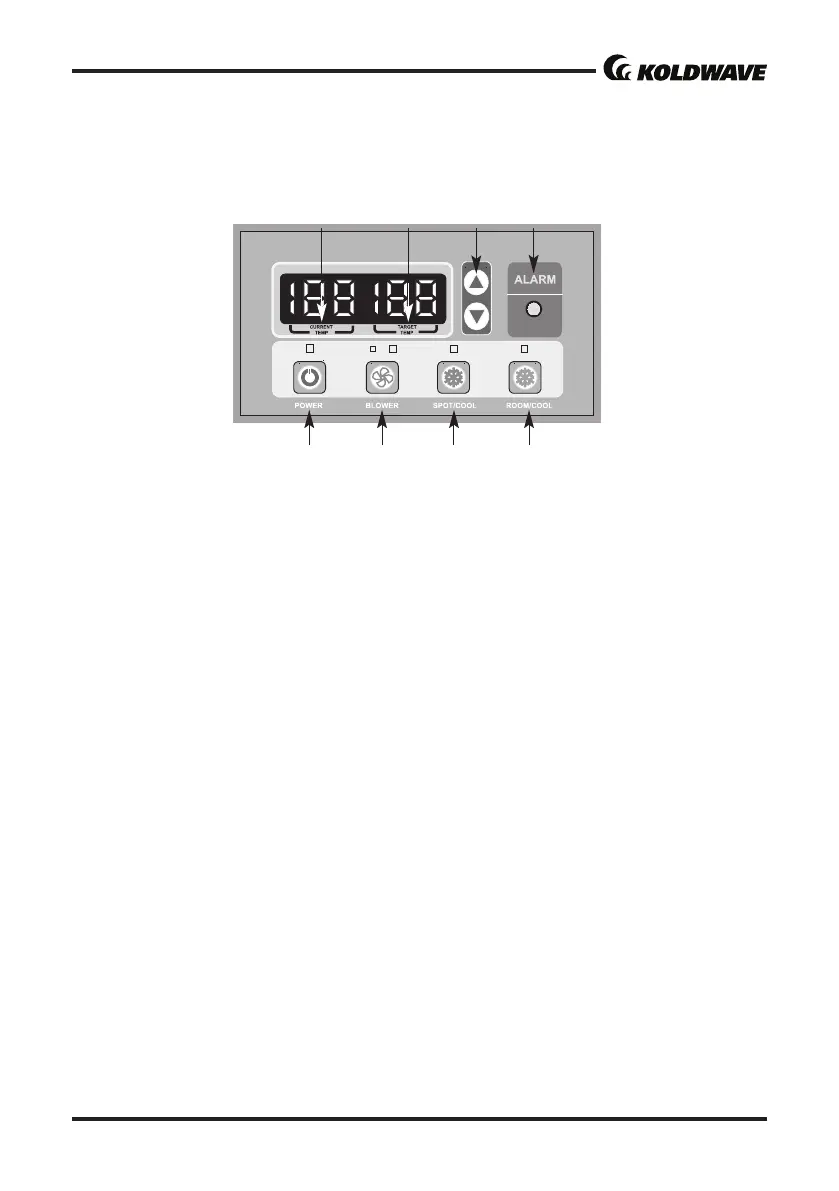
CONTROL PANEL
1. POWER BUTTON: Acvates unit when POWER BUTTON is pressed. (Fan starts on low speed). If
power buon is pressed during operaon, unit stops.
2. BLOWER BUTTON: Changes fan speed from (Low) to (High) when pressed.
3. SPOT/COOL BUTTON: Acvates compressor and begins producing cool air 5 seconds aer but
-
ton is pressed. Regulates temperature based on outlet cool air temperature.
4. ROOM/COOL BUTTON: Acvates compressor and produces cool air 5 seconds aer buon is
pressed. Regulates temperature based on inlet ambient air temperature.
5. SET TEMP BUTTONS: Change target temperature/data value by +/- 1. Change data value by +/-
10 by pressing connually. Press the SET TEMP BUTTONS to set temperature. Upper buon is
to heighten temperature and Lower buon is to lower temperture.
6. ALARM: Alarm indicator lights (blinks) and indicates abnormal system operaon. If Alarm oc
-
curs, compressor stops.System operaon stops when ALARM light is acvated (blinks) longer
than 3 minutes.
7. CURRENT TEMP: Displays current room temperature in display in Fahrenheit. (In Room
Cool Mode only). SPOT/COOL Mode – Displays outlet (cool air) temperature during normal
operaons. In order to change °F to °C, press SPOT/COOL and ROOM/COOL buons together
for 2 seconds. C will blink 2 mes and Figure will change to °C. ALARM codes blink and are
displayed when abnormal operaon occurs.
NOTE: Canadian version shows the temperature in Celsius rst when you turn on the unit.
8. TARGET TEMP: displays the unit set temperature for ROOM/COOL mode only.
OFF-TIMER: Enter to Timer Seng Mode if you press BLOWER Buon and SPOT/COOL Buon
together for1 seconds. Press UP/DOWN Buon to set the mer unl it shows the gure you want
to set. Aer 5 seconds,the gure will be memorized and the compressor will stop aer the me set.
AUTO RESTART: If the unit goes o due to an electrical interrupon, the unit will automacally
restart when the power resumes.
1 2
3 4
Figure 9



 To Next Page