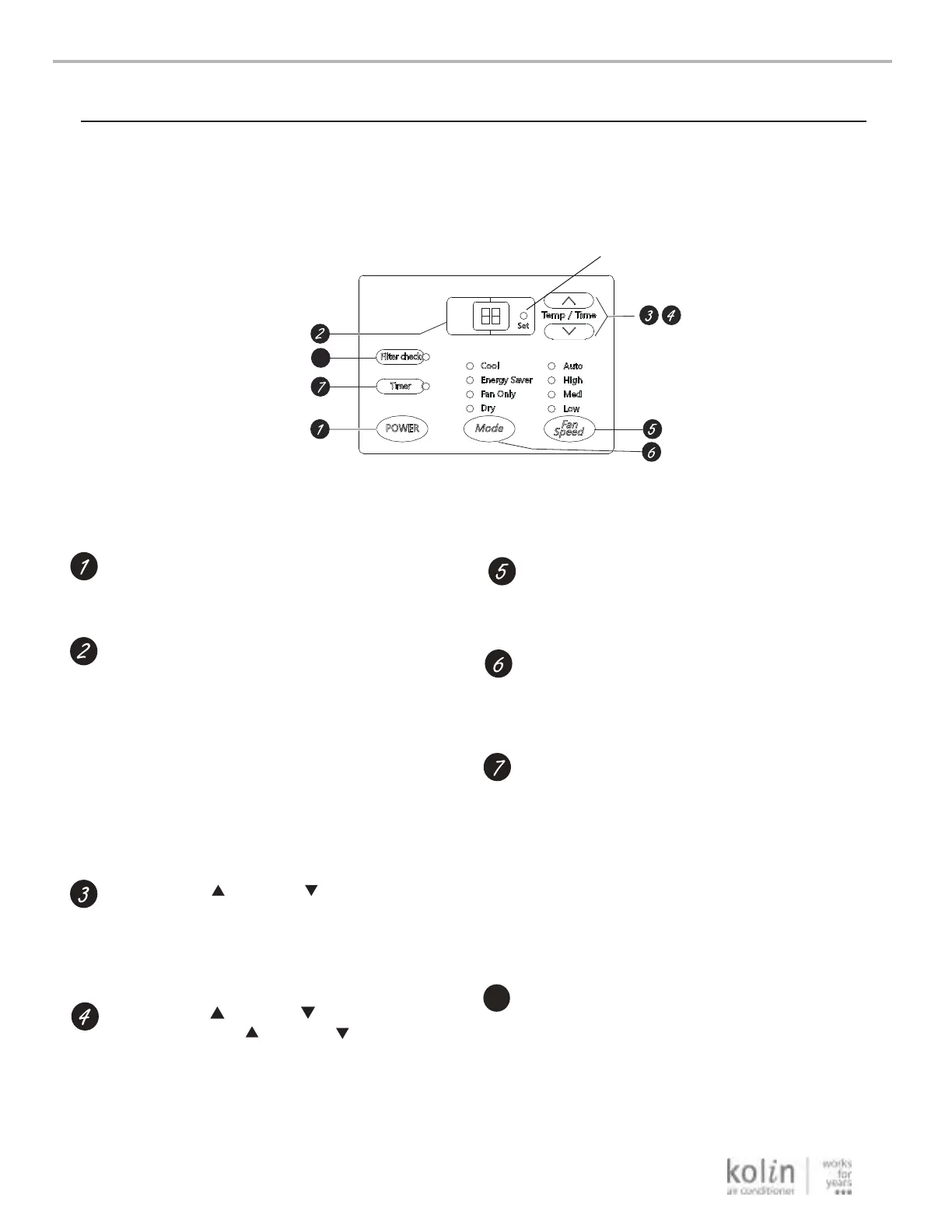
Controls
Power Pad
4
8
Lights next to the touch pads on the air conditioner control panel indicate the selected settings.
Air Conditioner Controls
Light indicates the unit
is in the temperature or
delay time Set mode.
Starting YourAir Conditioner —DigitalControl
8
/Decrease touch of the lncrease pads on
Turns air conditioner on and off.
Display
1. Under ON status without timer
setting, the operation mode is Auto,
Cool, Energy Saver or Dry mode,
and the set temperature will be displayed.
2. Under ON status without timer setting,
the operation mode is Fan only mode
and the ambient temperature will be
displayed.
3. Time will be displayed under timer
setting or timer preview.
/
Temp lncrease
Decrease
Pads Use
/
Timer lncrease Decrease
Pads Each
Fan Speed Pads
Use to set the fan speed to Low, Med, High or
Auto on the unit.
Mode Pad
Use to set the air conditioner to Cool,Energy
Saver,Fan Only ,Dry or Auto mode,
Timer Pad
Timer ON can be set under off state of unit.If
timer ON reaches,the system will run under
previous setting mode.
The setting range is 0.5~24hr.
Timer OFF can be set under on state of unit.
If timer OFF reaches ,the unit will turn off.
The timer can be set in 0.5 hour increment
below hours and in 1 hour increment for 10
hours or above.
Filter check Pad
After fan rotates for 250h totally,lamp of cleaning
filter is on to remind customer clean it.
Note: When user cleaned the filter, press Filter
check button to clear the operation time. Mean while,
the warning indicator will turn off.
to set temperature when in Cool, Energy
Saver or Dry mode. The Setlight will turn
on while setting.
the unit will set the delay time when using the
Timer pad on the unti. when using the Timer pad
on the unit. The Setlight will turn on while setting.



 To Next Page