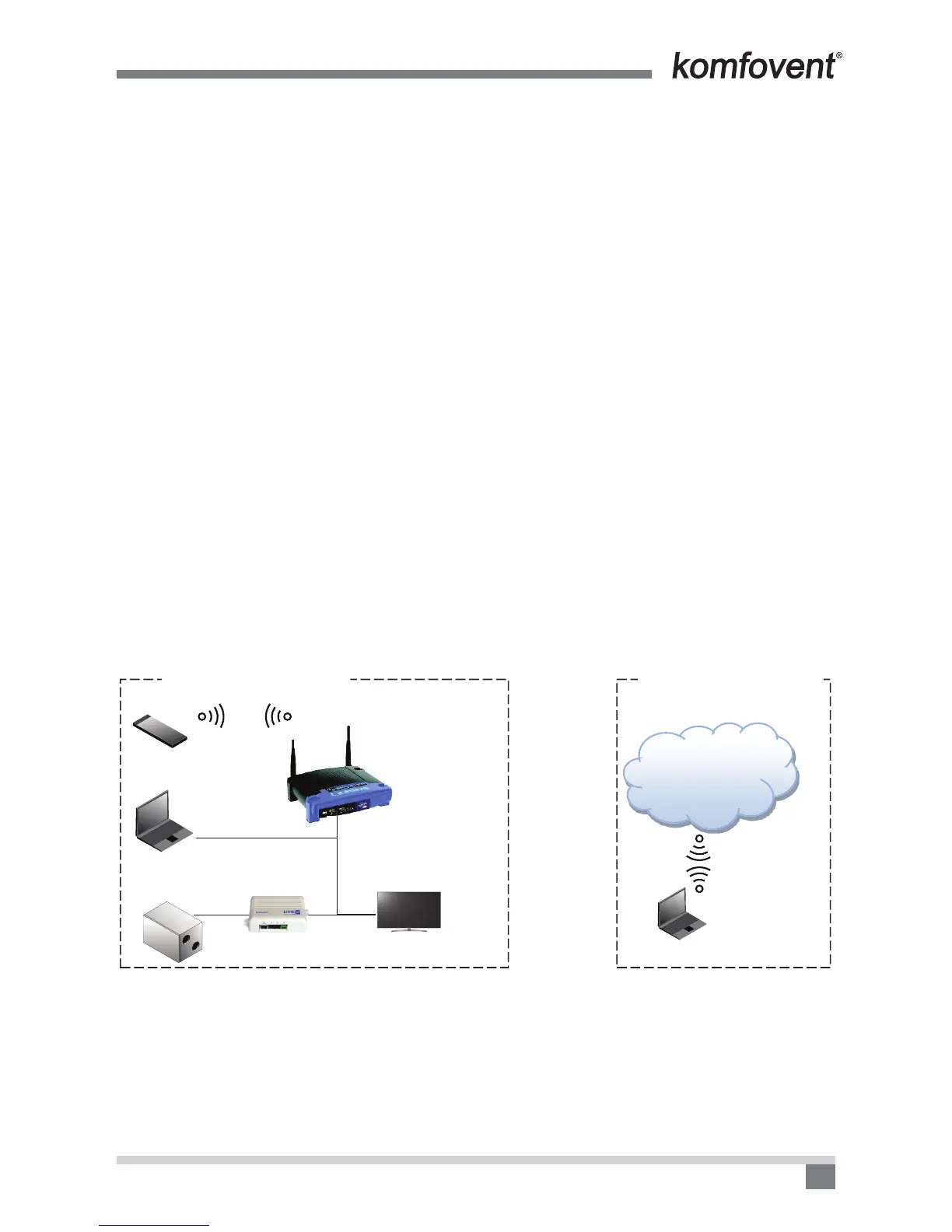
All Komfovent air handling unit settings are available through the web site integrated in Ping2, at the IP address
192.168.0.29, which is set by default at the factory. There are several methods for connection to the controller
scheme based on the way of connection.
Connect via the Android app named Komfovent home:
1. Access to the air handling unit parameters in the local area network through the phone, using the router.
2. Access to the air handling unit parameters online (in the external network) through the phone, using the
router.
This instruction contains a brief overview of the connection methods using the Android app.
1. ACCESS TO THE AIR HANDLING UNIT PARAMETERS IN THE LOCAL AREA
NETWORK THROUGH THE PHONE, USING THE ROUTER
It is the simplest way to control the unit from your phone, when you are in the vicinity of the unit. You can only
control it by connecting to a local area network router that is connected to the Ping2 module which, in turn is
connected to the air handling unit.
You must have:
1. Air handling unit with controller (C4).
2. Mobile phone with Android OS 4.0.0 (GingerBread) and higher, with Komfovent home app.
3. Ping2 module.
4. Standard router
Local area network is the network created by the router from the devices in the local area network for which
it has assigned the local area network address. The address is assigned as soon as the device is connected
to the router (if this feature is not disabled in the router) in any way: using a LAN cable or WiFi wireless con-
nection.
In this particular case, in the image the mobile phone is connected to the local area network because it is
connected to the router wirelessly through WiFi. Therefore, the mobile phone and the air handling unit are in
the common Local area network and can interact with each other. It should be emphasized that the local area
network has no connection to the devices on the internet.


 To Next Page