4. CONCEPTS OF EXTERNAL NETWORK AND LOCAL AREA NETWORK
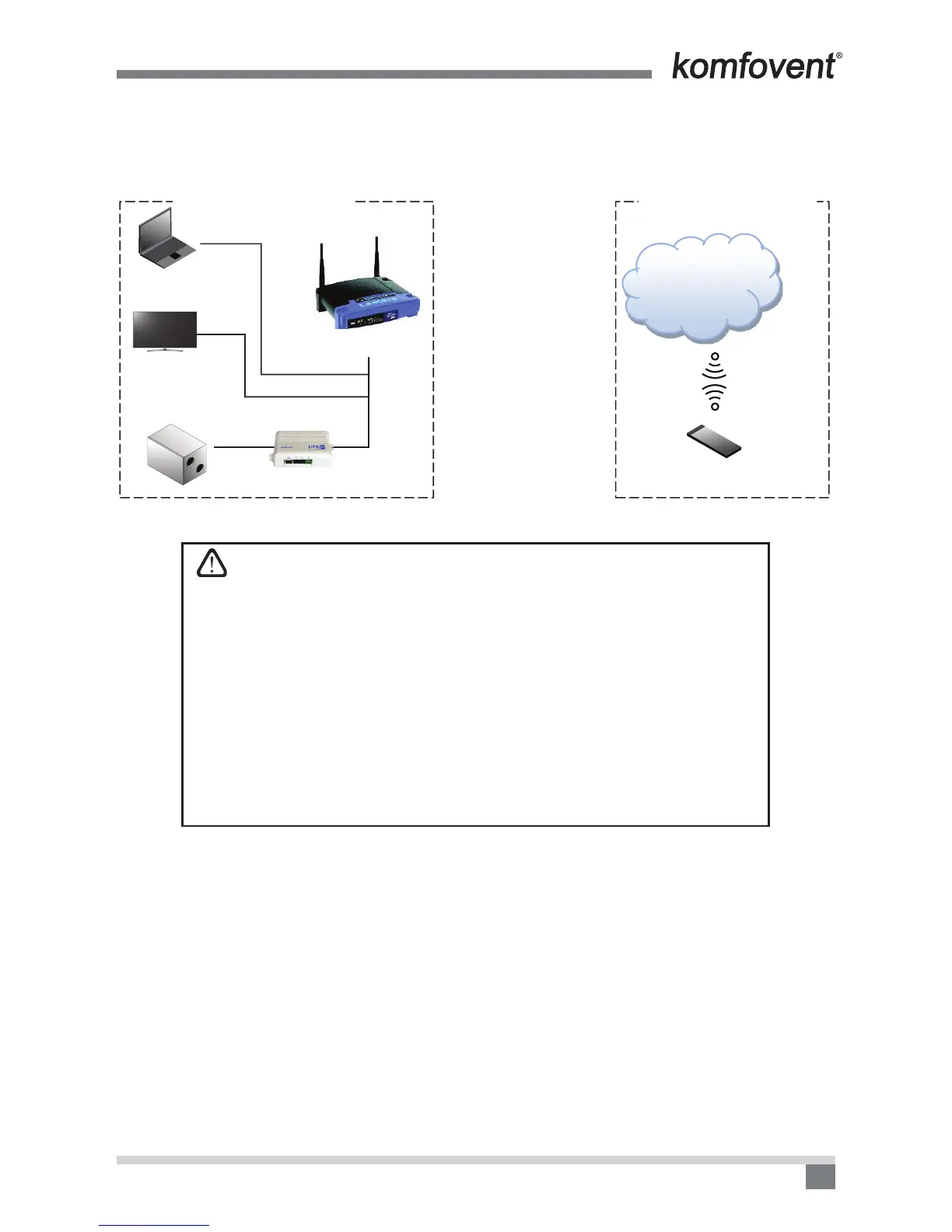
In this case, in the image the mobile phone is connected to the Internet, i.e. the external network, and the
router in the local area network has no Internet connection. Therefore, the mobile phone cannot access the air
handling unit which is in the router’s local area network.
Ping2
C4
INTERNET
192.168.0.29
LOCAL AREA NETWORK EXTERNAL NETWORK
The scheme which cannot be used for controlling the air handling unit with the mobile phone
Important – the type of network you are using – the local or external, depends
on the address you are using to connect to the ventilation unit.
1. If you are connecting to the unit via WiFi indicating an IP address such as:
192.168.0.29 and the Port number 502 – you are in the local area network. (It
is not possible to login at this address when you are on the external network).
2. If you are connecting to the unit with an IP address such as: 84.15.200.253,
Port number 4502 – you are on the external network.
In both cases, the result will be the same – you will connect to the ventilation
unit and can control it.
The essential differences between these connections are: In case 2, the data
travel path will be very long, although it may be that you are physically close to
the device and the router, which may cause connection interruptions and slow
down the performance of the app. Meanwhile, in case 1 there will be no commu-
nication failures, but you can control the ventilation unit only while being within
the router’s visibility zone. When you leave, the connection to the ventilation
unit will be terminated.


 To Next Page