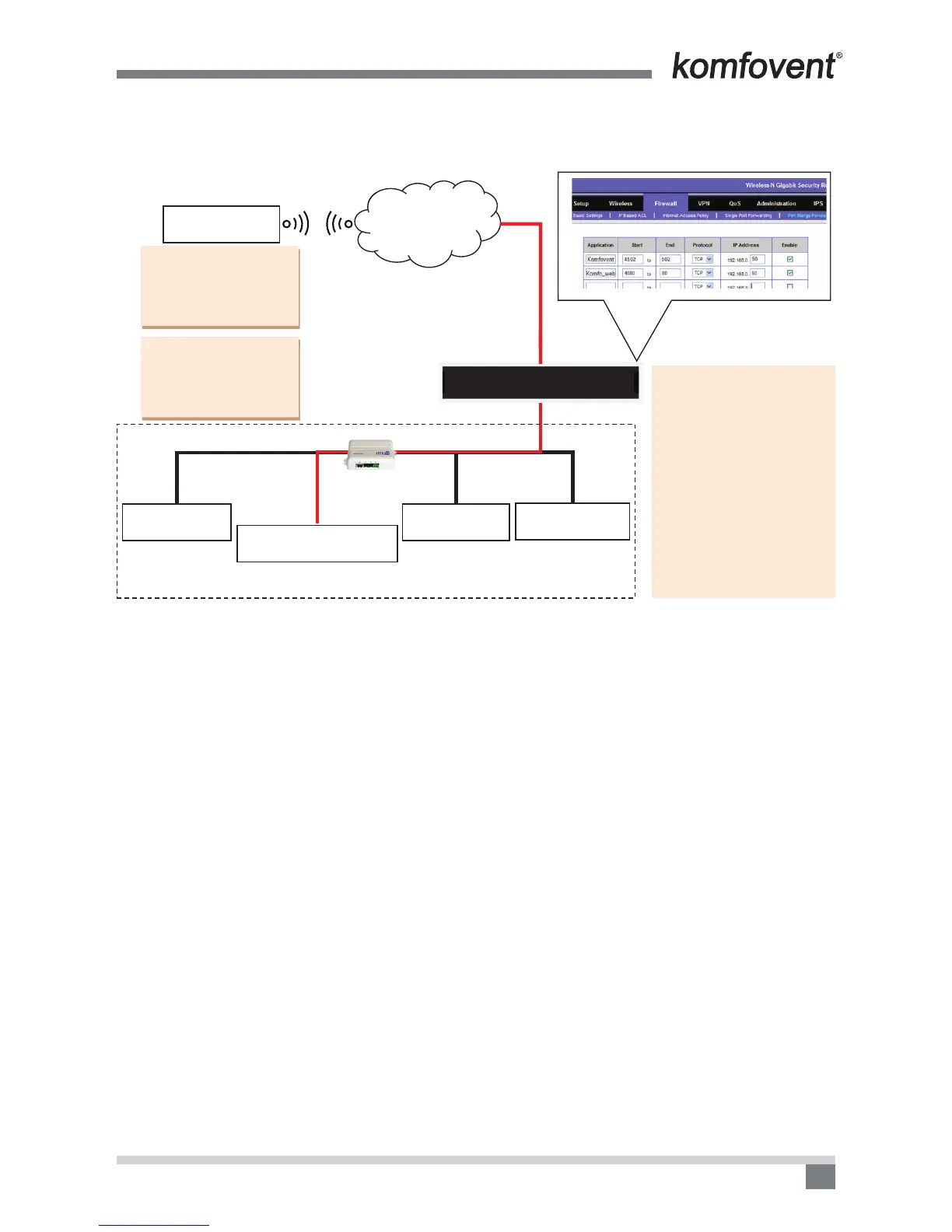
WIFI/GSM
PORT: 4080
In the Komfovent app,
enter the router IP address:
84.15.200.253 and the Port
number created in the route:
4502
In the WEB browser enter the
router IP address and the Port
number created in the route in
the following format:
http://84.15.200.253:4080
ROUTE SETTING
(PORT FORWARD):
1. For addressing the router’s
4502 Port number, direct to the air
handling unit with the IP address in
the local area network 192.168.0.60,
PORT number 502,
for communication with the
Komfovent app.
2. For addressing the router’s
4080 Port number, direct to
the air handling unit with the IP
address in the local area network
192.168.0.60, PORT number 80, for
communication with the browser.
192.168.0.25 192.168.0.30 192.168.0.200
192.168.0.60
192.168.0.29
PORT: 502
PORT: 80
Png2
C4
INTERNETTelephone 1
Router
Telephone 2
Air handling unit
TV set Computer
You can create external, i.e. (Start) Port numbers based on your preferences. It is important to remember or
write them down. You must specify them for connection to the external devices. Internal (End) Port numbers of
devices are usually indicated by the manufacturer, otherwise they should be determined by yourself.
Let’s have a look at what’s going on in the picture above. The phone 1, using the Komfovent home app,
wirelessly (GSM/WiFi) connects to the Internet by specifying the router address 84.15.200.253 and the Port
number, for example: 4502. The router receives the request, and using its settings creates a tunnel for data
transfer to the air handling unit with an IP address on the local area network 192.168.0.60 and Port number 502.
In this way, the devices on the Internet can connect to, and control the air handling unit.
When connecting through the browser, on the device’s address bar, enter the router address and specify
the Port number in the following format: http:// 84.15.200.253:4080. We will access the air handling unit, which
is within the router’s local area network.


 To Next Page