2322
Method of Usage Method of Usage
IV. Voice Control Mode
1
2
3
4
5
6
7
8
9
10
11
12
13
14
15
No.
Voice Control Entry
Voice control entry
Answer entry
·When the massage chair is turned on or in standby mode, the sound “Hi Alice” or
“Hey Alice” will be produced to enable the voice control function. Alternatively, you
can press the voice control button armrest to enable the voice control function.
·Long press the Voice control button 3 seconds to turn on or off the voice control
function.
·After such function is enabled successfully, the massage chair will reply “I am here.”
At this moment, once a corresponding voice control entry to be implemented is
given within six seconds, the corresponding voice control function can be performed
after a reply is received from the massage chair; if no correct voice control entry is
given within six seconds, the voice control function automatically will be off
automatically and needs to be enabled again.
·Note: When waking up the voice control function, please use English, the speech
rate is moderate, Voice commands should be follow up the Voice entry.
Entry: “Hi Alice” or “Hey Alice”. Answer: I am here.
Massage on
Massage close
Stress Relieving
Energy
Good-night Sleep
Neck & shoulder care
Full-body stretch
Spine Massage
Open the air pressure
Close the air pressure
Up the seat position
Down the seat position
Change the other mode
Go little down
Go little up
Answer: Ok, Massage on.
Answer: Ok, Massage close.
Answer: Ok, Stress Relieving.
Answer: Ok, Energy.
Answer: Ok, Good-night Sleep.
Answer: Ok, Neck & shoulder care.
Answer: Ok, Full-body stretch.
Answer: Ok, Spine Massage.
Answer: Ok, Open the air pressure.
Answer: Ok, Close the air pressure.
Answer: Ok, Up the seat position.
Answer: Ok, Down the seat position.
Answer: Ok, Change the other mode.
Answer: Ok, Go little down.
Answer: Ok, Go little up.
Note: commands 14 and 15 can only be used after command 13.
I
II
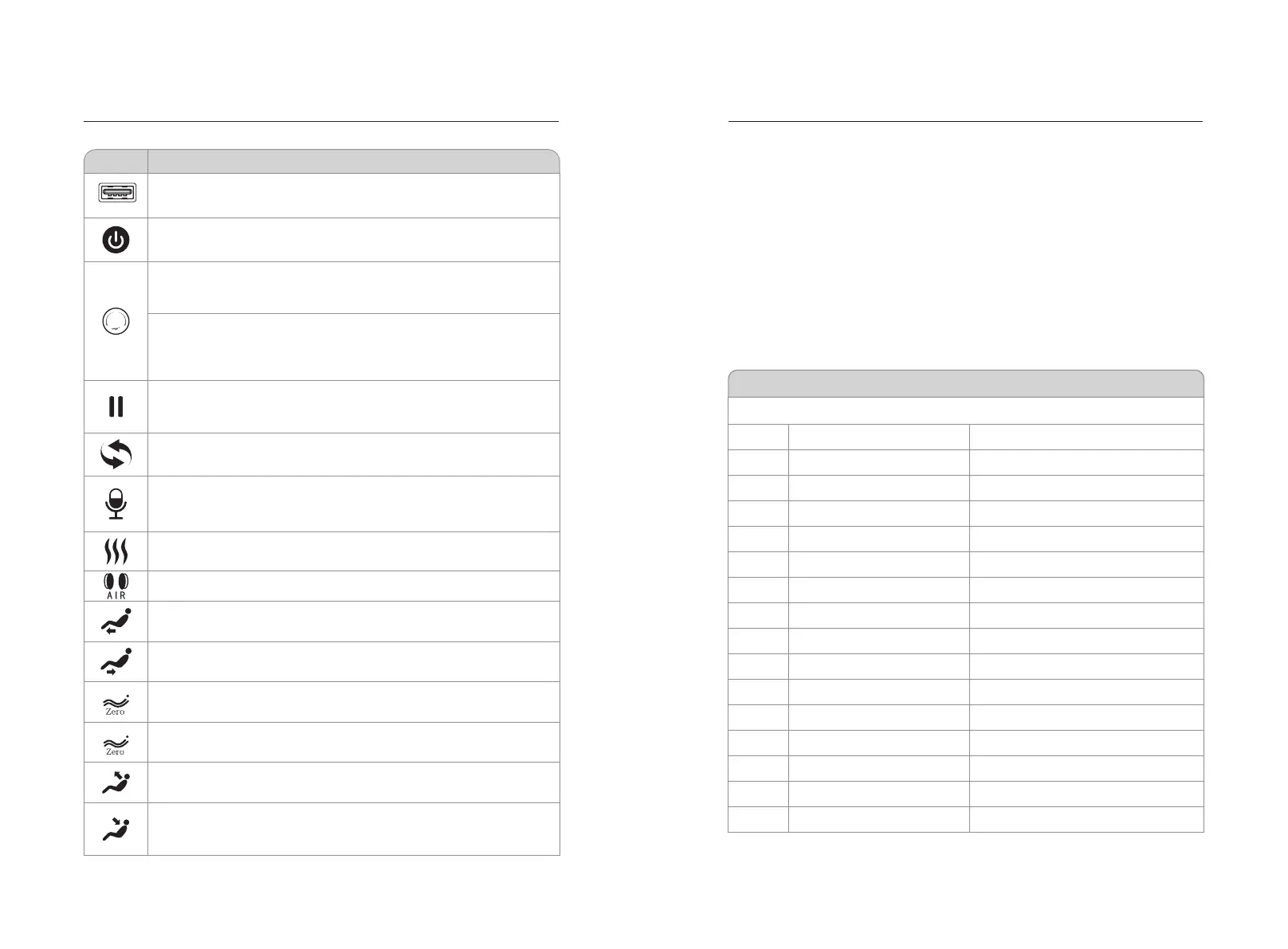
Power key: Short press this key to turn ON/OFF the massage.
Linkage lying knob: By rotating this knob clockwise, the backrest will
move downward slowly and the legrest will rise slowly; by releasing it,
such DOWN/UP action of the backrest and the legrest will be stopped.
Linkage sitting knob: By rotating this knob counterclockwise, the
backrest will rise slowly and the legrest will move downward slowly;
by releasing it, such UP/DOWN action of the backrest and the legrest
will be stopped.
Auto mode key: each time the key is short pressed, it will be switched
to next automatic massage function; long press 3 seconds to enter
Bluetooth On/Off function.
Heat treatment key: Click the key to enable or disable the heat
treatment function.
Air pressure key: Turn on/off air pressure massage function.
Legrest down key: Press the button to make the legrest move
downward slowly. Release it to stop such action.
Legrest up key: Pull the button to make the legrest rise slowly.
Release it to stop such action.
Zero-gravity key I : the positions of the legrest and the backrest can
be automatically adjusted to the positions I for zero gravity.
Backrest up key: the back rest keeping lifting when pressing this
key, and black rest stopped lifting once release the key.
Backrest down key: the back rest keeping reclining when
pressing this key, and black rest stopped reclining once release
the key.
Function
Description
Zero-gravity key II : the positions of the legrest and the backrest can
be automatically adjusted to the positions II for zero gravity.
Press this keyduring massage, and all the massage actions will be
suspended at once. (i.e. the massage chair will turn off after 20min).
Then press this key again to restore all the previous massage actions.
Voice control and wake-up key: Short press to enable the voice
control function, long press 3 seconds to turn on or off the voice
control function.
USB jack: USB charging port, you can charge smart devices (such as
mobile phones).Open key: short press this key to open key.



 To Next Page