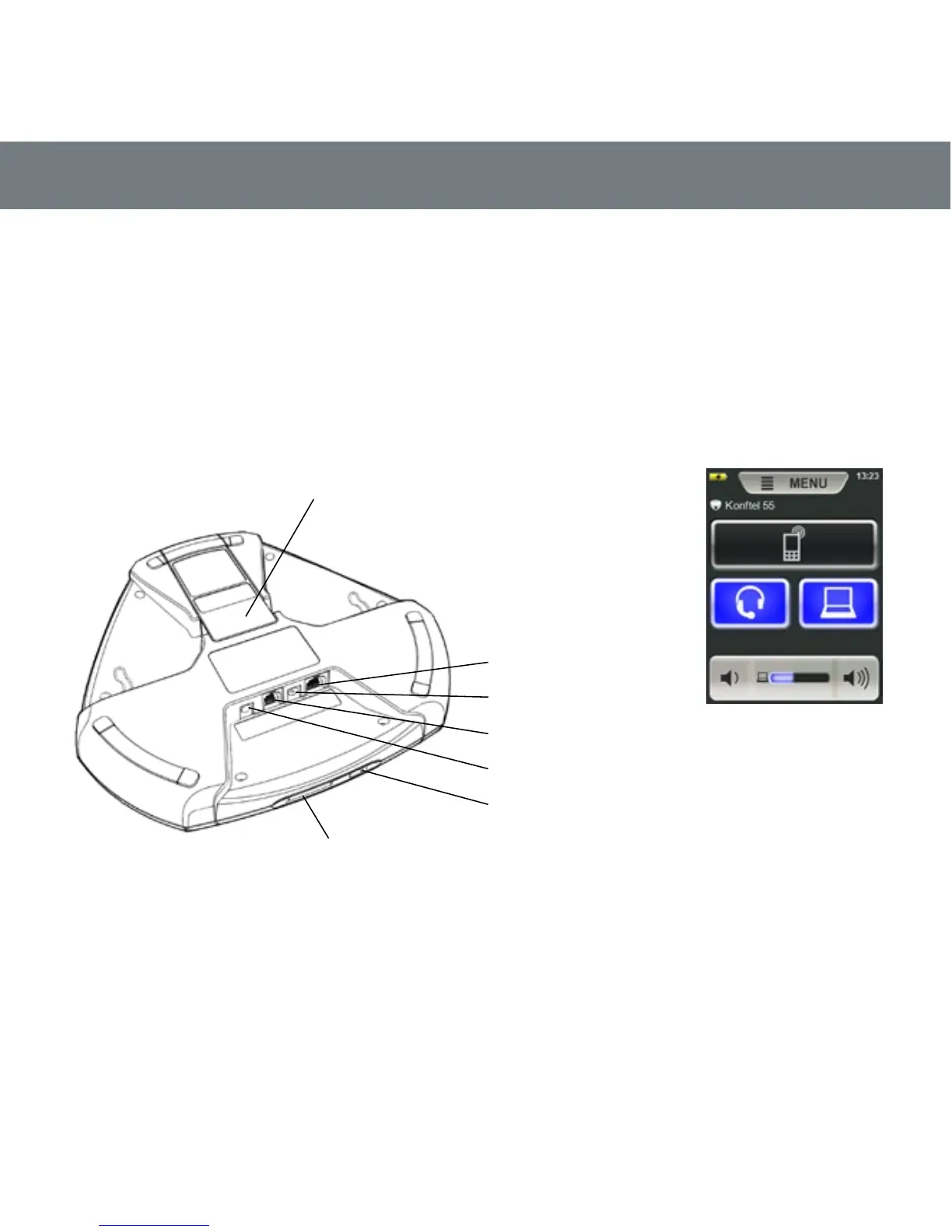
The Konftel 55 automatically detects the connections you make. When you connect a mobile
phone, the screen displays a button for activating the audio stream from the mobile. When you
insert an SD card, a button to record onto the card is displayed. A lit button indicates that the
feature is active. When you press the button, it switches between on and off.
The Konftel 55 offers a range of connectivity options yet is very simple to use. Only the features
that can be used at the time are displayed. If you wish to nd out more about all the features of
the Konftel 55, please read the PDF manual on www.konftel.com.
Port for SD memory card
It is possible to record a call in progress
and use the Konftel 55 as a dictaphone.
Insert an SD card and press the record
button to start recording.
Recordings can be accessed via the menu.
Computer (mini USB)
Desktop phone (adapter)
Headset (3.5 mm)
Power supply
Mobile phone
Connection for:
DESCRIPTION
What the screen can
look like.
Here a mobile phone and
a headset are connected
and a computer is
connected and active.
Battery cover



 To Next Page