IS12 Mega
28
E04252
4.2.2 NMEA Input/Output
The Mega instrument features an NMEA0183 input and output
and is interfaced to external equipment using the crimp termi-
nals supplied. To ensure a good connection when fitting the
terminals to the interface cable, fold back the exposed wires
over the insulation before inserting into the terminal (Fig 4.11).
Use a good quality crimp tool to crimp the terminals.
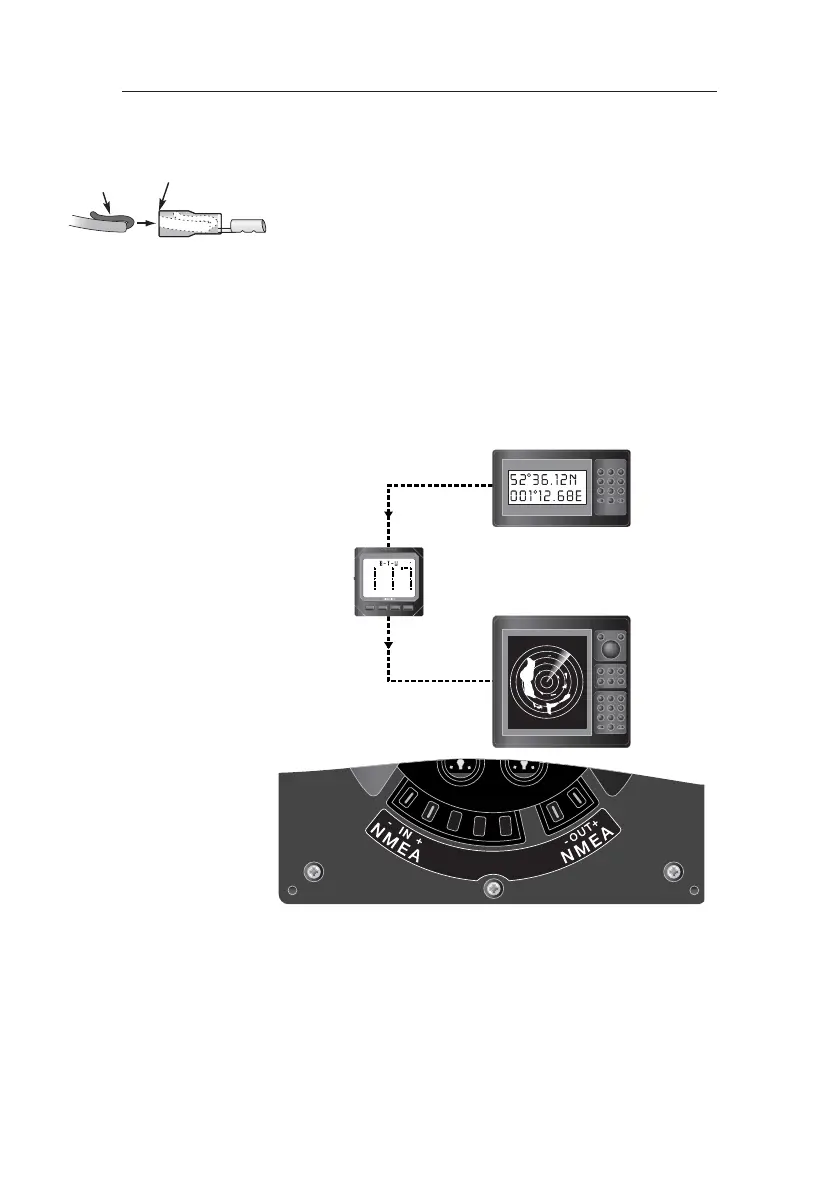
The two terminals on the rear of the unit (Fig 4.12) marked
NMEA OUT + (Data) and NMEA OUT - (Common) should be
connected to the NMEA IN connections of the interfaced equip-
ment.
The two terminals marked NMEA IN + (Data) and NMEA IN -
(Common) should be connected to the NMEA OUT connec-
tions of the interfaced equipment.
Fig 4.12 - NMEA Connections - IS12 Mode
When in IS12 Mode, the Mega can receive and display incom-
ing navigational data via NMEA (not NMEA instrument data)
and will output IS12 instrument data (depending on the mas-
ter units in the system). For further details of NMEA sentences
received/transmitted, see Section 5.2.
NOTE Only one instrument per IS12 system can input NMEA data.
Fold wire
end back
Ensure bare wires
are not visible
Fig 4.11 - Crimp Terminals
NMEA In
Nav data to be dis-
played on the Mega
NMEA Out
Instrument data from the
Mega to an external unit




 To Next Page