4.1.4 PF-707 Corner fold (dog ear) and conveyance JAM of small
size
(1) Symptom
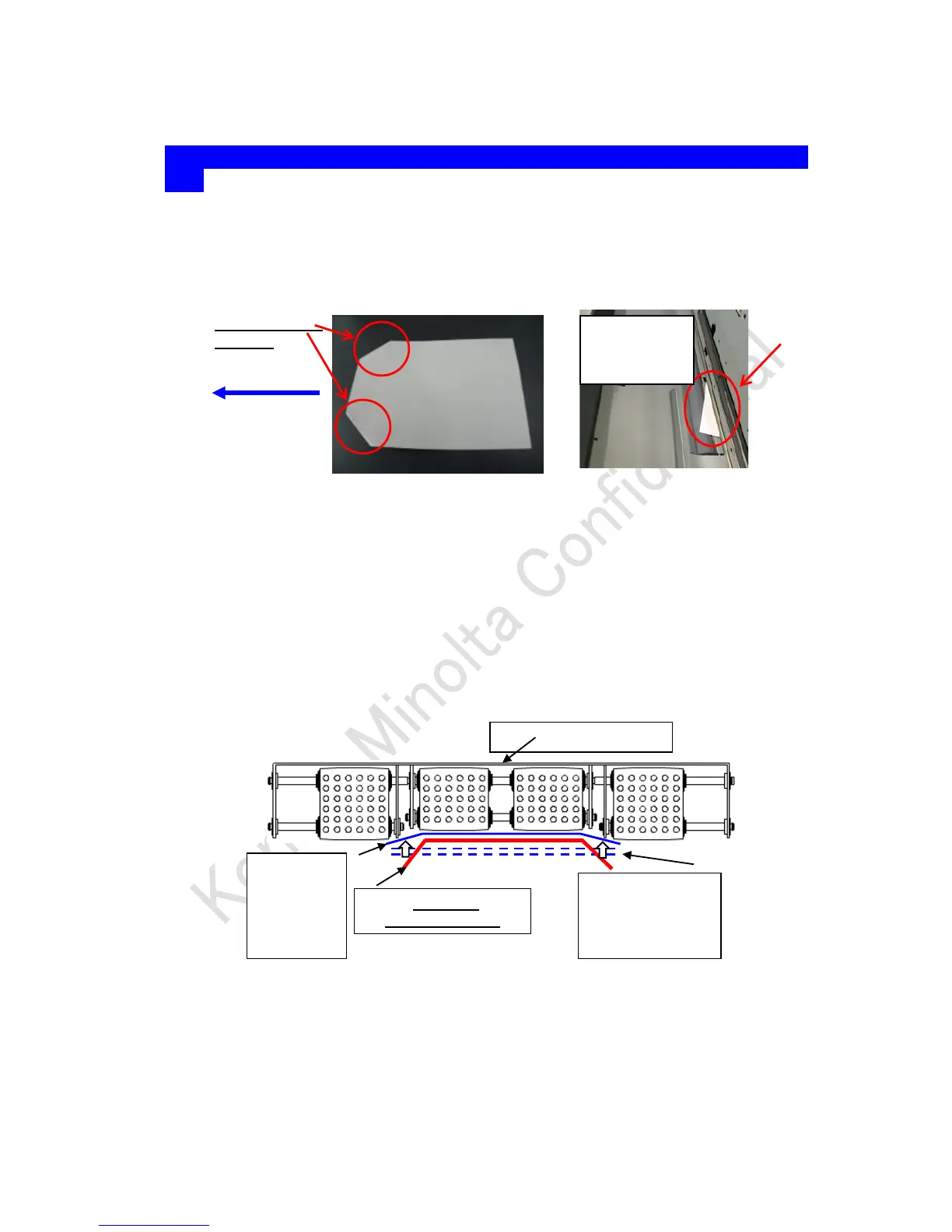
When using the small size (Width near to B6S, 5.5x8.5S), the corner of the lead edge side is folded
(front side is folded down side)
Caused by the corner folding, conveyance JAM occurs at the downstream of the PFU tray exit.
(2) Cause
When the edge of the paper is not suctioned by the belt, this part sags due to the air from the
lead edge.
When the paper is conveyed with this state, the paper edge hits the tray and the paper corner
are folded.
Or largely skewed paper in the tray is fed and causing JAM or image skew to occur at PFU and
main body conveyance section
The symptom occurs only with the paper which cannot be suctioned (B5S, 5.5x8.5S etc)
(Indicated in red line in the figure below)
If the edge of the 1
st
sheet is lifted up by the floating 2
nd
or later sheet, the symptom does
not occur. (Blue line in the photo below)
The condition symptom tends to occur
High humidity environment (moisture slows down the 2
nd
and later paper to float)
Paper weight 91g/m
2
or less of Plain paper and 158g/m
2
or less of carted paper (especially,
when it is not stiff enough, the edge of paper sags)
(3) Solution
To reduce the power to push down the paper edge, set 1 or more step(s) lower value for the



 To Next Page
 Loading...