EasyManua.ls Logo

Konica Minolta PagePro 1380 MF - User Manual

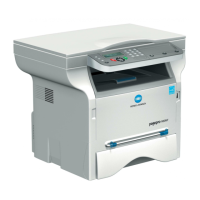
Konica Minolta PagePro 1380 MF
104 pages
Print Icon
To Next Page IconTo Next Page
Loading...
PagePro 1380 MF
User’s Guide
4558-7731-01A
1800788-001A

Table of Contents

Other manuals for Konica Minolta PagePro 1380 MF

Questions and Answers

  • R
    Ronald LopezAug 18, 2025
    How to fix media misfeeds on Konica Minolta PagePro 1380 MF?
    • J
      James SanchezAug 18, 2025
      To resolve media misfeeds in your Konica Minolta All in One Printer: * Open the front door and remove the toner cartridge. Remove the jammed media. Reinsert the toner cartridge and close the front door. * Gently open the ADF cover and carefully pull the jammed paper out of the ADF. Close the ADF front cover.
  • C
    Connie HouseAug 20, 2025
    How to resolve toner smudges on Konica Minolta PagePro 1380 MF?
    • A
      amymooreAug 20, 2025
      To address toner smudges on your Konica Minolta All in One Printer: * Remove the toner cartridge and shake it left and right a few times to distribute the remaining toner. * Remove the toner cartridge and check it for damage. Replace the toner cartridge, if necessary. * Smudges on the media indicate a dirty feed roller. Contact your local vendor.
  • D
    David StoutAug 22, 2025
    Why is the print too light on my Konica Minolta PagePro 1380 MF?
    • R
      Rebecca BrowningAug 23, 2025
      If the print is too light on your Konica Minolta All in One Printer, it could be due to: * The toner cartridge may be running out of toner. Remove the toner cartridge and shake it left and right a few times to distribute the remaining toner. If the problem persists, replace the toner cartridge. * The toner cartridge may be defective. Remove the toner cartridge and check it for damage. Replace the toner cartridge, if necessary.
  • B
    Brandon McclureAug 26, 2025
    How to fix uneven print density on Konica Minolta PagePro 1380 MF All in One Printer?
    • L
      Lisa OrtizAug 26, 2025
      To correct uneven print density on your Konica Minolta All in One Printer: * Remove the toner cartridge and shake it left and right a few times to distribute the remaining toner to ensure even distribution. * The toner cartridge may be defective. Remove the toner cartridge and check it for damage. Replace the toner cartridge, if necessary. * The image transfer roller may be defective. Contact your local vendor.
  • N
    noahellisAug 28, 2025
    Why is my Konica Minolta All in One Printer printing a blank page?
    • S
      Sheri CruzAug 28, 2025
      If your Konica Minolta All in One Printer is printing a blank page, the toner cartridge may be defective. Remove the toner cartridge and check it for damage. Replace the toner cartridge if necessary.
  • B
    Brandon GentryAug 30, 2025
    Why is my Konica Minolta PagePro 1380 MF printing a black page?
    • P
      Peter RobertsonAug 30, 2025
      If your Konica Minolta All in One Printer is printing a black page: * The toner cartridge may be defective. Remove the toner cartridge and check it for damage. Replace the toner cartridge, if necessary. * Your machine may require servicing. Contact your local vendor.
  • C
    Cameron OsborneSep 2, 2025
    Why is my Konica Minolta PagePro 1380 MF printing too dark?
    • P
      Peter FitzgeraldSep 2, 2025
      If your Konica Minolta All in One Printer is printing too dark, the toner cartridge may be defective. Remove the toner cartridge and check it for damage. Replace the toner cartridge, if necessary.
  • J
    James WilliamsSep 4, 2025
    How to fix white or black lines on Konica Minolta All in One Printer prints?
    • A
      Ashlee PerezSep 4, 2025
      If you are experiencing white or black lines on your Konica Minolta All in One Printer prints, the toner cartridge may be defective. Remove the toner cartridge and check it for damage. Replace the toner cartridge, if necessary.
  • E
    erodriguezSep 7, 2025
    How to resolve blurred background on Konica Minolta PagePro 1380 MF?
    • P
      pfreemanSep 7, 2025
      If you notice a blurred background on prints from your Konica Minolta All in One Printer, the toner cartridge may be defective. Remove the toner cartridge and check it for damage. Replace the toner cartridge, if necessary.
  • M
    Marisa MahoneySep 9, 2025
    What to do if the image comes off when rubbed on Konica Minolta PagePro 1380 MF?
    • T
      toddwebsterSep 9, 2025
      If the image comes off when rubbed on your Konica Minolta All in One Printer, it could be: * The media is moist from humidity. Remove the moist media and replace it with new, dry media. * Media with specifications not covered by the machine warranty is being used. Use media that is covered by the machine warranty.

Summary

Printer Operation

Specifying Printer Driver Settings

How to configure printer settings through the driver interface.

Using the Printer Driver

Explanation of common buttons and tabs within the printer driver.

Replacing Consumables

Replacing the Toner Cartridge

Step-by-step guide to replacing the toner cartridge.

Replacing the Drum Cartridge

Step-by-step guide to replacing the drum cartridge.

Troubleshooting

Media Misfeeds and Print Quality

Steps to clear paper jams and resolve print quality issues.

Konica Minolta PagePro 1380 MF Specifications

General IconGeneral
TypeAll-in-One Printer
FunctionsPrint, Copy, Scan, Fax
Print TechnologyLaser
Print Speed (Black)20 ppm
Print Resolution1200 x 1200 dpi
Paper Capacity250 sheets
Scanner TypeFlatbed
Scan Resolution600 x 600 dpi
Copier Speed (Black)20 cpm
Copier Resolution (Black)600 x 600 dpi
Fax Transmission Speed33.6 kbps
Maximum Paper SizeA4
ConnectivityUSB, Ethernet
Operating System CompatibilityWindows, Mac

Related product manuals