FlexDR
C30
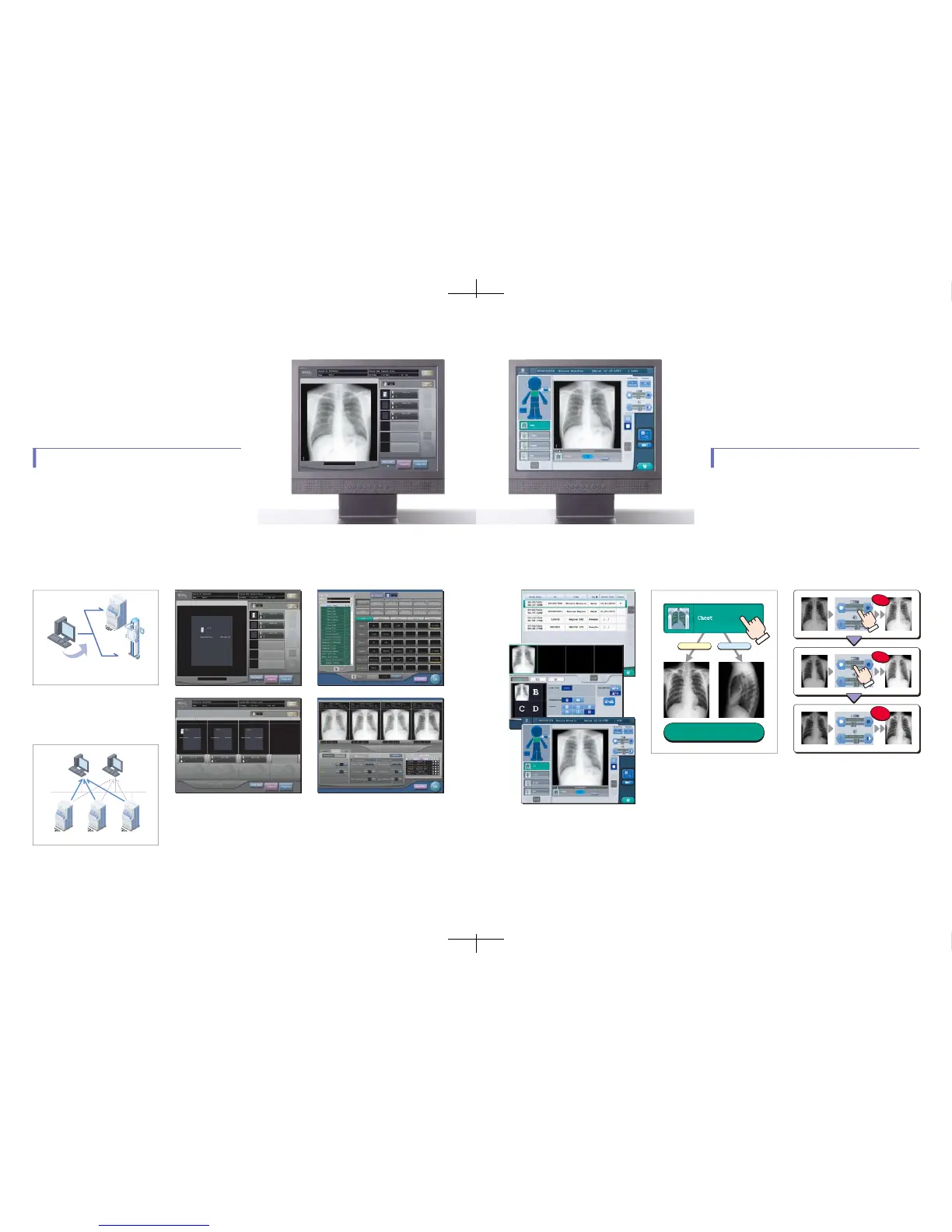
TheCS-2recognizesthebodypart
automaticallyandapplycorrectimage
processingparameters
Learning
Learning
Automatic
Adjustment
P−A LATERAL
ChoosetheConsoleforyourIdealEnvironment
■ Multi-readercontrol.
OneCS-3unitseamlesslycontrolsbothreaderunitsof
theModel210andFlexDRC30.Forsuperiorprocess-
ingcontinuity,theflowofexposuresisuninterrupted
whiletheimagesareacquired.
■ FreelySelectableReader.
ImagesarealwaysdisplayedontheCS-3wherethe
plateisregistered,regardlessofwhichreaderwas
usedtoscantheplate.Thismakesiteasierforthe
operatortocheckimagequalitywhilemaximizingthe
readerutilization.
■ Abetterreal-timedisplay.
Shortertimefromexposuretoimagecheckingisimpor-
tantfortheuser'sefficiency.TheCS-3makesit
possibletochecktheimageintheleastamountoftime
possible,sinceimagesaredisplayedinrealtime.
■ UserTool
Thistoolallowstheusertomodifyprocessingparam-
etersettings,examinationkeylayout,andother
settingswithease.Theoperationishighlyvisually
oriented :userscanbrowsepreviousimageswhile
usingslidebarstochangethesettings;imagesare
thenupdatedasthesettingschange.Thedropand
dragfunctionforcreatingexaminationkeysarealso
intuitiveandsimpletouse.
■ EasyUserInterface
(
EasyGUI
)
CS-2allowstheusertoselectthebodyparttobe
examinedfromtheicon.Simplifiedscreenoperations,
frompatientregistrationtoimageverificationare
achievedbyvariousautomatedprocessingfunction.
■ AutomaticBodyPartRecognition.
Acomprehensiveanalysisofshapeanddensityvaria-
tionsinthebodypart,andoftheedgeandcontinuityof
bones,enabletheCS-2toproduceanoptimalimage
withouttheneedforcreatingspecificexamtagkey
settings.
■ AutomaticProcessingParameter
LearningFunction.
TheCS-2automaticallymemorizespreferreddensity
andcontrastadjustmentsmadebytheusersandregu-
larlycalculatestheaveragenumbersforthesesettings.
Asaresult,CS-2automaticallycustomizesimage
qualitytomatchusers'preference.
REGIUSCONSOLECS-3
CS-3incorporatesauserinterfacesimilartothatofCS-1.Bothare
highlyregardedfortheirintuitivenessandsimplicity.CS-3providesthe
userflexibilityinsystemconfigurationneededtocreatetheidealwork-
flow.TheunitisalsoequippedwithaUserToolthatgivescomplete
freedomtocustomizeimagesettings.
REGIUSCONSOLECS-2
TheCS-2consoleusedfortheREGIUSSeriesisdesignedtoprovidethe
userwithevengreatereaseandsimplicityofoperation.Withtheaimof
offeringaconsolethatcanbeoperatedbyanyoneimmediatelyafterinstal-
lation,onlythemostessentialfunctionsareincorporatedintotheCS-2
userinterface.Atthesametime,variousautomatedprocessingfunctions
havebeenincorporatedintoCS-2tocreateahighlyefficientenvironment.














 To Next Page