ENGLISH
Uninterruptable Power Supply
Product Overview
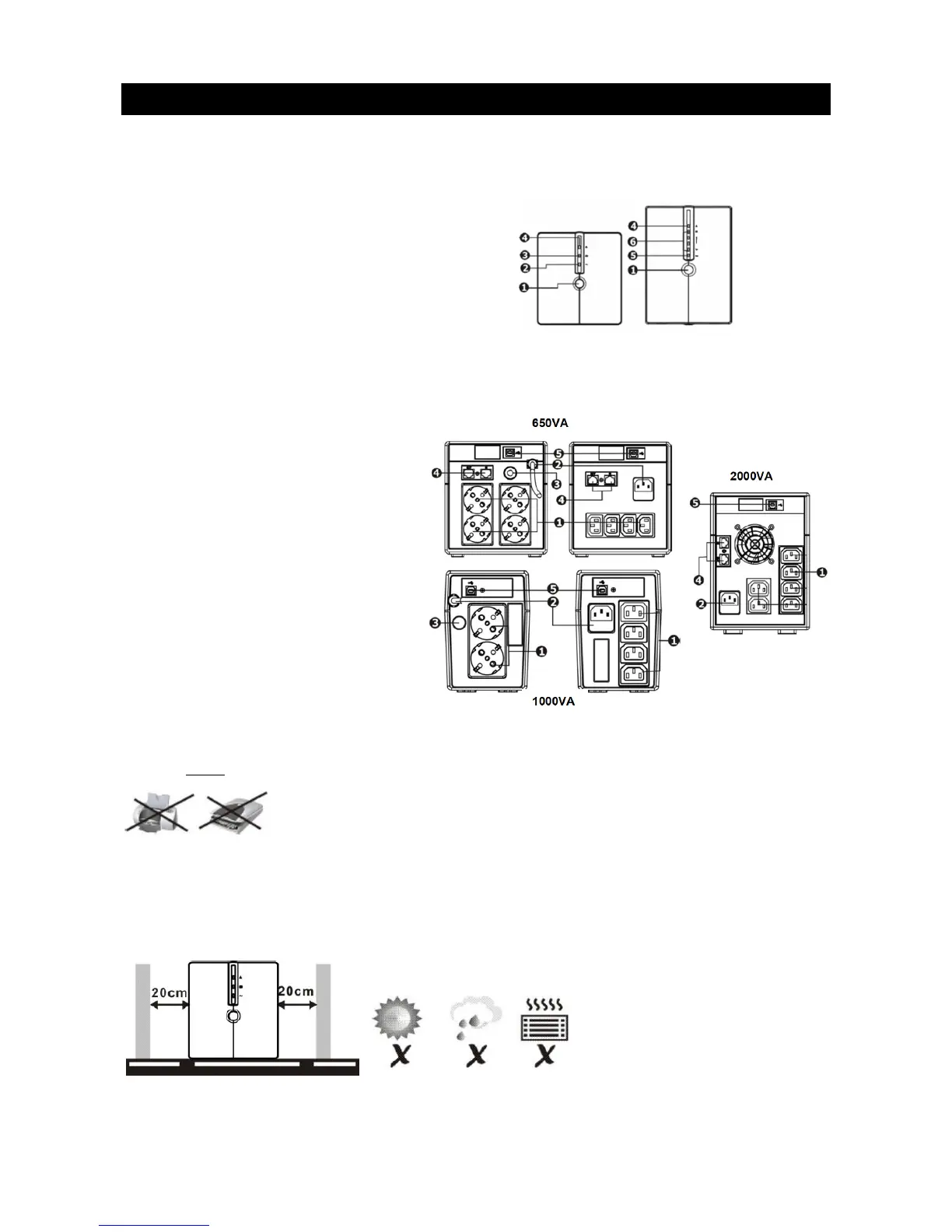
1. Power switch
2. AC mode: green light
3. Battery mode: yellow flashing
4. Fault LED: red light
5. UPS status LED: AC mode: green light
Battery mode: green flashing
6. AC mode: indicates load level
Battery mode: indicating battery
cap
acity
Front view
1. Output points
2. AC output
3. Circuit breaker
4. Surge protection
5. USB communication port
Rear view
Note: Before inst
allation check that nothing inside the package is damaged.
Caution: Never
connect a laser printer or scanner to the UPS unit. This may damage to the unit.
Placement & storage
Install the UPS in a protected area that is free from excessive dust and has adequate air flow (see picture
below). Place the UPS away from other units by at least 20 cm to avoid interference. Do not operate the UPS
when the temperature and humidity is outside specified limits. (Please check specs for the limitations).
2


 To Next Page