Installation and Maintenance Guide
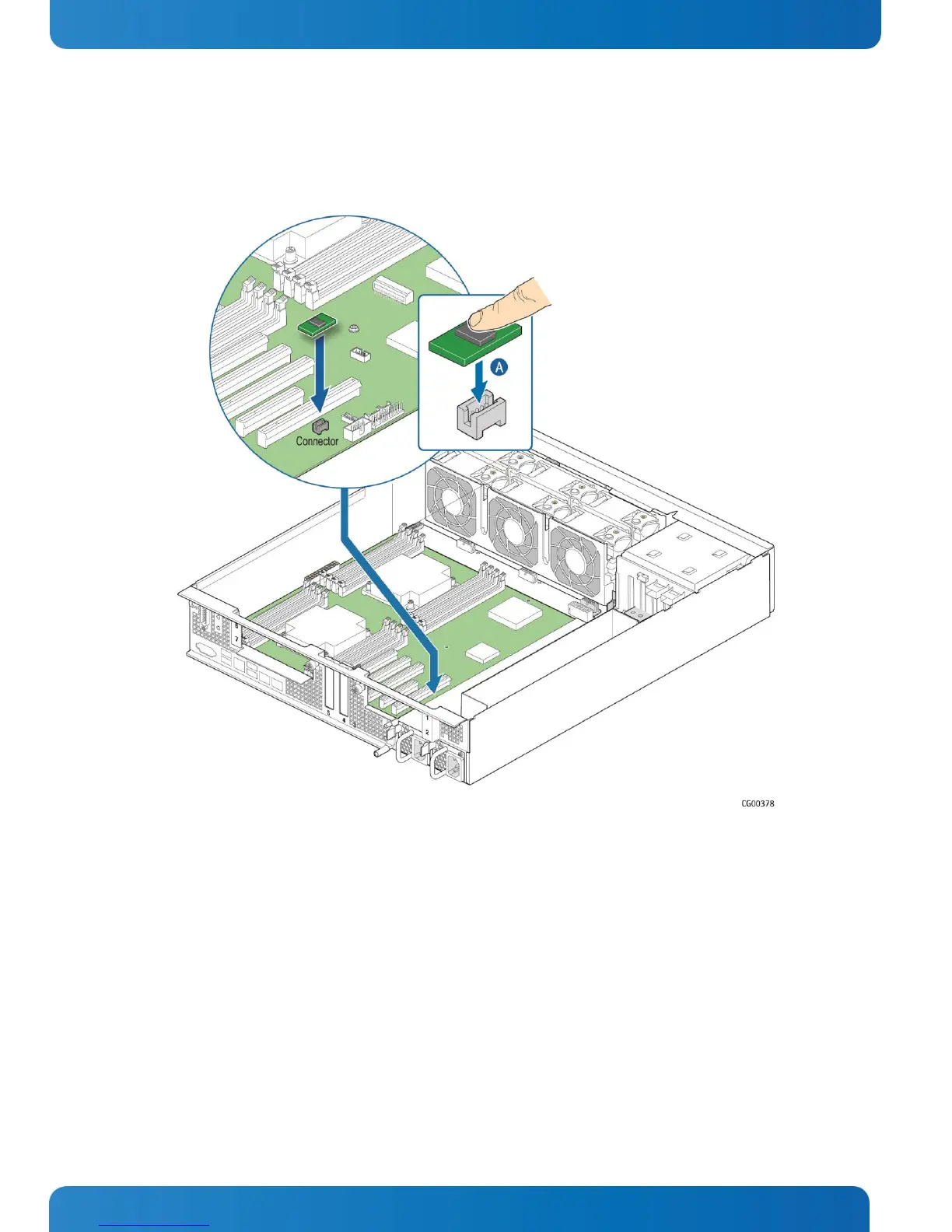
1. Press the key into the socket on the baseboard. (Figure 36, “A”)
Figure 36: Installing the RMM4 Key
2. Re-install the left-side riser card assembly and the chassis cover. For instructions, see (RK) and (RL) in Chapter 6
3. If this is the last task you are performing plug in the power cord(s) and re-attach any peripheral devices
5.2.12 Installing an M.2 Storage Drive
A separately purchased, optional M.2 flash drive provides SATA storage. The M.2 flash drive is installed on the S2600CW2SK
server board.
Before you can install an M.2 flash drive, you must first remove the chassis cover and the left riser card assembly. For
instructions, see (A) and (B1) in Chapter 4.
To install the M.2 flash drive card:
1. Connect the M.2 card to the header on the baseboard near the CMOS battery. (Figure 37, “A”)
2. Seat the other end of the M.2 card around the post on the baseboard.
3. Secure the M.2 card by fastening the screw in the post. (“B”)


 To Next Page