EasyManua.ls Logo

Korg 01/W pro - Page 11

Korg 01/W pro
41 pages
Print Icon
To Next Page IconTo Next Page
To Previous Page IconTo Previous Page
Loading...
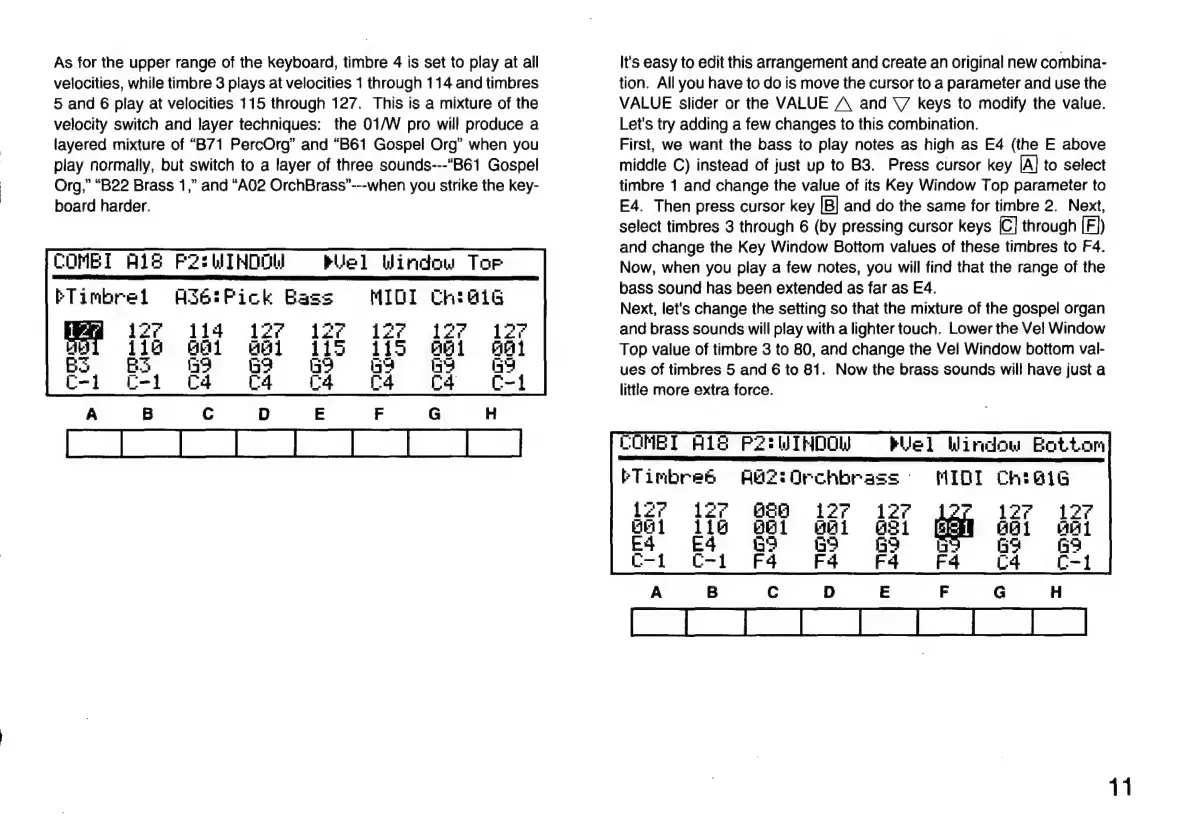
As
for
the
upper
range
of
the
keyboard,
timbre
4
is
set
to
play
at
all
velocities,
while
timbre
3
plays
at
velocities
1
through
114
and
timbres
5
and
6
play
at
velocities
115
through
127.
This
is
a
mixture
of
the
velocity
switch
and
layer
techniques:
the
01/W
pro
will
produce
a
layered
mixture
of
“B71
PercOrg”
and
“B61
Gospel
Org”
when
you
play
normally,
but
switch
to
a
layer
of
three
sounds---“B61
Gospel
Org,”
“B22
Brass
1,”
and
“A02
OrchBrass”---when
you
strike
the
key-
board
harder.
COMBI
A18
F2:LITNDOL
ETimbrel
As6:Pick
Bas
127
114
Rue]
Window
Tor
Cheats
1;
EH
BS
Ep,
G
C-i
C
It's
easy
to
edit
this
arrangement
and
create
an
original
new
combina-
tion.
Allyou
have
to
do
is
move
the
cursor
to
a
parameter
and
use
the
VALUE
slider
or
the
VALUE
A
and
Y
keys
to
modify
the
value.
Let's
try
adding
a
few
changes
to
this
combination.
First,
we
want
the
bass
to
play
notes
as
high
as
E4
(the
E
above
middle
C)
instead
of
just
up
to
B3.
Press
cursor
key
|A]
to
select
timbre
1
and
change
the
value
of
its
Key
Window
Top
parameter
to
E4.
Then
press
cursor
key
[B]
and
do
the
same
for
timbre
2.
Next,
select
timbres
3
through
6
(by
pressing
cursor
keys
[C]
through
[E])
and
change
the
Key
Window
Bottom
values
of
these
timbres
to
F4.
Now,
when
you
play
a
few
notes,
you
will
find
that
the
range
of
the
bass
sound
has
been
extended
as
far
as
E4.
Next,
let's
change
the
setting
so
that
the
mixture
of
the
gospel
organ
and
brass
sounds
will
play
with
a
lighter
touch.
Lower
the
Vel
Window
Top
value
of
timbre
3
to
80,
and
change
the Vel
Window
bottom
val-
ues
of
timbres
5
and
6
to
81.
Now
the
brass
sounds
will
have
just
a
little
more
extra
force.
COMBI
H1S
P2tWIHDOW
=
Wel
Window
Bottom
MIQI
FTimbres
Aa?
Orchbrass
-
lz’
127
686
äl
dig
661
Ed
G9
E4
C-i C-i
11

Related product manuals