EasyManua.ls Logo

Korg 01/W pro - Page 12

Korg 01/W pro
41 pages
Print Icon
To Next Page IconTo Next Page
To Previous Page IconTo Previous Page
Loading...
Next,
let's
add
a
string
section
sound
that
plays
whenever
the
organ
plays.
Change
the
Key
Window
Bottom
value
of
timbre
7
to
F4,
and
go
back
to
page
0.
Move
the
cursor
to
the
Timbre
Mode
parameter
and
change
the
value
of
this
parameter
to
INT.
Then
change
the
value
of
the
Program
parameter
to
“A07
TheStrings.”
Now
try
playing
a
few
notes.
You
should
hear
the
sound
of
strings
along
with
the
organ.
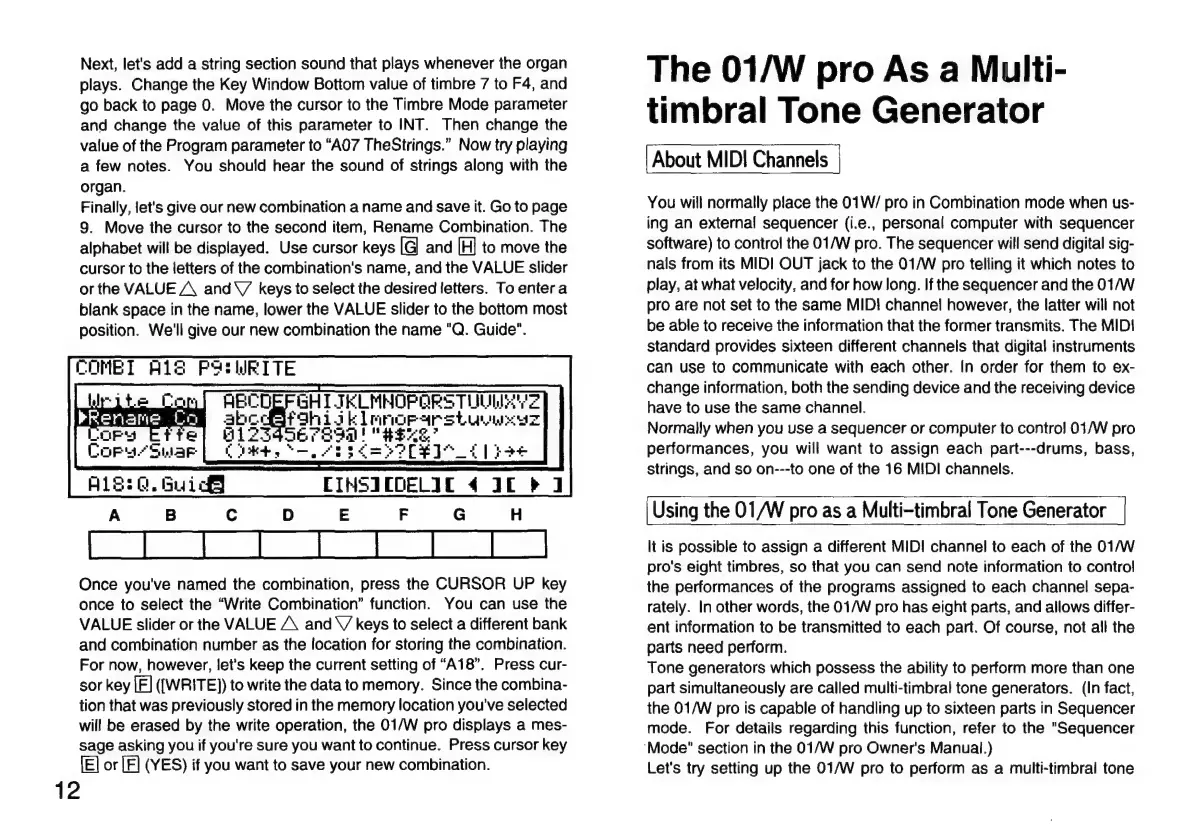
Finally,
let's
give
our
new
combination
a
name
and
save
it.
Go
to
page
9.
Move
the
cursor
to
the
second
item,
Rename
Combination.
The
alphabet
will
be
displayed.
Use
cursor
keys
[G]
and
[H]
to
move
the
cursor
to
the
letters
of
the
combination's
name,
and
the
VALUE
slider
or
the
VALUE
A
and
V
keys
to
select
the
desired
letters.
To
enter
a
blank
space
in
the
name,
lower
the
VALUE
slider
to
the
bottom
most
position.
We'll
give
our
new
combination
the
name
"Q.
Guide".
COMET
A18
POSWRITE
SUMNOP
ORE
TIUA
Z
AL
mirnorar
stu
Z
Once
you've
named
the
combination,
press
the
CURSOR
UP
key
once
to
select
the
“Write
Combination”
function.
You
can
use
the
VALUE
slider
or
the
VALUE
A
and
V
keys
to
select
a
different
bank
and
combination
number
as
the
location
for
storing
the
combination.
For
now,
however,
let's
keep
the
current
setting
of
“A18”.
Press
cur-
sor
key
[É]
([WRITE])
to
write
the
data
to
memory.
Since
the
combina-
tion
that
was
previously
stored
in
the
memory
location
you've
selected
will
be
erased
by
the
write
operation,
the
01/W
pro
displays
a
mes-
sage
asking
you
if
you're
sure
you
want
to
continue.
Press
cursor
key
[E]
or
[E]
(YES)
if
you
want
to
save
your
new
combination.
12
The
01/W
pro
As
a
Multi-
timbral
Tone
Generator
About
MID!
Channels
You
will
normally
place
the
01W/
pro
in
Combination
mode
when
us-
ing
an
external
sequencer
(i.e.,
personal
computer
with
sequencer
software)
to
control
the
01/W
pro.
The
sequencer
will
send
digital
sig-
nals
from
its
MIDI
OUT
jack
to
the
01/W
pro
telling
it
which
notes
to
play,
at
what
velocity,
and
for
how
long.
If
the
sequencer
and
the
01/W
pro
are
not
set
to
the
same
MID!
channel
however,
the
latter
will
not
be
able
to
receive
the
information
that
the
former
transmits.
The
MIDI
standard
provides
sixteen
different
channels
that
digital
instruments
can
use
to
communicate
with
each
other.
In
order
for
them
to
ex-
change
information,
both
the
sending
device
and
the
receiving
device
have
to
use
the
same
channel.
Normally
when
you
use
a
sequencer
or
computer
to
control
01/W
pro
performances,
you
will
want
to
assign
each
part---drums,
bass,
strings,
and
so
on---to
one
of
the
16
MIDI
channels.
Using
the
01/W
pro
as
a
Multi-timbral
Tone
Generator
It
is
possible
to
assign
a
different
MID!
channel
to
each
of
the
01/W
pro's
eight
timbres,
so
that
you
can
send
note
information
to
control
the
performances
of
the
programs
assigned
to
each
channel
sepa-
rately.
In
other
words,
the
01/W
pro
has
eight
parts,
and
allows
differ-
ent
information
to
be
transmitted
to
each
part.
Of
course,
not
all
the
parts
need
perform.
Tone
generators
which
possess
the
ability
to
perform
more
than
one
part
simultaneously
are
called
multi-timbral
tone
generators.
(In
fact,
the
01/W
pro
is
capable
of
handling
up
to
sixteen
parts
in
Sequencer
mode.
For
details
regarding
this
function,
refer
to
the
"Sequencer
‘Mode"
section
in
the
01/W
pro
Owner's
Manual.)
Let's
try
setting
up
the
01/W
pro
to
perform
as
a
multi-timbral
tone

Related product manuals