EasyManua.ls Logo

Korg 01/W pro - Page 17

Korg 01/W pro
41 pages
Print Icon
To Next Page IconTo Next Page
To Previous Page IconTo Previous Page
Loading...
E
Parametric
Equalizer
The
parametric
equalizer
effect,
37.
Parametric
EQ,
provides
you
with
a
three-band
equalizer.
It
allows
you
to
set
cutoff
frequencies
for
the
high
and
low
ranges,
and
apply
a
filter
with
a
variable
band
width
to
the
middle
frequencies.
LOW
GAIN
MID
GAIN
HIGH GAIN
+12dB
-12dB
LOW
MID
HIGH
Freq
Freg
Freq
Using
the
effects
processors
Now
that
you
have
checked
out
the
various
types
of
effects
that
the
01/W
pro
makes
available,
you're
probably
wondering
how
to
go
about
setting
up
a
combination
or
program
so
that
its
output
is
sent
to
the
effects
processors.
Connect
the
combination
to
the
effects
processor
The
01/W
pro's
effects
processors
have
four
input
circuits,
labeiled
A
through
D.
You
can
connect
each
of
the
timbres
in
a
combination
to
the
effects
processors
via
one
of
these
input
circuits
using
the
Panpot
parameter
at
the
bottom
of
page
1
of
the
Edit
Combination
mode
dis-
play.
(To
connect
a
program,
you
would
use
the
OSC
Pan
parameter
found
on
page
0
of
the
Edit
Program
mode
display.)
Select
an
effects
processor
placement.
The
01/W
pro's
two
digital
multi-effect
processors
can
be
arranged
in
one
of
three
ways.
Let's
look
at
each
of
these
arrangements
in
turn.
w
Serial
Move
the
cursor
to
the
“Effect
Placement”
parameter
in
the
lower
left
corner
of
page
8.
A
graphic
indicating
the
current
layout
of
the
effects
processor
units
will
appear
on
the
right
side
of
the
display.
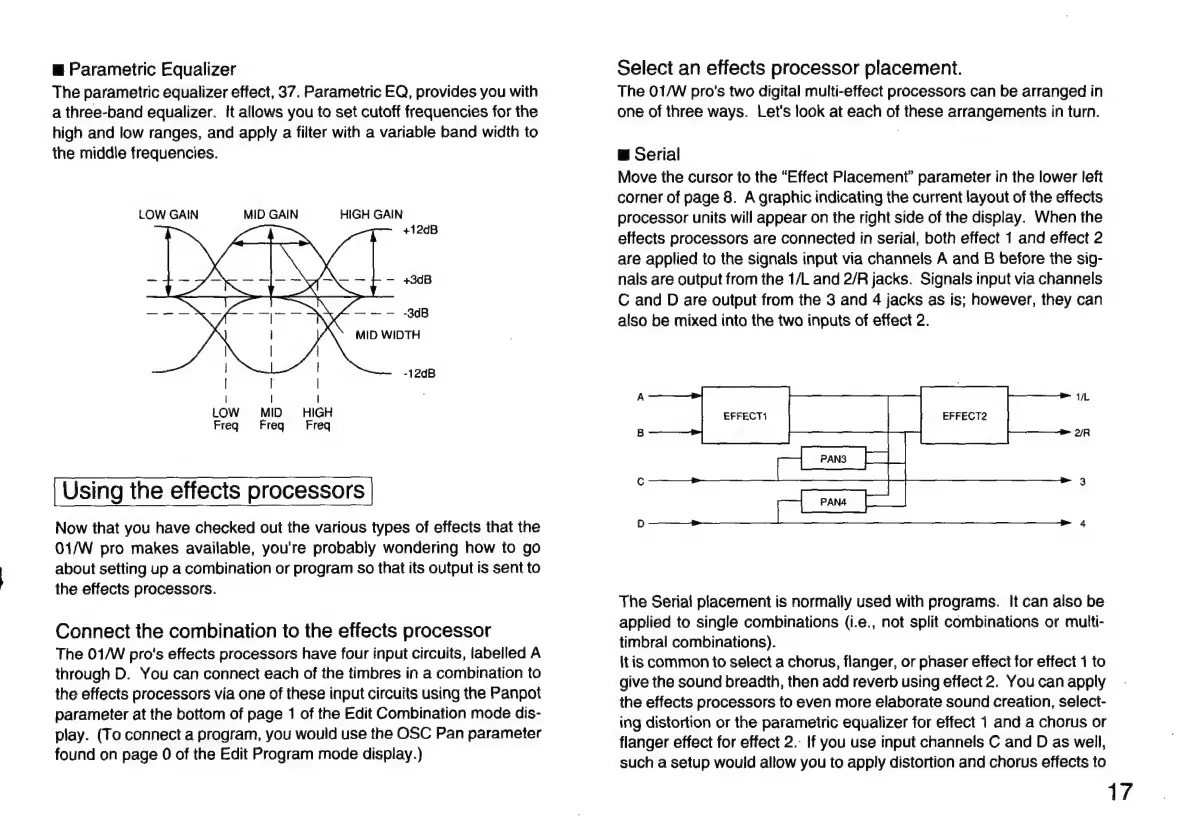
When
the
effects
processors
are
connected
in
serial,
both
effect
1
and
effect
2
are
applied
to
the
signals
input
via
channels
A
and
B
before
the
sig-
nals
are
output
from
the
1/L
and
2/R
jacks.
Signals
input
via
channels
C
and
D
are
output
from
the
3
and
4
jacks
as
is;
however,
they
can
also
be
mixed
into
the
two
inputs
of
effect
2.
A
EFFECT
EFFECT2
B
The
Serial
placement
is
normally
used
with
programs.
It
can
also
be
applied
to
single
combinations
(i.e.,
not
split
combinations
or
multi-
timbral
combinations).
It
is
common
to
select
a
chorus,
flanger,
or
phaser
effect
for
effect
1
to
give
the
sound
breadth,
then
add
reverb
using
effect
2.
You
can
apply
the
effects
processors
to
even
more
elaborate
sound
creation,
select-
ing
distortion
or
the
parametric
equalizer
for
effect
1
and
a
chorus
or
flanger
effect
for
effect
2.:
If
you
use
input
channels
C
and
D
as
well,
such
a
setup
would
allow
you
to
apply
distortion
and
chorus
effects
to
17

Related product manuals