EasyManua.ls Logo

Korg 01/W pro - Page 18

Korg 01/W pro
41 pages
Print Icon
To Next Page IconTo Next Page
To Previous Page IconTo Previous Page
Loading...
a
guitar,
for
example,
while
appiying
the
chorus
effect
alone
to
a
strings
sound.
:
x
À
EFFECT1
ATAR
DISTORTION
zs
Cc
[me
Pre
E
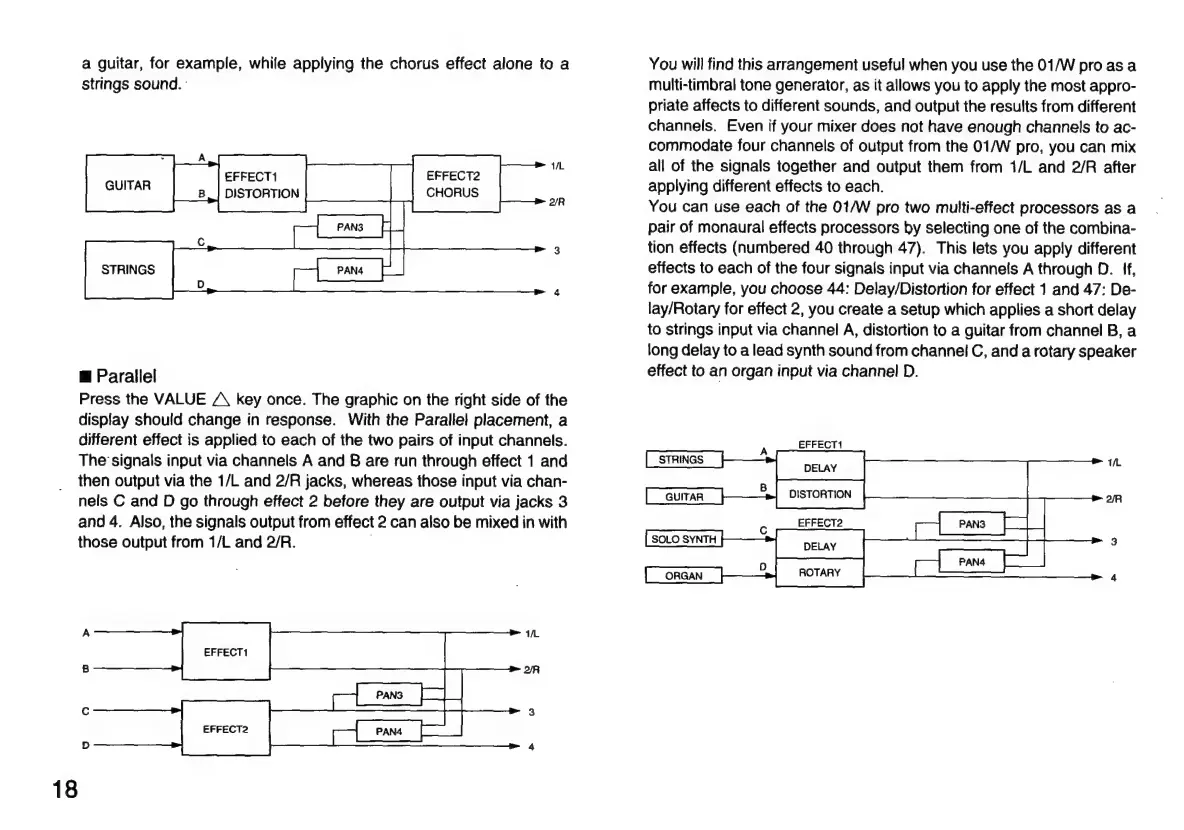
Parallel
Press
the
VALUE
/
key
once.
The
graphic
on
the
right
side
of
the
display
should
change
in
response.
With
the
Parallel
placement,
a
different
effect
is
applied
to
each
of
the
two
pairs
of
input
channels.
The
signals
input
via
channels
A
and
B
are
run
through
effect
1
and
then
output
via
the
1/L
and
2/R
jacks,
whereas
those
input
via
chan-
nels
C
and
D
go
through
effect
2
before
they
are
output
via
jacks
3
and
4.
Also,
the
signals
output
from
effect
2
can
also
be
mixed
in
with
those
output
from
1/L
and
2/R.
.
18
You
will
find
this
arrangement
useful
when
you
use
the
01/W
pro
as
a
multi-timbral
tone
generator,
as
it
allows
you
to
apply
the
most
appro-
priate
affects
to
different
sounds,
and
output
the
results
from
different
channels.
Even
if
your
mixer
does
not
have
enough
channels
to
ac-
commodate
four
channels
of
output
from
the
01/W
pro,
you
can
mix
all
of
the
signals
together
and
output
them
from
1/L
and
2/R
after
applying
different
effects
to
each.
You
can
use
each
of
the
01/W
pro
two
multi-effect
processors
as
a
pair
of
monaural
effects
processors
by
selecting
one
of
the
combina-
tion
effects
(numbered
40
through
47).
This
lets
you
apply
different
effects
to
each
of
the
four
signals
input
via
channels
A
through
D.
ff,
for
example,
you
choose
44:
Delay/Distortion
for
effect
1
and
47:
De-
lay/Rotary
for
effect
2,
you
create
a
setup
which
applies
a
short
delay
to
strings
input
via
channel
A,
distortion
to
a
guitar
from
channel
B,
a
long
delay
to
a
lead
synth
sound
from
channel
C,
and
a
rotary
speaker
effect
to
an
organ
input
via
channel
D.
EFFECT1
A
STRINGS
DELAY
GUITAR
DISTORTION
SOLO
SYNTH

Related product manuals