EasyManua.ls Logo

Korg 01/W pro - Page 19

Korg 01/W pro
41 pages
Print Icon
To Next Page IconTo Next Page
To Previous Page IconTo Previous Page
Loading...
E
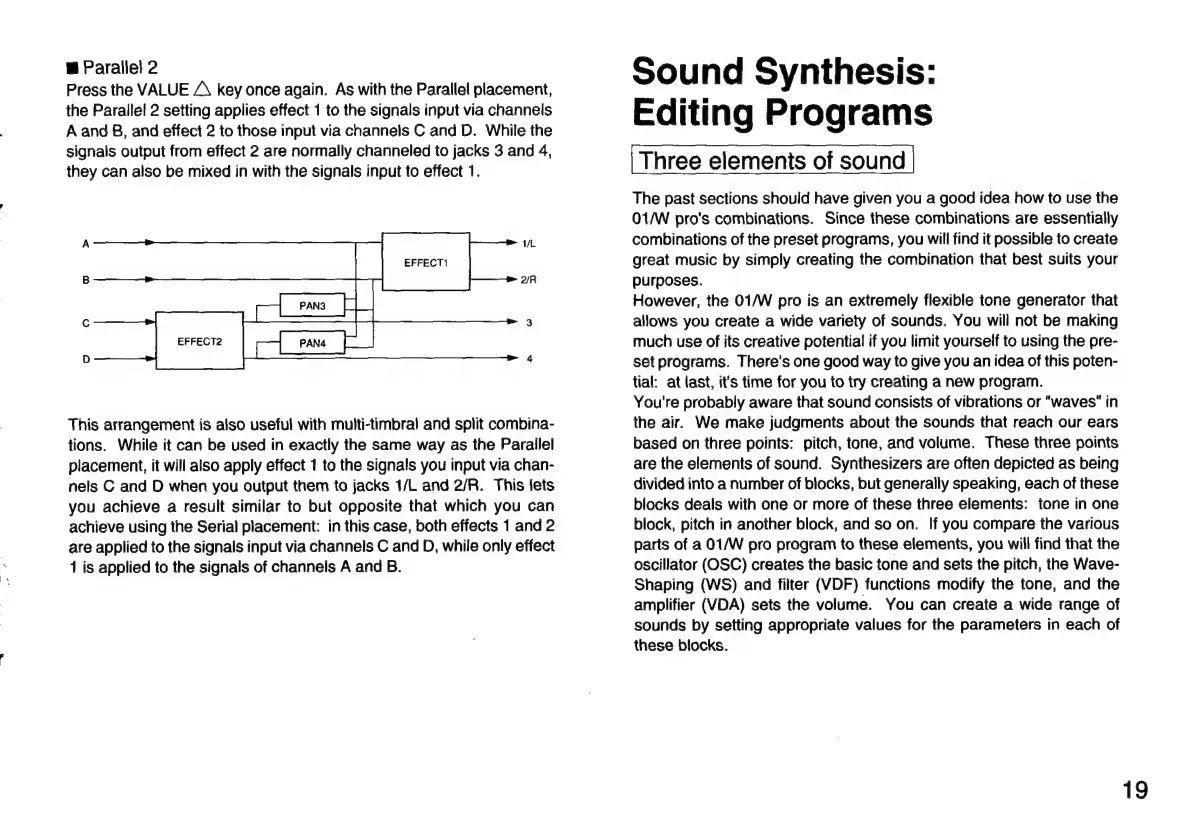
Parallel
2
Press
the
VALUE
A
key
once
again.
As
with
the
Parallel
placement,
the
Parallel
2
setting
applies
effect
1
to
the
signals
input
via
channels
A
and
B,
and
effect
2
to
those
input
via
channeis
C
and
D.
While
the
signals
output
from
effect
2
are
normally
channeled
to
jacks
3
and
4,
they
can
also
be
mixed
in
with
the
signals
input
to
effect
1.
a
EFFECT2
pe
J
This
arrangement
is
also
useful
with
multi-timbral
and
split
combina-
tions.
While
it
can
be
used
in
exactly
the
same
way
as
the
Parailel
placement,
it
will
also
apply
effect
1
to
the
signals
you
input
via
chan-
nels
C
and
D
when
you
output
them
to
jacks
1/L
and
2/R.
This
lets
you
achieve
a
result
similar
to
but
opposite
that
which
you
can
achieve
using
the
Serial
placement:
in
this
case,
both
effects
1
and
2
are
applied
to
the
signals
input
via
channels
C
and
D,
while
only
effect
1
is
applied
to
the
signals
of
channels
A
and
B.
Sound
Synthesis:
Editing
Programs
Three
elements
of
sound
The
past
sections
should
have
given
you
a
good
idea
how
to
use
the
01/W
pro's
combinations.
Since
these
combinations
are
essentially
combinations
of
the
preset
programs,
you
will
find
it
possible
to
create
great
music
by
simply
creating
the
combination
that
best
suits
your
purposes.
However,
the
01/W
pro
is
an
extremely
flexible
tone
generator
that
allows
you
create
a
wide
variety
of
sounds.
You
will
not
be
making
much
use
of
its
creative
potential
if
you
limit
yourself
to
using
the
pre-
set
programs.
There's
one
good
way
to
give
you
an
idea
of
this
poten-
tial:
at
last,
it's
time
for
you
to
try
creating
a
new
program.
You're
probably
aware
that
sound
consists
of
vibrations
or
"waves"
in
the
air.
We
make
judgments
about
the
sounds
that
reach
our
ears
based
on
three
points:
pitch,
tone,
and
volume.
These
three
points
are
the
elements
of
sound.
Synthesizers
are
often
depicted
as
being
divided
into
a
number
of
blocks,
but
generally
speaking,
each
of
these
blocks
deals
with
one
or
more
of
these
three
elements:
tone
in
one
block,
pitch
in
another
block,
and
so
on.
If
you
compare
the
various
parts
of
a
01/W
pro
program
to
these
elements,
you
will
find
that
the
oscillator
(OSC)
creates
the
basic
tone
and
sets
the
pitch,
the
Wave-
Shaping
(WS)
and
filter
(VDF)
functions
modify
the
tone,
and
the
amplifier
(VDA)
sets
the
volume.
You
can
create
a
wide
range
of
sounds
by
setting
appropriate
values
for
the
parameters
in
each
of
these
blocks.
19

Related product manuals