EasyManua.ls Logo

Korg 01/W pro - Page 23

Korg 01/W pro
41 pages
Print Icon
To Next Page IconTo Next Page
To Previous Page IconTo Previous Page
Loading...
of
the
violin
sound
contains
more
harmonics
than
does
that
of
the
flute.
Now,
you
may
be
thinking
that
you
couldn't
hear
any
higher
notes.
Keep
in
mind
that
harmonics
are
merely
one
of
the
elements
that
make
up
the
entirety
of
a
sound's
tone---they
can't
be
heard
separately
from
the
sound
itself.
(Together,
they
form
a
single
sound.)
Thus,
when
we
say
that
a
sound's
tone
consists
of
its
wave-
form,
we
are
taking
into
account
the
fact
that
a
certain
variety
and
quantity
of
harmonics
are
mixed
in
with
the
note's
basic
pitch.
What
would
happen
if
we
started
removing
the
harmonics
from
a
sound,
beginning
with
those
of
the
highest-pitch
and
working
down?
lf
we
do
this
to
the
sound
produced
by
a
violin,
it
will
eventually
begin
to
sound
more
like
a
flute.
(That
is,
without
the
high-pitch
harmonics,
the
harmonic
structure
of
a
violin
comes
to
resemble
that
of
a
flute.)
This
removing
of
harmonics
from
the
highest
down
is
exactly
what
the
01/W
pro's
filter
(VDF)
does.
Let's
try
doing
this
to
the
program
we're
editing.
Move
to
page
2
(VDF
1)
after
selecting
Multisound
134
or
107.
Lower
the
value
of
the
Cutoff
parameter
in
the
upper
left
corner
of
the
display
to
00,
then
play
a
few
notes.
The
sound
will
become
quite
dark
and
muddy.
Next
try
raising
the
value
all
the
way
to
99.
The
sound
will
become
LEVEL
FREQUENCY
0
99
CUTOFF
FREQUENCY
much
brighter.
Generally
speaking,
the
more
harmonics
a
sound
con-
tains,
the
brighter
it
will
become.
In
order
to
pass
a
Multisound
through
the
VDF
without
removing
any
harmonics,
set
the
value
of
the
filter
Cutoff
parameter
to
99.
Careful
use
of
the
filter
will
allow
you
to
create
sounds
with
characteristics
that
the
original
Multisounds
do
not
possess.
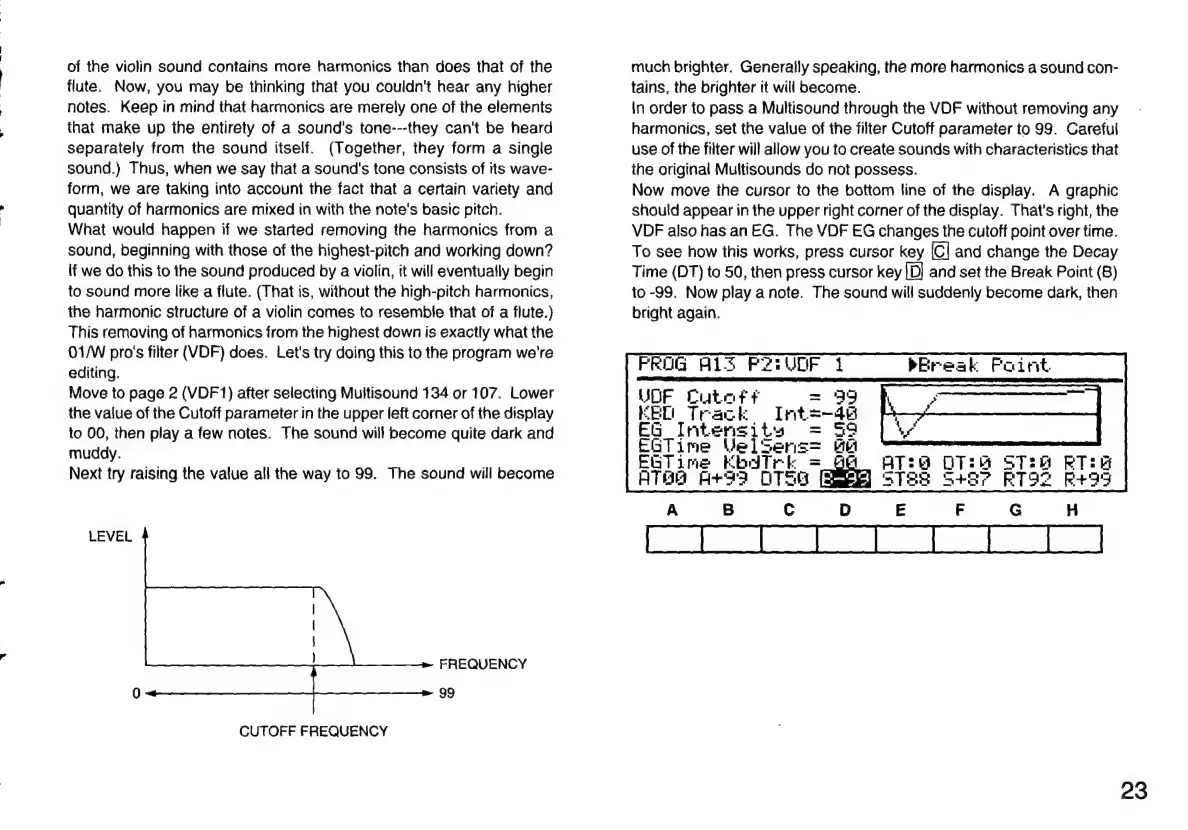
Now
move
the
cursor
to
the
bottom
line
of
the
display.
A
graphic
should
appear
in
the
upper
right
corner
of
the
display.
That's
right,
the
VDF
also
has
an
EG.
The
VDF
EG
changes
the
cutoff
point
over
time.
To
see
how
this
works,
press
cursor
key
[C]
and
change
the
Decay
Time
(DT)
to
50,
then
press
cursor
key
[D]
and
set
the
Break
Point
(B)
to
-99.
Now
play
a
note.
The
sound
will
suddenly
become
dark,
then
bright
again.
PROG
A132
P2:
UDF
UDF
Catet
t
EEO
Track
Int
EG
Intensity
EGTime
Vel
Ser;
Filimne
EbdTrk
ATH
A+33
OTS
pw
Break
Faint
mie
Ra
mace
Pu
it
li
a
a
|
o7
iƱ
23

Related product manuals