EasyManua.ls Logo

Korg 01/W pro - Page 26

Korg 01/W pro
41 pages
Print Icon
To Next Page IconTo Next Page
To Previous Page IconTo Previous Page
Loading...
Return
to
Program
mode
and
select
Program
“A32
FrHrn&Tuba.”
This
is
a
brass
sound.
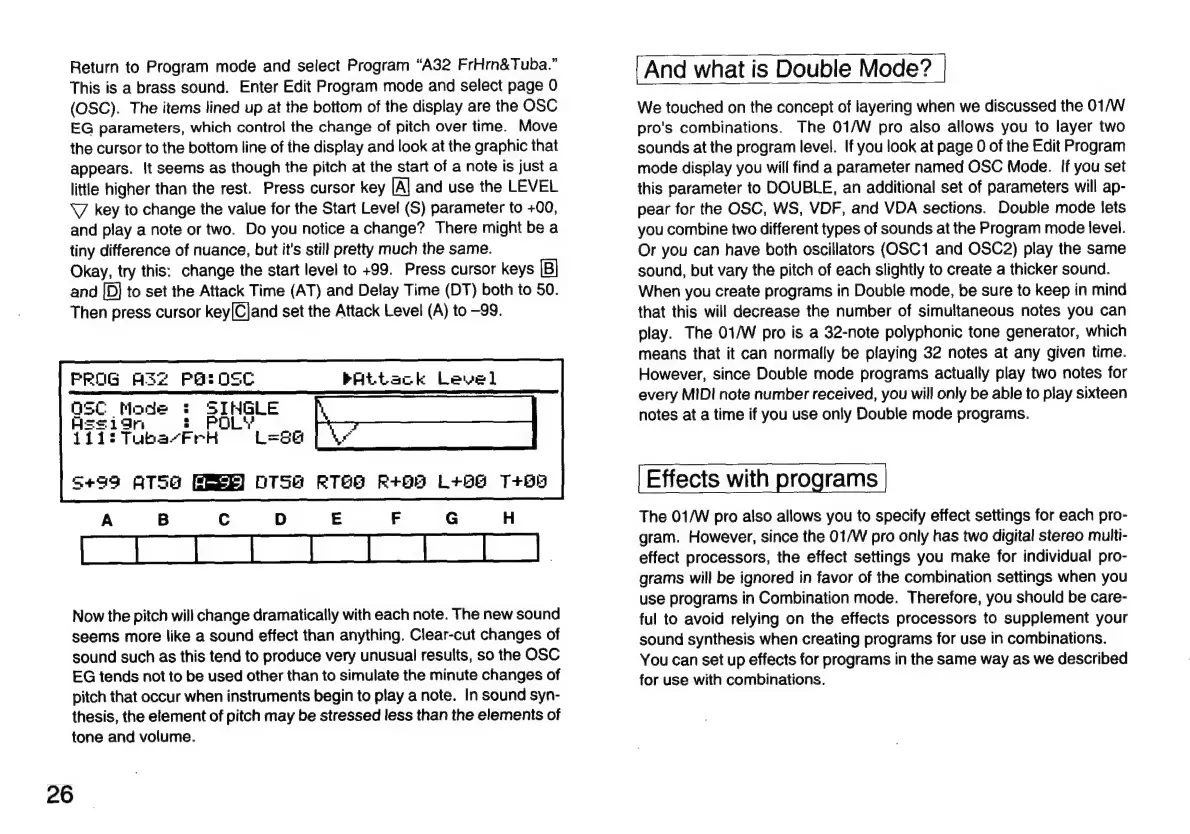
Enter
Edit
Program
mode
and
select
page
O
(OSC).
The
items
lined
up
at
the
bottom
of
the
display
are
the
OSC
EG
parameters,
which
control
the
change
of
pitch
over
time.
Move
the
cursor
to
the
bottom
line
of
the
display
and
look
at
the
graphic
that
appears.
It
seems
as
though
the
pitch
at
the
start
of
a
note
is
just
a
little
higher
than
the
rest.
Press
cursor
key
[A]
and
use
the
LEVEL
V
key
to
change
the
value
for
the
Start
Level
(S)
parameter
to
+00,
and
play
a
note
or
two.
Do
you
notice
a
change?
There
might
be
a
tiny
difference
of
nuance,
but
it's
still
pretty
much
the
same.
Okay,
try
this:
change
the
start
level
to
+99.
Press
cursor
keys
and
[D]
to
set
the
Attack
Time
(AT)
and
Delay
Time
(DT)
both
to
50.
Then
press
cursor
key[Cjand
set
the
Attack
Level
(A)
to
—99.
PROG
AS2
POSOSC
bAtLtack
Level]
OSC
Mad
Hes
Now
the
pitch
will
change
dramatically
with
each
note.
The
new
sound
seems
more
like
a
sound
effect
than
anything.
Clear-cut
changes
of
sound
such
as
this
tend
to
produce
very
unusual
results,
so
the
OSC
EG
tends
not
to
be
used
other
than
to
simulate
the
minute
changes
of
pitch
that
occur
when
instruments
begin
to
play
a
note.
In
sound
syn-
thesis,
the
element
of
pitch
may
be
stressed
less
than
the
elements
of
tone
and
volume.
26
And
what
is
Double
Mode?
We
touched
on
the
concept
of
layering
when
we
discussed
the
01/W
pro's
combinations.
The
01/W
pro
also
allows
you
to
layer
two
sounds
at
the
program
level.
If
you
look
at
page
0
of
the
Edit
Program
mode
display
you
will
find
a
parameter
named
OSC
Mode.
If
you
set
this
parameter
to
DOUBLE,
an
additional
set
of
parameters
will
ap-
pear
for
the
OSC,
WS,
VDF,
and
VDA
sections.
Double
mode
lets
you
combine
two
different
types
of
sounds
at
the
Program
mode
level.
Or
you
can
have
both
oscillators
(OSC1
and
OSC2)
play
the
same
sound,
but
vary
the
pitch
of
each
slightly
to
create
a
thicker
sound.
When
you
create
programs
in
Double
mode,
be
sure
to
keep
in
mind
that
this
will
decrease
the
number
of
simultaneous
notes
you
can
play.
The
01/W
pro
is
a
32-note
polyphonic
tone
generator,
which
means
that
it
can
normally
be
playing
32
notes
at
any
given
time.
However,
since
Double
mode
programs
actually
play
two
notes
for
every
MIDI
note
number
received,
you
will
only
be
able
to
play
sixteen
notes
at
a
time
if
you
use
only
Double
mode
programs.
Effects
with
programs
The
01/W
pro
also
allows
you
to
specify
effect
settings
for
each
pro-
gram.
However,
since
the
01/W
pro
only
has
two
digital
stereo
multi-
effect
processors,
the
effect
settings
you
make
for
individual
pro-
grams
will
be
ignored
in
favor
of
the
combination
settings
when
you
use
programs
in
Combination
mode.
Therefore,
you
should
be
care-
ful
to
avoid
relying
on
the
effects
processors
to
supplement
your
sound
synthesis
when
creating
programs
for
use
in
combinations.
You
can
set
up
effects
for
programs
in
the
same
way
as
we
described
for
use
with
combinations.

Related product manuals