EasyManua.ls Logo

Korg 01/W pro - Page 3

Korg 01/W pro
41 pages
Print Icon
To Next Page IconTo Next Page
To Previous Page IconTo Previous Page
Loading...
Making
Connections,
Part
1:
Audio
Output
Connect
the
01/W
pro
to
audio
equipment
Before
you
can use
the
01/W
pro,
you
must
connect
it
to
a
set
of
amplified
monitor
speakers
or
stereo
equipment
in
order
to
amplify
the
audio
signal
output
by
the
01/W
pro
and
turn
it
into
sound.
Always
remember
to
turn
the
power
switch
OFF
or
the
volume
control
down
on
the
01/W
pro
and
audio
equipment
before
you
connect
them.
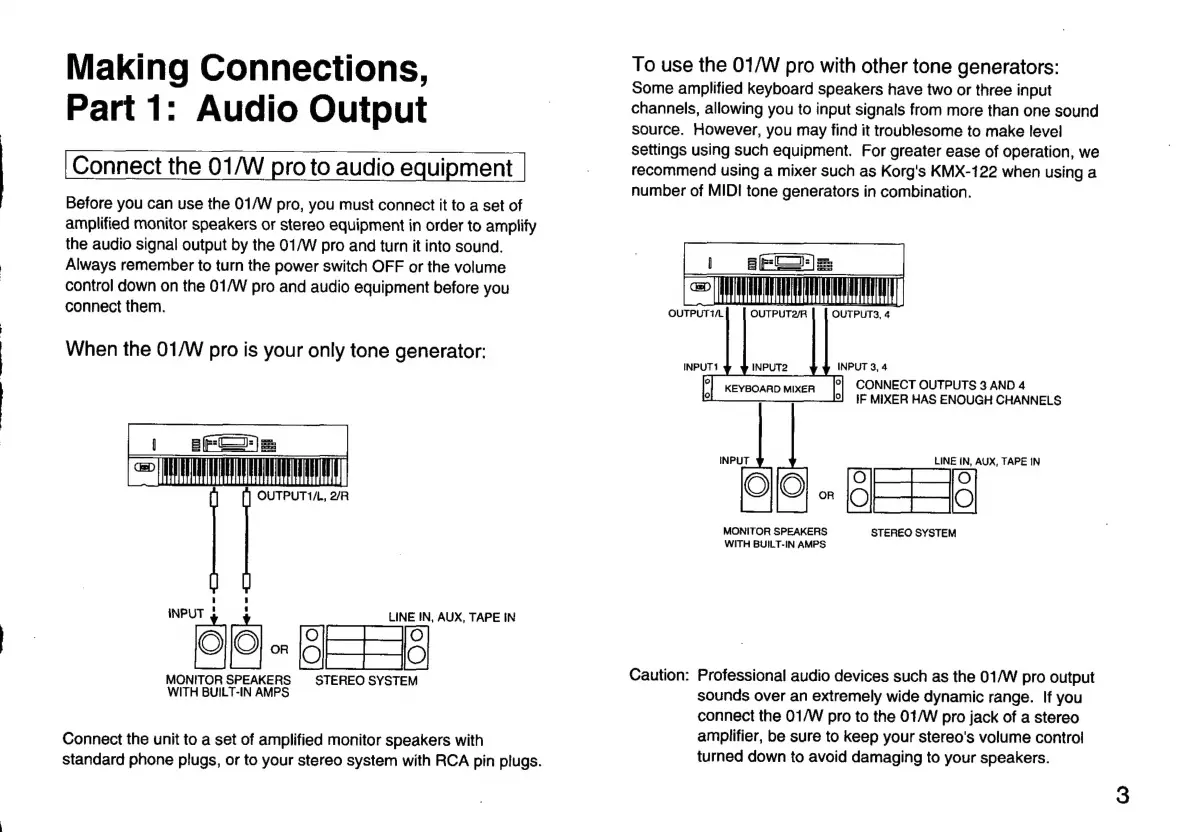
When
the
01/W
pro
is
your
only
tone
generator:
|
BESTS
E
OUTPUT1/L,
2/R
LINE
IN,
AUX,
TAPE
IN
"(0
-
BEE
MONITOR
SPEAKERS
STEREO
SYSTEM
WITH
BUILT-IN
AMPS
Connect
the
unit
to
a
set
of
amplified
monitor
speakers
with
standard
phone
plugs,
or
to
your
stereo
system
with
RCA
pin
plugs.
To
use
the
01/W
pro
with
other
tone
generators:
Some
amplified
keyboard
speakers
have
two
or
three
input
channels,
allowing
you
to
input
signals
from
more
than
one
sound
source.
However,
you
may
find
it
troublesome
to
make
level
settings
using
such
equipment.
For
greater
ease
of
operation,
we
recommend
using
a
mixer
such
as
Korg's
KMX-122
when
using
a
number
of
MIDI
tone
generators
in
combination.
|
stella
=
TT
OUTPUT2/R
OUTPUTS,
4
INPUT1
INPUT2
INPUT
3,
4
P]
Kevsoaromner
|
CONNECT
OUTPUTS
3
AND
4
IF
MIXER
HAS
ENOUGH
CHANNELS
LINE
IN,
AUX,
TAPE
IN
-
oF
+
4g
MONITOR
SPEAKERS
STEREO
SYSTEM
WITH
BUILT-IN
AMPS
Caution:
Professional
audio
devices
such
as
the
01/W
pro
output
sounds
over
an
extremely
wide
dynamic
range.
If
you
connect
the
01/W
pro
to
the
01/W
pro
jack
of
a
stereo
amplifier,
be
sure
to
keep
your
stereo's
volume
control
turned
down
to
avoid
damaging
to
your
speakers.

Related product manuals