EasyManua.ls Logo

Korg 01/W pro - Page 4

Korg 01/W pro
41 pages
Print Icon
To Next Page IconTo Next Page
To Previous Page IconTo Previous Page
Loading...
Turn
on
the
power
Now
you
can
turn
the
power
on.
First,
turn
the
01/W
pro
on,
followed
by
your
mixer
(if
you're
using
one)
and
then
your
amplifier(s).
The
01/W
pro's
LCD
should
light
up
when
you
turn
on
the
power.
Can
you
read
the
display?
If
the
angle
of
the
LCD
makes
it
difficult
to
read
the
contents,
adjust
the
display's
contrast
setting.
Begin
by
pressing
the
GLOBAL
mode
select
key
to
enter
Global
mode.
(A
mode
is
an
operating
state
of
which
the
01/W
pro
has
seven.
Global
mode
allows
you
to
make
settings
related
to
the
01/W
pro's
overall
operation.
We
will
describe
the
other
modes
as
we
come
to
them.)
The
cursor---the
dark
rectangle
in
the
display---should
be
located
at
the
LCD
Contrast
parameter.
(A
parameter
is
an
item
for
which
you
can
change
the
set
value.)
Try
using
the
VALUE
slider
or
the
VALUE
A
and
Į
keys
to
adjust
the
value
that
is
displayed
after
this
pa-
rameter.
You
can
set
a
value
of
1
to
8.
Use
a
lower
value
when
looking
up
at
the
display
from
below,
or
a
higher
value
when
looking
down
on
the
display
from
above.
Try
playing
the
demo
song
Try
playing
the
demo
song.
Before
you
do
anything
else,
you'll
proba-
bly
want
to
hear
what
the
01/W
pro
sounds
like.
Begin
by
inserting
the
floppy
disk
that
came
with
your
synthesizer,
label
side
up
and
shutter
first,
into
the
disk
drive
located
on
the
left
front
edge
of
the
unit.
Push
the
disk
in
gently
until
you
hear
it
settle
into
the
drive
with
a
click.
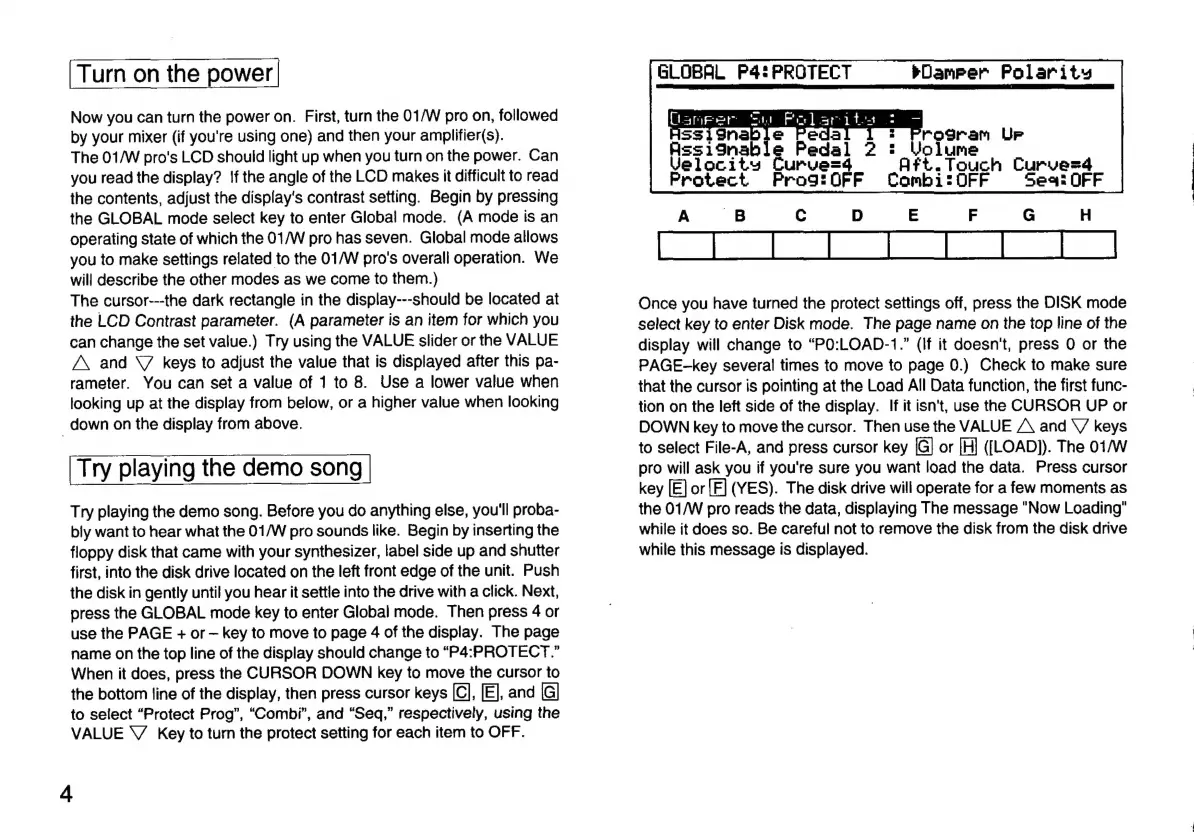
Next,
press
the
GLOBAL
mode
key
to
enter
Global
mode.
Then
press
4
or
use
the
PAGE
+
or
key
to
move
to
page
4
of
the
display.
The
page
name
on
the
top
line
of
the
display
should
change
to
“P4:PROTECT.”
When
it
does,
press
the
CURSOR
DOWN
key
to
move
the
cursor
to
the
bottom
line
of
the
display,
then
press
cursor
keys
[C],
[E],
and
[G]
to
select
“Protect
Prog”,
“Combi”,
and
“Seq,”
respectively,
using
the
VALUE
V
Key
to
turn
the
protect
setting
for
each
item
to
OFF.
4
GLOBAL
FP4:
PROTECT
Damper
Polarity
Carpet
Sa
ae
it
HSsSignable
:
Program
Ur
AssiInahle
Pedal
2
:
Volume
Velocity
Curve=4
Aft.
Touch
Curvezá
Protect
Prog:0FF
Combi:OFF
Sea:
OFF
A
B
C
D
E
F
G
H
Once
you
have
turned
the
protect
settings
off,
press
the
DISK
mode
select
key
to
enter
Disk
mode.
The
page
name
on
the
top
line
of
the
display
will
change
to
“PO:LOAD-1.”
(If
it
doesn't,
press
O
or
the
PAGE-key
several
times
to
move
to
page
0.)
Check
to
make
sure
that
the
cursor
is
pointing
at
the
Load
All
Data
function,
the
first
func-
tion
on
the
left
side
of
the
display.
If
it
isn't,
use
the
CURSOR
UP
or
DOWN
key
to
move
the
cursor.
Then
use
the
VALUE
A
and
V
keys
to
select
File-A,
and
press
cursor
key
[G]
or
[H]
([LOAD]).
The
01/W
pro
will
ask you
if
you're
sure
you
want
load
the
data.
Press
cursor
key
[E]
or
[F]
(YES).
The
disk
drive
will
operate
for
a
few
moments
as
the
01/W
pro
reads
the
data,
displaying
The
message
"Now
Loading"
while
it
does
so.
Be
careful
not
to
remove
the
disk
from
the
disk
drive
while
this
message
is
displayed.

Related product manuals