EasyManua.ls Logo

Korg 01/W pro - Page 33

Korg 01/W pro
41 pages
Print Icon
To Next Page IconTo Next Page
To Previous Page IconTo Previous Page
Loading...
Press
the
REC/WRITE
key
on
the
front
panel.
When
this
key
lights
up
you
can
press
the
START/STOP
key
at
any
time
to
begin
recording.
When
the
01/W
pro
reaches
the
last
measure
of
the
pattern,
it
will
loop
back
to
the
first
measure
and
keep
recording.
Any
new
notes
you
play
will
be
overdubbed
onto
the
notes
you
recorded
during
the
first
pass.
To
stop
recording,
press
the
START/STOP
key
again.
Now
you
can
press
the
START/STOP
key
without
pressing
REC/WRITE
first
to
lis-
ten
to
the
pattern
you
recorded.
Next,
let's
try
placing
the
pattern
on
a
track.
Move
to
page
6
(EDIT
MEAS).
Use
the
CURSOR
UP
or
DOWN
keys
to
move
the
cursor
to
Put/Copy
Pattern,
which
is
the
fourth
function
down
on
the
right
side
of
the
display.
Press
cursor
key
B
and
enter
the
number
of
the
pattern
you
wish
to
place
on
the
track,
then
press
cursor
keys
[D]
and
[E]
to
specify
the
track
and
the
meas-
ure
number
where
you
wish
to
insert
the
pattern.
If
you
place
a
pat-
tern
on
a
track
that
already
contains
sequencer
data,
writing
to
any
measures
that
contain
data
will
cause
the
previous
data
to
be
erased,
so
be
sure
you
enter
the
track
and
measure
numbers
correctly.
When
your
settings
are
complete,
press
cursor
key
|G}
([PUT])
to
place
the
pattern
on
the
track.
Be
careful
not
to
press
cursor
key
|H}
([COPY7)
instead,
as
doing
so
will
copy
the
performance
data
from
the
pattern
to
the
track.
This
will
not
result
in
the
savings
of
data
that
occurs
when
you
place
the
pattern
onto
a
track.
SONGO
P6:EDIT
MEAS
|
Quantize.
Shift
Note
bPattern
Erase
Measure
Copy
Measure
Modify
Velocity
M
=
Delete
Measure
bRut
Copa
Pattern
aes
=
o
Trkgil
MOGI
~
EPUTICCPY]
A
B
C
D
E
F
G
H
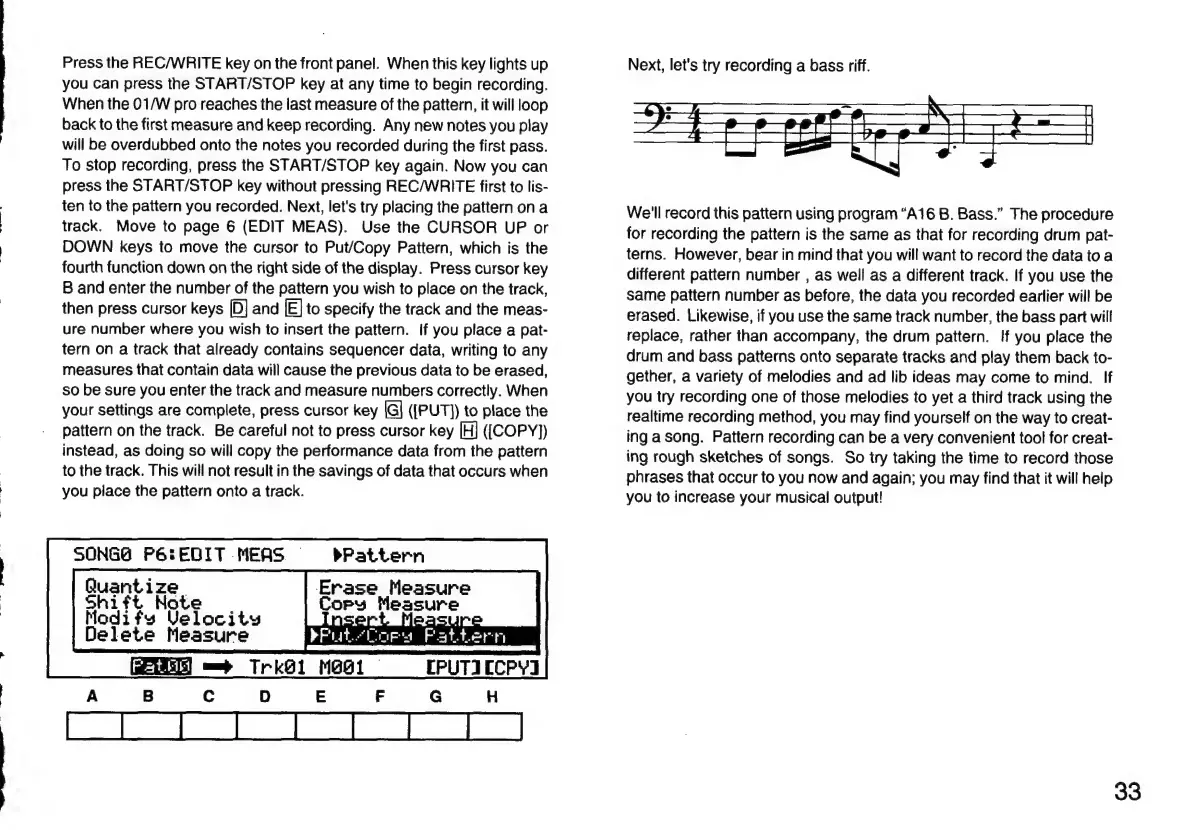
Next,
let's
try
recording
a
bass
riff.
We'll
record
this
pattern
using
program
“A16
B.
Bass.”
The
procedure
for
recording
the
pattern
is
the
same
as
that
for
recording
drum
pat-
terns.
However,
bear
in
mind
that
you
will
want
to
record
the
data
to
a
different
pattern
number
,
as
well
as
a
different
track.
If
you
use
the
same
pattern
number
as
before,
the
data
you
recorded
earlier
will
be
erased.
Likewise,
if
you
use
the
same
track
number,
the
bass
part
will
replace,
rather
than
accompany,
the
drum
pattern.
If
you
place
the
drum
and
bass
patterns
onto
separate
tracks
and
play
them
back
to-
gether,
a
variety
of
melodies
and
ad
lib
ideas
may
come
to
mind.
If
you
try
recording
one
of
those
melodies
to
yet
a
third
track
using
the
realtime
recording
method,
you
may
find
yourself
on
the
way
to
creat-
ing
a
song.
Pattern
recording
can
be
a
very
convenient
tool
for
creat-
ing
rough
sketches
of
songs.
So
try
taking
the
time
to
record
those
phrases
that
occur
to
you
now
and
again;
you
may
find
that
it
will
help
you
to
increase
your
musical
output!
33

Related product manuals